
Ever feel like you’re constantly playing catch-up, losing track of leads, or drowning in manual data entry? This isn't just about being busy; it's a symptom of revenue leakage. For small businesses, workflow management isn't some high-tech buzzword—it's a practical strategy to plug the financial holes created by old-school, manual processes that are holding you back.
For most small business owners, the daily grind is a whirlwind of juggling phone calls, firing off emails, and updating spreadsheets. While that hustle is essential, it often hides costs that are quietly draining your resources. Every missed callback, every delayed quote, and every lead that goes cold because it wasn't followed up on is a lost sale.

These tiny cracks in your process quickly add up. A potential customer calls for a quote. You scribble the details on a sticky note, but an urgent issue pulls you away. By the time you find that note again, they’ve already moved on to a competitor. This isn't a failure of effort; it's a failure of the system.
The financial hit is way bigger than most people think. For service-based businesses that live and die by calls, texts, and emails, IDC data shows that a shocking 20–30% of annual revenue can be lost to manual slip-ups. Think re-keying data, sending duplicate follow-ups, or waiting on approvals that never come.
This revenue leakage often flies under the radar because it's spread across dozens of small, seemingly minor tasks. But when you add it all up, the cost of this friction is often the difference between thriving and just getting by.
To really get a handle on this, it helps to look at the bigger picture of minimizing operating costs. Messy workflows are a huge operational expense, even if they don’t show up as a line item on your P&L statement.
To put this into perspective, let's break down the real-world difference between manual and automated systems.
The contrast between sticking with old habits and embracing automation is stark. Here’s a quick look at how updating your workflows can completely change the game for key business functions.
As you can see, the solution isn't about working harder; it's about putting smarter systems in place that work for you.
Running your business from memory or a chaotic pile of notes forces you into a constant state of "firefighting" instead of proactive growth. This reactive cycle has some serious consequences:
Ultimately, disorganized workflows stop you from focusing on what actually moves the needle: delivering amazing service and growing your business. If you're ready to get started, you can learn exactly how to automate administrative tasks and streamline your workflow in our complete guide.
Before you can dream of automating anything, you first need a brutally honest picture of how things actually work right now. That's what process mapping is all about. Forget complex software—think of it as drawing a simple, clear blueprint of your daily operations.
The entire goal is to visually trace a task from its very beginning to its end. You want to capture every single action, every decision point, and every time work gets handed off to someone else. It's an incredibly simple exercise, but it almost immediately shines a spotlight on the hidden friction in your business—the bottlenecks, the mind-numbing repetitive tasks, and the exact spots where important info falls through the cracks.
You really don't need fancy tools. A whiteboard and some sticky notes are my go-to. A big sheet of paper works just fine, too. The only rule is to map the real process, not the idealized version you think you have.
To get the biggest bang for your buck, start by mapping a process that’s a constant headache or one that directly messes with your revenue. Pick something that just feels clunky, slow, or is always causing errors.
Good places to start are usually:
Once you’ve picked a process, grab the people who are in the trenches doing the work every day. Their on-the-ground knowledge is pure gold. Have them walk you through every single step, no matter how tiny or obvious it seems.
The real magic of process mapping happens when you uncover the "ghost steps." These are the unofficial workarounds and redundant tasks your team invented just to cope with a broken system. Those are your prime targets for automation.
Let's quickly map a classic workflow for a small service business: handling a new lead who calls in.
Just looking at this laid out, the problems practically scream at you. Steps 2, 3, and 4 are completely manual, repetitive, and are huge opportunities for typos or delays. This is the exact moment where a smart workflow management for small business strategy begins to pay off.
Jumping into the world of automation software can feel like trying to drink from a firehose. With thousands of options out there, it’s ridiculously easy to get analysis paralysis. But for effective workflow management for a small business, you don’t need some massive, enterprise-level system. The key is to start small with a simple, powerful tech stack that solves your biggest headaches first.
Forget about finding one magical tool that does everything. That's a myth. Instead, focus on building a core trio: a central communication hub, a customer relationship manager (CRM), and an integration tool to connect them. Your central hub is where conversations begin—think of an AI receptionist like My AI Front Desk. The CRM is where all your customer data lives. And the integration tool, like Zapier, acts as the digital glue.
The smartest approach? Start with the platform that plugs your biggest leak. For most service businesses, that’s almost always lead capture and initial communication. Get that right, and then you can start adding to your toolkit.
Your initial setup should be lean and focused. Don't overcomplicate things. The goal is to pick affordable, user-friendly tools that can grow with you.
Here are the essential pieces:
This simple structure creates a seamless flow. A lead calls your AI receptionist, their info is captured, and Zapier instantly creates a new contact in your CRM. No more sticky notes or forgotten follow-ups.
The real power isn't in any single tool, but in how they work together. An integrated system automates the handoffs between tasks, which is where most small businesses drop the ball and lose revenue.
The market for these tools is massive and mature. The global workflow automation market was valued at over $19.6 billion in recent years, with projections to soar past $45 billion by 2030. According to Startus Insights, this growth is powered by over 3,000 companies, creating an incredible ecosystem where you can easily connect an AI front desk to thousands of other apps without custom coding.
This means world-class tools are more accessible than ever. For a curated list, check out our guide on the 10 best workflow automation tools for small businesses.
Alright, you've mapped out your processes and picked your tools. Now for the fun part: making the magic happen. This is where we stop talking and start doing, turning those ideas into real, tangible results for your business.
We’re going to build a few high-impact automations that tackle some of the most common headaches small businesses face. These aren't complicated, month-long projects. Think of them as simple, powerful "recipes" you can set up in an afternoon to stop leads from falling through the cracks and claw back some of your valuable time.
At a high level, the goal is to get your different software tools talking to each other. Your phone system, your CRM, your calendar—they all need to be connected.
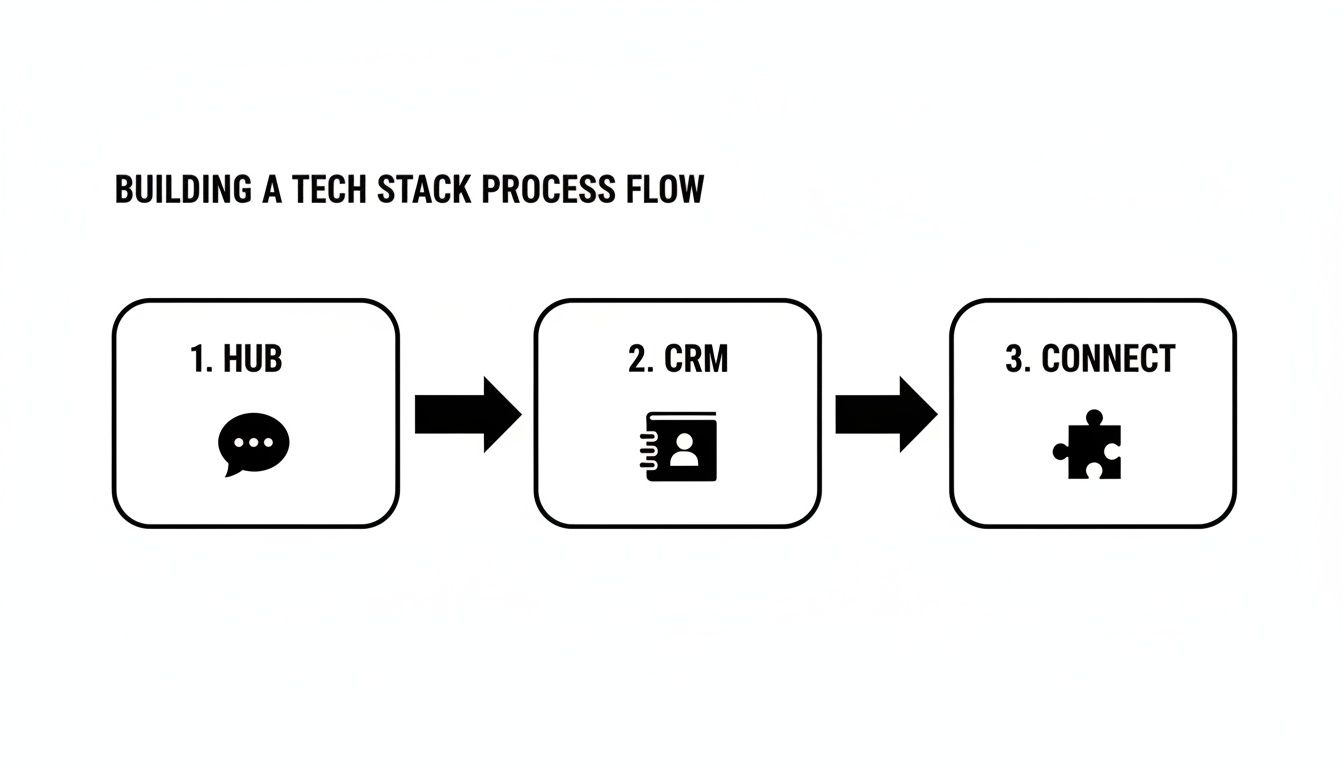
The idea is simple: data has to flow seamlessly between your systems. When it does, you eliminate tedious manual work and can respond to customers in record time.
What’s one of the biggest ways service businesses lose money? The lag time between a new lead calling and their info actually making it into your CRM. If you’re doing this by hand, you’re moving too slow and opening the door for errors. Let's fix that.
Picture this: a potential customer calls your business. Instead of you scrambling for a pen and paper, your AI Receptionist picks up. It has a natural conversation, asks the right qualifying questions, and neatly collects their name, phone number, and email.
Then, the automation kicks in. Using a post-call webhook or a simple Zapier integration, all that information is instantly pushed into your CRM. A new contact record is created and tagged as a "New Lead" before the caller has even hung up. No one on your team has to lift a finger.
Think about how many times a day you answer the same basic questions: "What are your prices?" "What services do you offer?" "Where are you located?" It's a massive time drain. A smart texting workflow can take this right off your plate.
With a tool like My AI Front Desk, you can create texting workflows that listen for specific keywords during a call. When a caller mentions "pricing" or "cost," the system automatically sends them a text with a direct link to your pricing page—while you're still talking to them.
This isn't just about saving time. It’s about delivering a killer customer experience. You’re giving prospects the exact information they want, right when they ask for it. That makes your business look incredibly responsive and professional.
This is a perfect example of using tech to be more helpful. If you want to dive deeper into connecting your tools, check out our guide on how AI workflow automation can boost business efficiency.
Let's be honest: phone tag is a profit killer. The endless back-and-forth trying to find a meeting time is frustrating for everyone and can easily derail a potential sale. Let's just automate the whole thing.
Here’s how the workflow looks:
Just like that, your phone line transforms from a simple communication channel into an automated booking engine. It completely closes the loop, turning an interested caller into a confirmed meeting in one smooth interaction.
To give you a few more ideas, here are some plug-and-play recipes you can steal.
These are just starting points, of course. The real power comes when you start combining these ideas and tailoring them to your specific business needs.
Setting up your automated workflows isn't a "set it and forget it" kind of deal. To really squeeze the value out of your new setup, you have to treat it like a living, breathing part of your business—something that needs regular check-ups and a bit of tuning.
This is what turns a decent workflow into a genuine engine for growth. The goal is to stop guessing and start making decisions based on real data. Instead of just feeling like things are better, you'll have simple, clear numbers to prove it. This lets you see exactly what’s working, spot new bottlenecks, and make smart tweaks that actually grow your bottom line.
Forget drowning in complicated analytics dashboards. You just need to focus on a few key performance indicators (KPIs) that tell you the real story about your efficiency and what your customers are experiencing.
Here are a few I always recommend starting with:
A word of caution: don't get hung up on vanity metrics. The point isn't just to track numbers for the sake of it. You need to use these figures to ask better questions. If booking rates are dipping, is there something off with the script? If response times are lagging, is there a broken integration somewhere?
All that data you're collecting? It's a goldmine of customer insights.
For instance, if you listen to call recordings or skim transcripts and notice people are constantly asking the same question—like "Do you guys offer financing?"—that's a massive clue. You can instantly jump in and update your AI's script to answer that question right away, which makes for a better customer experience and shorter calls.
The same logic applies to your texting workflows. Are people actually clicking the links you send them? If that link to your pricing page has a terrible click-through rate, maybe the text itself needs to be punchier or more compelling.
These small, data-guided tweaks really add up. It’s this constant cycle of listening and adapting that helps you improve business efficiency and build a foundation for real growth. By making your automated system a little smarter every single week, you create an unstoppable advantage. To see how this plays out in a real-world service business, check out our guide on boosting salon productivity by streamlining workflows.
Once your foundational workflows are humming along, you've officially moved beyond survival mode. This is a great place to be. Your automated system is no longer just about plugging leaks; it’s about building a strategic platform for serious growth. This is where workflow management for small business stops being an efficiency tool and becomes a true growth engine.
Now you can start thinking bigger. Ambitious owners should be looking at advanced, multi-step workflows that chain actions together. Instead of a simple "call comes in, create CRM contact," imagine this: a single call triggers a whole sequence. It could instantly create the CRM contact, add them to a "New Lead" email nurture sequence, schedule a follow-up task for a sales rep in three days, and send a Slack notification to the sales channel. All of that, done in a flash.
One of the most powerful shifts you can make is moving from passively waiting for leads to actively creating them. This is where tools like an AI outbound dialer can completely change the game. You can load up a list of past clients or cold leads and have your AI make the initial contact, qualify their interest, and even book appointments for your human team to close.
This strategy opens up a ton of possibilities:
It’s a scalable way to fill your sales pipeline proactively instead of just hoping the phone rings.
The real unlock for scaling is when your workflows start generating new opportunities on their own. By automating outreach and complex follow-up, you build a system that actively drives revenue, even when you're focused on other parts of the business.
Finally, think about how your now-robust workflow system lets you expand your entire business model. With your administrative and lead management tasks running on autopilot, you suddenly have the bandwidth to offer new, higher-value services.
For instance, a marketing agency could use its dialed-in system to offer a premium "24/7 Lead Response" package to its clients. A home service company could launch a new subscription-based maintenance plan, knowing their automated scheduling and billing workflows can handle the increased volume without a hitch. Your operational excellence effectively becomes a product you can sell.
Jumping into workflow management for your small business is bound to bring up a few questions. That's totally normal. You might be wondering about the tech side of things, or just how these new systems will actually mesh with the way you already operate. Let's tackle some of the most common hurdles I see business owners thinking about.
Not at all. Seriously. Modern workflow tools are built for business owners and their teams, not for developers. Platforms like Zapier use a really simple, visual "if this, then that" logic. It feels less like coding and more like connecting digital Legos.
Most of the time, integrations are a simple click-and-connect affair. For instance, linking My AI Front Desk to your CRM usually just means logging into both accounts and picking a few options from a dropdown menu. The platform does all the heavy lifting in the background.
Yes, and this is a huge sigh of relief for most owners. You’ve spent years getting customers to know and trust your current number; you absolutely shouldn't have to ditch it.
The good news is that most advanced communication platforms, including AI receptionists, use call forwarding. You keep your number, and all incoming calls are just routed to the new system to be handled. For your customers, the transition is completely invisible.
It's night and day. An auto-reply is static—it sends the exact same message to everyone, every single time, with no intelligence. A true automated workflow is dynamic. It actually understands the context of a conversation and can trigger specific, multi-step actions based on what a customer needs.
A smart workflow can, for example:
This isn’t just about sending a canned response. It’s an active system that genuinely moves business forward without you having to be involved in every single step.
Ready to stop juggling manual tasks and start building a smarter, more efficient business? The My AI Front Desk AI receptionist is designed to handle your calls, qualify leads, and schedule appointments 24/7. Learn more and get started today.
Start your free trial for My AI Front Desk today, it takes minutes to setup!


