
You're helping a customer in person. The phone rings once, then again. A new web lead tries your main number, gets sent to voicemail, and moves on to the next business.
That moment is why small business owners ask what is the receptionist, and why the answer matters more than it used to.
A receptionist isn't just the person at the front desk. In practice, the receptionist is your first response system. They greet visitors, answer calls, route questions, book appointments, calm confusion, and often decide whether a potential customer stays engaged or gives up. In a small business, that role sits right on the line between operations and revenue.
Years ago, the front desk was mostly seen as administrative support. Today, it's closer to revenue operations at the point of first contact. If the first call is handled well, you get a booked job, a scheduled consultation, or a qualified lead in your CRM. If it's handled poorly, you get silence.
A familiar version of the receptionist still exists. Someone sits near the entrance, answers the phone, smiles at walk-ins, and keeps the day moving. For many businesses, that setup still works well enough until call volume spikes, lunch breaks happen, or the person in the chair quits.
That last problem is bigger than many owners realize. The receptionist job market has 0% projected employment change from 2024 to 2034, and only 2% of reception clerks remain in their roles for more than 11 years, according to the Bureau of Labor Statistics overview of receptionists. For an owner, that often means constant hiring, retraining, and inconsistency at the first point of contact.
A receptionist handles the moments that customers judge quickly:
Those moments shape trust. They also shape conversion.
A law office may need someone to calm a nervous caller and gather the right intake details. A salon may need fast booking and confirmation. A plumbing company may need after-hours triage so an urgent customer doesn't call a competitor. Different businesses have different workflows, but the front desk sits at the start of all of them.
The front desk is where customer experience and lead conversion meet.
That's why the definition of receptionist has expanded. It still includes a human employee in many offices, but it can also mean a digital or AI-powered system that answers calls, qualifies inquiries, books appointments, and passes the right conversations to staff.
If you want a broader view of how the role has grown beyond greetings and transfers, this piece on the power of the front desk as more than just a welcome is worth reading.
Ask ten owners what a receptionist does, and most will say, “answers phones and greets people.” That's true, but it's incomplete.
In reality, the receptionist usually carries a mixed workload. Standard job benchmarks show receptionists spend about 60% of their time on core front-line functions and the remaining 40% on supporting administrative work, according to Boise State's receptionist job standard. That split helps explain why the role often feels overloaded.
At the center of the job are the tasks everyone sees:
Those tasks sound simple until they happen at the same time. A receptionist may be speaking with a visitor while a phone line flashes, a delivery arrives, and a team member asks whether a client has checked in.
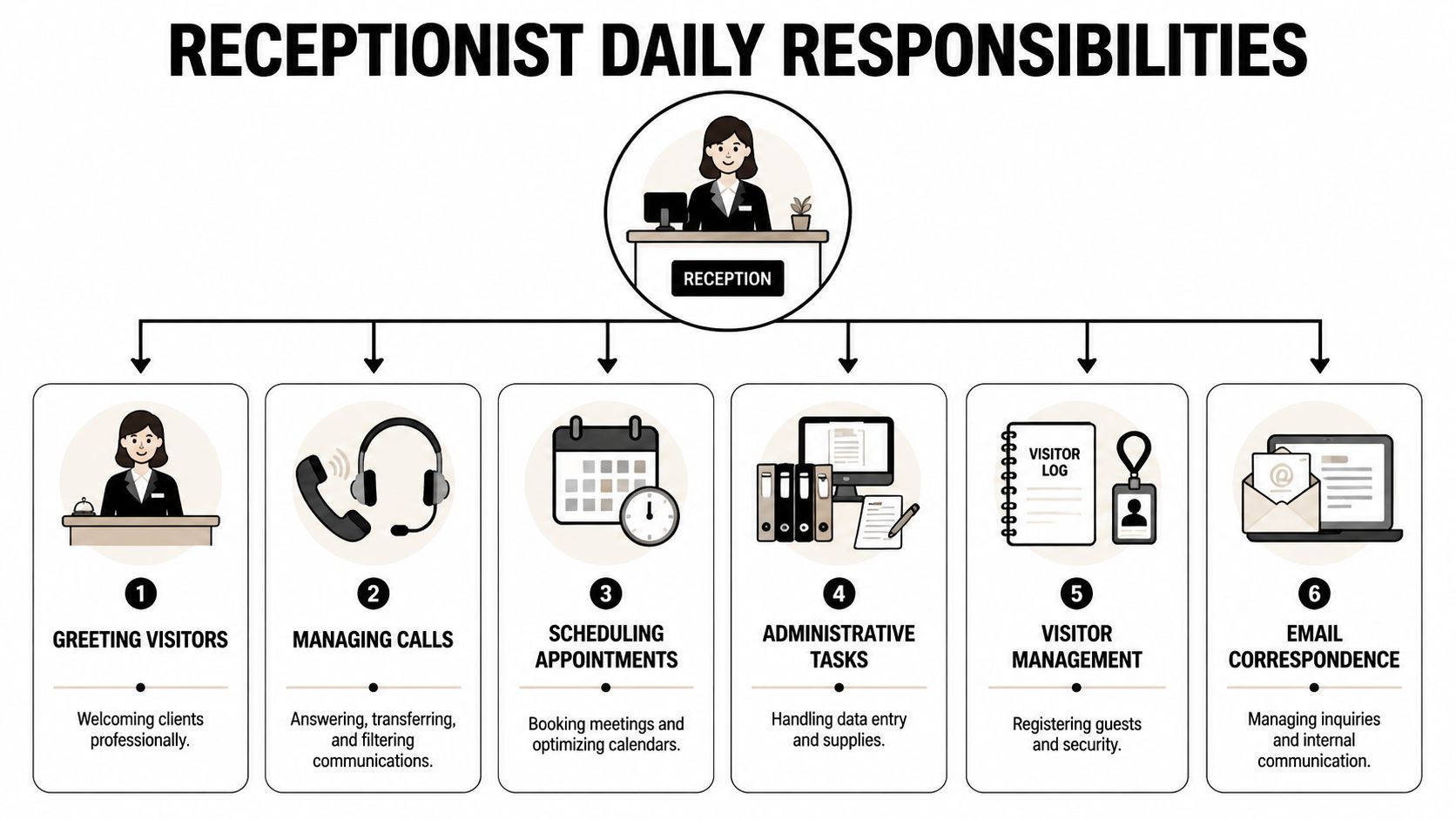
The rest of the day often fills with tasks that don't look like “reception,” but still land at the front desk:
Director of First Impressions: That phrase fits because the receptionist doesn't just respond. They shape how organized, trustworthy, and responsive the business feels.
There's also a social and historical side to the role. As of 2024, receptionists and information clerks in the United States numbered about 1,267,839, and 88.9% were women, according to Zippia's receptionist demographics overview. That history matters because the role has long been treated as support work, even when it carries real operational pressure and direct influence on sales outcomes.
Small businesses often pile more onto the receptionist because the front desk sits at the center of communication. That can make one role responsible for all of these at once:
That's why the question isn't only what is the receptionist. It's also whether one person can realistically do the whole job without bottlenecks.
For a deeper breakdown of how the role works today, see this guide on what receptionists do in a modern business.
A missed call at 12:07 p.m. can be more expensive than it looks.
For a small business owner, that call might be a new patient, a tenant with an urgent repair, or a homeowner ready to book service. If no one answers because the front desk is helping a walk-in, covering lunch, or untangling the schedule, the problem is not only customer service. It is revenue leakage.
That is the clearest way to compare human and AI receptionists. One model depends on a person's available attention. The other is built to keep inbound demand from slipping through the cracks.
| Feature | Human Receptionist | AI Receptionist (My AI Front Desk) |
|---|---|---|
| Availability | Usually tied to staffed hours, breaks, and time off | Can answer around the clock based on your setup |
| Call capacity | Limited by interruptions and one-person bandwidth | Can handle many conversations at once |
| Consistency | Can vary by training, stress level, and experience | Follows the configured workflow every time |
| Appointment booking | Strong when focused, slower during busy periods | Can book automatically through calendar integrations |
| Data entry | Manual updates and message taking | Can log information directly into connected systems |
| Overflow handling | Calls may stack up during rush periods | High-volume periods are easier to absorb |
| Escalation | Strong for emotional or unusual situations | Can route complex cases to a human |
| Cost structure | Salary, onboarding, supervision, turnover | Predictable software spend, depending on plan |
A good human receptionist does something software still cannot fully match. They read tone, calm frustrated people, catch unusual details, and protect relationships when a conversation goes off script.
That matters. A dental office dealing with an anxious patient or a law firm screening a sensitive intake call may want a person involved.
But small businesses often ask one receptionist to do four jobs at once. Answer phones. Greet visitors. Update calendars. Pass messages to the team. The strain shows up during rush periods, and the business pays for it in voicemails, callbacks, and lost leads.
AI changes the front desk economics because it treats every incoming call like an active business opportunity, not just another interruption to survive.
An AI receptionist works like a call coordinator, scheduler, and intake assistant in one system. It can answer instantly, ask the same qualifying questions every time, book appointments, log details, and send follow-up texts without relying on sticky notes or memory. For businesses that win work from inbound calls, that turns the front desk into part of revenue operations.
Here is the practical difference. A human receptionist often has to choose which task gets attention first. An AI receptionist does not face that tradeoff.
Owners sometimes frame this as a staffing question. The bigger question is conversion.
If ten prospects call and only six reach someone, the front desk is affecting sales. If all ten get answered, screened, and booked or routed correctly, the front desk is producing measurable return. That is why AI receptionists are getting attention. They do more than reduce admin burden. They help businesses capture demand that would otherwise disappear.
A busy HVAC company is a good example. On a hot Monday morning, calls come in fast. One person at the desk can only process them one by one while also helping technicians and existing customers. An AI receptionist can keep every caller engaged, collect job details, and send qualified opportunities where they need to go.
Human receptionists are usually the better fit for:
AI receptionists are usually the better fit for:
For many small businesses, the best setup is not human or AI. It is human plus AI. The person handles exceptions and relationship-heavy moments. The AI covers volume, speed, and consistency.
If you want a balanced view of how these roles are changing, read this guide on the future of front-desk roles and whether receptionists will be replaced by AI.
A good AI receptionist should work like a front desk coordinator, a scheduler, and a lead-capture assistant in one system. If it only answers basic questions, you have not improved operations much. You have replaced voicemail with a friendlier voice.
What matters is what happens after the greeting. Does the caller get booked, routed, qualified, and recorded correctly? If not, your team still has to clean up the work later, and revenue still slips through the cracks.
Start with the basic job of the front desk. Every caller needs an answer, even when three, five, or ten calls hit at once.
Look for features such as:
Control settings matter too. A small business may want the AI to answer only after hours, only during lunch, or only when the human team is already tied up. That flexibility keeps the system useful without forcing you to rebuild your whole front desk around it.
Many businesses lose money here without noticing it. A caller asks for help. Someone writes details on paper or in a note app. Another person updates the calendar later. A third person tries to add the lead to the CRM. Every handoff creates delay, and delay lowers the odds that the lead converts.
A stronger setup keeps those steps connected:
The practical benefit is consistency. Manual re-entry creates mistakes, skipped fields, and missing context, especially on busy days. An AI receptionist that pushes call details directly into your calendar, CRM, or intake workflow helps reduce that cleanup work and gives your team a clearer record of each opportunity.
It can also reduce front-desk labor costs significantly, especially for after-hours coverage, overflow answering, and repetitive scheduling tasks. The exact savings depend on call volume, staffing model, and how much of the workflow the system handles.
A front desk creates value when it moves work forward. The call should not end as an isolated conversation. It should trigger the next step automatically.
Useful features include:
This matters for revenue operations. If a new lead calls about a service estimate, the front desk should capture the request, log the details, notify the right person, and create a follow-up trail. That is a very different outcome from taking a message and hoping someone remembers to call back.
A receptionist system earns its place when it reduces handoffs and helps more callers become booked appointments or qualified leads.
Features on a checklist are not enough. Callers still judge your business by how the interaction feels.
The system should sound natural, pronounce names and services correctly, and know when to escalate to a person. Voice libraries, pronunciation guides, multilingual support, and adjustable call behavior all help. A law office, med spa, and roofing company need different scripts, different intake questions, and different escalation rules.
That is the essential test. Your AI receptionist should match the way your business sells, serves, and follows up. If it can do that, it stops being a phone tool and starts acting like a revenue-producing part of the front desk.
The easiest way to understand the modern receptionist is to stop thinking about job descriptions and look at actual business situations.
A receptionist becomes valuable when it helps a business respond faster, book more efficiently, and keep staff focused on work that only humans should do.

A homeowner calls in the evening with an urgent issue. In a traditional setup, that call may go to voicemail. In an AI-supported setup, the system answers, gathers the problem, checks service area details, and books the next step or alerts the on-call person.
That changes the front desk from a passive message line into an active lead-capture channel.
The stylist is with a client. The owner is handling inventory. Calls come in for booking, rescheduling, and service questions.
An AI receptionist can answer those routine inquiries, confirm availability, and send follow-up texts without interrupting service delivery. The staff stays focused on the customer in the chair, and the business still responds quickly to the next customer.
The best use of AI at the front desk is protecting human attention for high-value work.
Law firms often get calls that need calm intake, basic routing, and careful scheduling. Not every caller is a fit, and not every fit needs an attorney immediately.
An AI receptionist can gather contact details, ask intake questions, route urgent matters appropriately, and place qualified consultations on the calendar. That gives attorneys and paralegals cleaner information and fewer interruptions.
The benefit usually isn't abstract. It shows up in day-to-day operations:
Reception work used to be discussed as overhead. In many small businesses, it's better understood as front-end revenue handling. If a business grows through inbound calls, booked consultations, and repeat appointments, the front desk isn't sitting outside the sales process. It's sitting at the front of it.
Most owners assume setup will be technical and messy. It doesn't have to be. The simplest rollouts start with one business problem and one workflow.
The hidden cost to avoid is turnover. As noted in this discussion of why receptionist turnover keeps hurting offices, repeated retraining on lead qualification and scheduling creates inconsistent customer experiences and lost leads. A stable AI system gives you a more repeatable baseline.
Pick the problem that hurts most right now.
Examples:
If you try to automate everything at once, the setup gets fuzzy. If you start with one narrow goal, you can measure whether it works.
A practical rollout usually looks like this:
Define the calls it should handle
Decide which conversations should be fully handled, partially handled, or escalated.
Write your core answers
Add hours, services, pricing boundaries, service areas, and common objections in plain language.
Connect your tools
Start with calendar integration and CRM logging. Add texting, notifications, or webhooks after the basics work.
Test real call scenarios
Call your own line. Try a new lead inquiry, a reschedule, a confused caller, and an urgent request.
Refine weekly
Review call logs, update scripts, and tighten escalation rules.
Working benchmark: If the AI can handle the routine calls that interrupt your team most often, it's already doing valuable work.
A simple business formula works well:
(Value of new leads captured + cost of saved labor) - AI subscription cost
You don't need invented projections to evaluate this. Track what changed after launch:
If you want a practical setup path, this guide to first steps with AI receptionists for business can help you think through rollout decisions.
Sometimes yes, sometimes no. Modern voice systems sound much more natural than older phone automation. What matters more is whether the conversation is helpful, fast, and accurate. If the system answers clearly, books correctly, and escalates when needed, most callers care more about the outcome than the label.
Yes. Many businesses keep their existing number and use call forwarding so the AI answers incoming calls behind the scenes. That means you don't have to retrain customers to call a new line.
A good setup shouldn't force every call through automation. It should escalate when needed. That might mean transferring to a team member, collecting details for a callback, or routing urgent matters by priority.
No. It can help businesses with a human receptionist, businesses that rely on owners answering calls, or businesses that have no formal front desk at all. The essential question is whether missed calls, interruptions, and inconsistent intake are slowing growth.
A receptionist used to mean one person at one desk. Today, it can mean a system that protects revenue, captures leads, and keeps your team focused on work that needs a human.
If you want to see how an AI receptionist can answer calls, book appointments, capture leads, and support your team without changing your whole operation, take a look at My AI Front Desk. It's built for small businesses that want to convert more inbound demand into real revenue.
Start your free trial for My AI Front Desk today, it takes minutes to setup!


