
Think of an IVR system for small business as your company's digital concierge—one that never sleeps and makes sure no customer call is ever missed. This isn't just a tool for massive corporations anymore. It's now an accessible, powerful way for even the smallest businesses to capture leads and deliver amazing service, 24/7.
Let's be real: for any growing business, a missed call is a missed opportunity. Potential customers want answers now. Sending them to a voicemail box is basically hanging a "Sorry, we're closed" sign on your digital front door.
This is the classic entrepreneur's dilemma. You can't possibly be available around the clock, but your customers kind of expect you to be.
A traditional phone line just can't keep up with that demand. It’s a one-way street that hits a dead end the moment you're busy or away. An AI-powered IVR, on the other hand, flips that weakness into a massive strength.
Instead of just taking messages, it actively engages every single caller. This isn't just an upgrade from voicemail; it's a completely different, smarter way to handle customer communication.
It wasn't long ago that IVR technology was reserved for big companies with equally big budgets and dedicated IT teams. That's all changed. Modern solutions like My AI Front Desk have put this tech within reach for everyone, turning it into a real growth engine for small businesses.
And this isn't your parents' clunky, robotic phone menu. A modern IVR system for small business can actually do things that help you grow:
A modern IVR immediately solves the lost revenue problem. It captures opportunities that would otherwise vanish into a full voicemail box or a competitor’s open phone line.
An IVR is a key part of a modern phone system for small business, and it does so much more than just answer calls. Yet, its adoption is still surprisingly low. Recent analyses show only 19% of small businesses globally use an IVR system, which leaves a huge competitive advantage on the table for those who jump on it.
You can find more on these market trends on MarketGrowthReports.com. By adding this technology, you're not just keeping up—you're getting way ahead of the competition.
Not all phone systems are built the same. For a small business, where every single call and every minute matters, the right features can mean the difference between a missed opportunity and a new customer. The goal isn't just to route calls anymore; it's to turn your phone into a tool that actively grows your business.
This means looking beyond basic menus and a simple voicemail box. A modern IVR system for small business should act more like a smart assistant—one that's equipped with capabilities that directly boost your bottom line, keep customers happy, and make your life easier.
Let's be honest, nobody likes those old "press one for sales, press two for support" menus. The single most important feature in a modern system is conversational AI. This technology lets your virtual receptionist understand what people are saying in their own words, just like a real person would.
A caller can just say, "I need to book an oil change for tomorrow afternoon," and the AI gets it. No confusing mazes, no endless options. This creates a professional first impression and a much smoother experience for your customers.
The best technology feels invisible. When a caller can just speak naturally and get what they need, you've removed a huge point of friction and instantly leveled up your customer service.
This is the line in the sand that separates a frustrating phone tree from a genuinely helpful digital receptionist. It's the difference between a caller hanging up in annoyance and successfully booking an appointment long after you've closed for the day.
A phone system really starts to shine when it talks to the other tools you already rely on. For any small business focused on growth, two connections are absolute game-changers:
These integrations transform your phone from a simple communication device into an automated lead capture and scheduling machine that works for you 24/7.
The difference between older phone menus and today's AI-powered systems is stark. The table below breaks down how far the technology has come and what you should expect from a modern solution.
It's clear that a modern AI Front Desk does so much more than just direct traffic—it actively engages with callers to generate real business outcomes.
What happens when your latest marketing effort is a huge success? A sudden flood of calls can jam up a traditional phone line, forcing potential customers to a busy signal. You need a system that can handle unlimited parallel calls. This technical feature is critical, ensuring that whether one person calls or one hundred call at once, every single one gets a professional answer.
Beyond answering calls, a modern system should use texting to its advantage. With intelligent texting workflows, your AI can send a follow-up text to a caller while they are still on the phone. For instance, if someone asks for directions, the AI can say, "No problem, I'm sending our address to you in a text right now." It’s a small touch that provides instant value and makes your business look incredibly professional.
To see how these capabilities come together, you can explore the full range of My AI Front Desk features designed specifically to help small businesses compete and win.

When you're looking at any new tool for your business, one question matters more than any other: is it worth the money? For a modern IVR system for small business, just glancing at the monthly price is like judging a car by its paint job—you're missing the powerful engine inside. A smart IVR isn't a cost center. It's a revenue-generating asset that works for you around the clock.
To get the real picture, you have to calculate its return on investment (ROI) by seeing how it directly helps your bottom line. The impact goes way beyond just answering the phone.
At its core, it's about swapping fixed staffing costs for scalable, efficient automation. That shift is a game-changer for service businesses where a single missed call means lost income. It's no surprise the global IVR market is expected to jump from USD 5 billion in 2025 to USD 12 billion by 2033, a trend fueled by this exact financial upside. You can dig into this growing market on MarketReportAnalytics.com. Think about it: a single AI receptionist can easily replace multiple part-time staff hours every week, completely changing your operational costs.
The quickest return you'll see is by cutting down on the need for a dedicated person to handle routine calls. How many hours does your team currently spend answering the same old questions, booking appointments, or just playing operator?
An AI-powered IVR handles all of that instantly, without ever needing a break. This frees up your human team to focus on high-value work that actually grows the business, like closing a big sale or providing expert support to a loyal customer. You save on payroll, benefits, and the hidden costs of training and staff turnover.
What’s the true value of a lead you would have otherwise missed completely? When a potential customer calls after hours or while your lines are tied up, a normal phone system boots them to voicemail—or worse, they just hang up and call your competitor.
An AI receptionist, on the other hand, captures every single one of those opportunities. It can qualify the caller, book them right into your calendar for a consultation, and even shoot them a follow-up text with your business info.
By engaging every caller, 24/7, an IVR system transforms your phone line from a passive utility into an active, round-the-clock lead generation machine. Every appointment booked at 11 PM is pure profit you wouldn't have had before.
This isn’t just about stopping the bleeding of lost revenue; it's about opening up entirely new streams of it.
Time is your most valuable resource, period. An IVR system gives you more of it by automating the repetitive, soul-crushing tasks that drain productivity day in and day out.
Just think about the time you'll get back from:
These small efficiencies stack up fast, letting your small team operate with the power and reach of a much larger company.
Ready to run the numbers for yourself? To get a good estimate of your potential ROI, just answer these three questions:
When you add it all up and weigh it against the surprisingly affordable cost of a modern system, the financial case becomes impossible to ignore. You can explore different subscription options by checking out the pricing for My AI Front Desk to see just how quickly the benefits outweigh the cost.
Putting an Interactive Voice Response (IVR) system in place might sound like a massive technical undertaking, but modern platforms have made the process surprisingly simple. You really don't need an IT background to get a powerful system up and running. Think of it less like building a car engine from scratch and more like snapping together a LEGO set with a great instruction manual.
A well-planned IVR system for small business becomes your best digital receptionist, effortlessly guiding customers where they need to go. This guide breaks the entire process down into five clear, manageable parts, taking you from an idea to a fully working setup without the usual tech headaches.
Before you even think about writing a script or touching a setting, you need to get inside your customers' heads. Why are they calling you in the first place? Grab a whiteboard or even just a notebook and sketch out the main reasons people call your business. What are the top three to five things they're trying to accomplish?
For most service-based businesses, it usually boils down to a few key paths:
By clearly defining these journeys, you're essentially creating the blueprint for your IVR menu. This ensures the system you build is centered around what your callers actually need, not just some generic template. Getting this step right is the foundation for a helpful, intuitive experience.
Now that you know the "why" behind the calls, it's time to write what your AI receptionist will actually say. The absolute goal here is to sound helpful and human—not like a cold, monotone robot. A fantastic script makes your business sound professional, warm, and welcoming right from the start.
Forget the corporate jargon and long, rambling sentences. Keep your prompts short, clear, and friendly.
"Hi, thanks for calling [Your Business Name]. To make sure you get to the right place, could you tell me briefly what you're calling about today? For example, you can say 'I'd like to book a new appointment' or 'I have a question about my bill.'"
This simple, open-ended greeting feels like a real conversation. It gives the caller clear examples, making it easy for them to respond naturally without feeling confused.
Here are a couple of practical script templates to get you started:
Scenario: New Lead Qualification & Scheduling
"Thanks for your interest in our services! To connect you with the right person, could you let me know if you're a new or existing client?"
(If new) "Great! Are you looking to schedule a consultation, get a price quote, or something else?"
(If scheduling) "Perfect. I can book that for you right now. I'm checking our calendar for openings. What day and time works best for you?"
Scenario: General Information Request
"Hello! If you're looking for our business hours or address, I can send that to you in a text message right now. Would you like me to do that?"
This is where the real magic happens. A modern IVR's true power isn't just in answering calls; it's in its ability to connect with the other software that runs your business. When you link your tools, your phone system transforms into an automated workflow machine.
For nearly every small business, two integrations are non-negotiable:
Platforms like My AI Front Desk make these connections incredibly easy—it often just takes a few clicks to authorize them. This one step can save you hours of admin work every week and ensures a valuable lead never slips through the cracks.
Your AI receptionist is ready to work 24/7, but your human team isn't. You need to tell your IVR how to handle calls differently during business hours versus after you’ve all gone home. This simple logic creates a consistent, helpful experience for callers, no matter when they dial.
For instance, during your normal hours (say, 9 AM to 5 PM), you might set the IVR to offer a live transfer to a team member. But after 5 PM, that option disappears. Instead, the AI focuses on taking a detailed message or scheduling a callback for the next business day.
This logic is crucial for managing customer expectations. It ensures urgent calls get the attention they need while routine requests are handled automatically, freeing you up to focus on what matters.
Before you unleash your new system on the world, you have to kick the tires. Grab your personal phone, call your new business number, and pretend you're a customer. Try to go down every single path you mapped out back in Step 1.
Ask yourself these questions:
Make several test calls to smooth out any wrinkles. Once you feel confident that everything is working just as it should, you're ready to go live. For a deeper dive into setup and optimization, you can explore the extensive library of My AI Front Desk tutorials to learn more advanced techniques and best practices.
A basic phone menu is just a traffic cop for your calls. But an intelligent, integrated system? That can actually run parts of your business for you. The real power of a modern IVR system for small business comes alive when it stops being a standalone tool and becomes the central hub for your customer operations. This is all thanks to the magic of integrations.
Think of it this way: your IVR is the friendly face at the front door, while integrations are the smart assistants working behind the scenes. They connect your phone system to all the other essential tools you use every day, creating a well-oiled machine that ensures a smooth customer journey from the very first ring.
This diagram breaks down the three core pillars of a solid IVR setup.
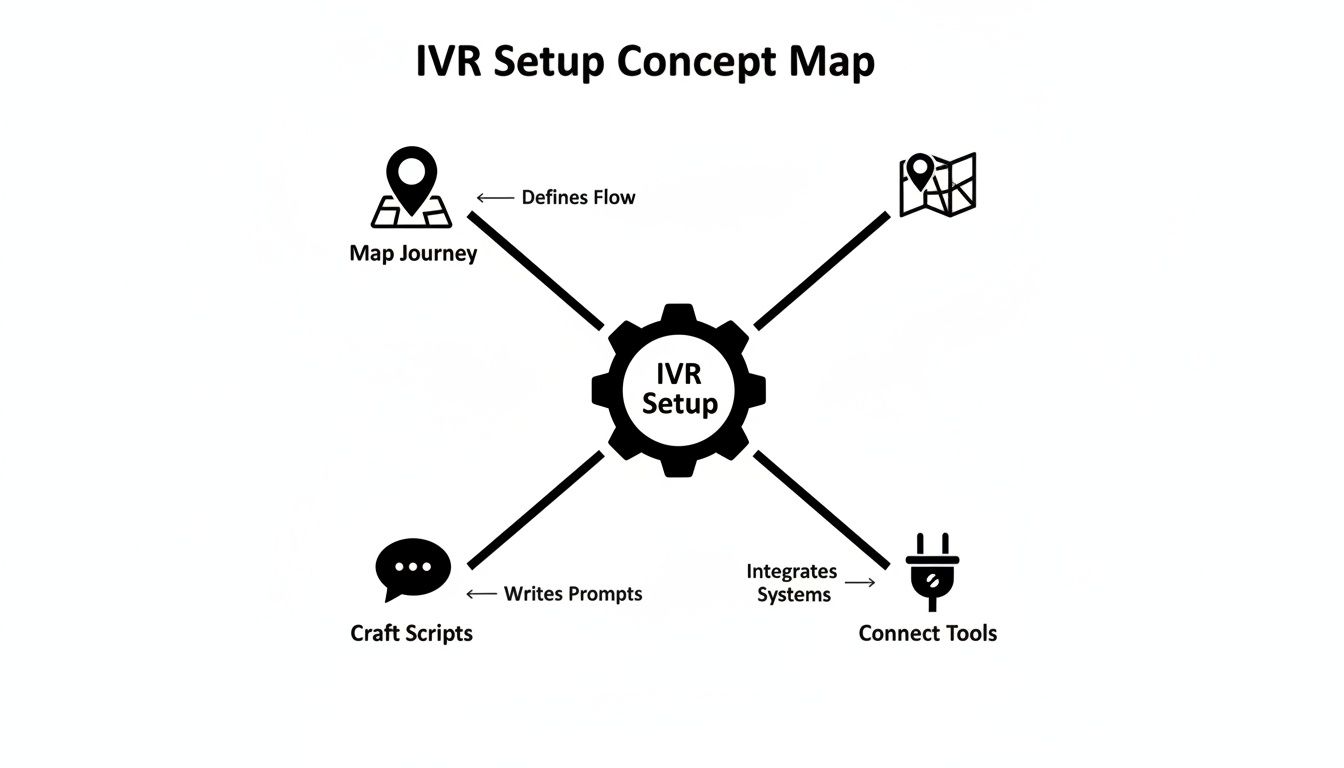
As you can see, connecting your tools is just as fundamental as mapping out the customer's path and writing your scripts.
For any business focused on growth, the most critical integration is with your Customer Relationship Management (CRM) platform. When your IVR talks to your CRM, you basically eliminate the risk of leads falling through the cracks because of a simple missed note or manual error.
Picture this: a potential new client calls after hours. The AI receptionist gathers their name, number, and why they're calling. Instead of that info just sitting in a voicemail box, it’s instantly and automatically logged as a brand new lead in your CRM. Your sales team walks in the next morning to a perfectly documented opportunity, ready for a follow-up call. That one connection just plugged a major leak in your sales funnel.
Another game-changing connection is with your calendar. By integrating with tools like Google Calendar, you empower your IVR to become a fully automated appointment scheduler. It can check your real-time availability and book meetings around the clock, all without a human lifting a finger.
This isn't just an amazing convenience for your customers; it frees up your team from the endless, time-sucking email chain of "does Tuesday at 2 work for you?" Every appointment booked at midnight is a win for your business.
An integrated IVR does more than just answer calls—it performs valuable business functions. It acts as a data entry clerk, a scheduler, and a workflow trigger, all powered by a single phone call.
To get a clearer sense of how this works in practice, you can learn more about how a purpose-built AI receptionist leverages these connections to drive real business results.
So what if you want to connect your IVR to the thousands of other apps you use? That’s where a tool like Zapier comes in. Think of Zapier as a universal translator, allowing all your different software to talk to each other and trigger automated workflows.
With a Zapier integration, a single phone call can set off a chain reaction of automated tasks. Here are just a few ideas:
These workflows amplify the impact of every single call. To push efficiency even further, it’s worth exploring broader marketing automation strategies for small businesses that can work in tandem with your IVR. By integrating your tools, you're not just buying a phone system; you're building a responsive, automated engine that works tirelessly to grow your business.
We’ve all been there—stuck in a maddening phone menu, repeatedly pressing zero, and getting nowhere. A clunky Interactive Voice Response (IVR) system can frustrate customers and tarnish your reputation before you even get a chance to speak with them.
The good news is that most of the classic IVR annoyances are relics of old-school tech. Today’s AI-powered platforms make it surprisingly easy to create a helpful, modern experience, as long as you steer clear of a few common traps.
The difference between a great IVR and a terrible one is simple: a great system is designed for the caller's convenience, not just the business's. It anticipates needs and offers the fastest path to a solution.
Think of your IVR system for small business as a helpful guide, not a frustrating gatekeeper. By focusing on the caller's experience, your automated system starts to feel less like a machine and more like a competent assistant who’s always ready to help.
Nothing screams "outdated and impersonal" faster than a cold, robotic voice rattling off a long list of options. It immediately sets the wrong tone. Thankfully, modern technology offers far better alternatives that make your small business sound polished and professional.
Instead of generic text-to-speech, platforms like My AI Front Desk give you access to a library of 100+ premium, natural-sounding AI voices. This one small change makes a massive difference in how callers perceive your brand.
And that old "press one for sales, press two for support" model? It's obsolete. It’s time to swap it out for a more intuitive approach:
This shift from a rigid structure to a flexible, conversational one is the most important step you can take toward creating an experience people won't hate.
Even the best systems need a bit of fine-tuning. A common mistake is to "set it and forget it." A truly great IVR is one you continuously improve based on how people actually use it.
Start with the basics, like pronunciation. If your company has a unique name or you use a lot of industry jargon, the AI might stumble at first. Most modern systems include a pronunciation guide where you can spell out tricky words phonetically. This ensures the AI says everything perfectly, every single time.
Finally, you need to use your analytics. Dive into your call logs and listen to recordings. Where are people getting stuck? At what point do they hang up? This data is gold. It shows you exactly where your script is confusing or where the AI needs a little more training. Regular check-ins turn your IVR from a static tool into a smart system that gets better over time.
Jumping into any new technology for your business is bound to bring up a few questions. Let's tackle some of the most common ones we hear from small business owners looking at an IVR system.
Yes, you absolutely can. This is probably the biggest sigh of relief for business owners who think they'll have to change the number they've spent years putting on trucks, websites, and business cards.
Modern, cloud-based IVR systems don't replace your number; they work with it through a simple process called call forwarding. You keep your number, and when a customer calls, it’s instantly and invisibly routed to your AI receptionist. Your customers won't notice a thing, except for the fact they get their questions answered right away.
Next to none. If you can write an email, you can set this up. Platforms like My AI Front Desk are built for the business owner on the go, not a team of IT experts. The entire process is guided, intuitive, and designed to get you up and running in minutes, not days.
Seriously, there's no coding involved. The setup usually just involves:
That’s a fair question, but today’s AI is built with smart safety nets to make sure you never miss out on a potential customer. If the system gets stuck or can't quite grasp what a caller is asking, it doesn't just give up and create a frustrating dead end.
Instead, it’s programmed to pivot gracefully. You can set it up to automatically take a detailed message and text it to you, forward the call to your personal cell, or even text the caller a link to your website's contact page. This way, every single call ends with a productive outcome. No lead is ever left behind.
Ready to see how an AI-powered receptionist can free up your time and capture more business? Check out the features and get started with My AI Front Desk by visiting https://myaifrontdesk.com today.
Start your free trial for My AI Front Desk today, it takes minutes to setup!


