
It's tempting to think of texting and email as an either/or choice. You pick one, master it, and hope for the best. But that’s like trying to build a house with just a hammer—you might make some progress, but you’re missing out on a whole toolbox of other powerful tools.
The real magic happens when you stop seeing them as separate channels and start using them together.
Think about it. Email is still the king of storytelling and detailed follow-ups. But let’s be honest, its pace can be… leisurely. A text message, on the other hand, is immediate and personal.
When you blend the two, you create a powerful synergy where each channel makes the other one stronger. This isn’t about picking a favorite; it's about making them work in concert.
When was the last time a text from a business sat unread on your phone for more than a few minutes? Probably never. The data backs this up. SMS messages have an almost unbelievable open rate of around 98%, and most are read within three minutes.
Email can’t compete with that speed. But it was never meant to.
Recent trends show just how much consumers are leaning into texting for quick, important stuff. SimpleTexting's 2025 report projects that a huge majority of consumers—between 71% and 83%—will prefer texting over other channels for simple interactions.
This doesn't push email to the sidelines. It just clarifies its role. Email is your go-to for:
To help you visualize where each channel shines, here’s a quick breakdown.
Ultimately, this isn't about replacing email with texts. It's about creating a fluid customer journey.
A quick text can confirm an appointment instantly, while a follow-up email provides all the necessary details, forms, and resources they'll need beforehand. That's a winning combination.
When you get these two channels talking to each other, you meet customers on their terms. A new lead fills out your website form and gets an instant text confirmation. Right away, they feel seen and acknowledged.
Later that day, a beautifully crafted email can land in their inbox, offering more value and gently guiding them toward the next step in your process. This coordinated approach turns what could be fragmented, disjointed interactions into a single, seamless conversation.
That’s where tools like My AI Front Desk come in, designed to automate and orchestrate this communication flow. You can build simple workflows that trigger both texts and emails, ensuring no lead ever falls through the cracks and every touchpoint feels intentional.
Before you even think about writing that first text or drafting that welcome email, we need to lay some groundwork. A smart text and email strategy isn't just about blasting out messages; it's about sending the right ones at the right time to get a specific result. Without a solid plan, you're just adding to the noise.
Let's start with a simple but critical question: what does success actually look like for my business? The answer will shape every decision you make, from the software you pick to the messages you send.
Don't try to boil the ocean. Pick one clear, measurable goal to build your initial strategy around. This laser focus is what makes your efforts count.
Are you trying to:
Once you nail down your primary objective, every single text and email has a purpose. It stops you from sending random messages that don't actually help your bottom line.
With your goal in hand, it’s time to find the software that makes combining texts and emails feel like second nature. You're looking for a platform that can automate the busywork, talk to your other systems, and handle both channels without a fuss.
I've seen so many businesses make the mistake of picking separate tools for texting and email that don't talk to each other. This just creates data headaches and extra manual work, which completely defeats the purpose of an integrated strategy.
Look for a solution like My AI Front Desk that has texting workflows built right in and can easily connect with your email provider or CRM using tools like Zapier. This setup lets you create powerful, automated sequences. Imagine an action in one channel (like a text response) automatically triggering an action in another (like sending a follow-up email). To really see what’s possible, check out this detailed guide to texting using email for business communication to see how these tools can work in tandem.
This is the most important piece of the puzzle, so listen up. You have to build your strategy on a secure, legal foundation. Compliance isn't a "nice-to-have"—it's a requirement that protects your business and, just as importantly, your customers.
The big one here is the Telephone Consumer Protection Act (TCPA), which governs text message marketing in the U.S. Its core principle is consent. You absolutely must have express written consent from someone before you send them marketing texts. This isn't a wink-and-a-nod thing; they need to knowingly and clearly agree to it.
Make sure your website forms, landing pages, and any other sign-up spots have crystal-clear language and a checkbox for people to opt-in. And always, always give them a simple way out, like replying "STOP." Ignoring these rules can lead to massive fines and torpedo your brand's reputation. When you put compliance first, you start building trust from the very first message.
Alright, you've got your goals locked in and your tools ready to go. Now for the fun part: mapping out your first automated sequence. This is where combining texting and email really starts to shine, turning a simple website inquiry into an actual conversation that warms up new leads—all while you’re busy running your business.
The easiest place to begin is with the most common starting point for any new lead: the contact form on your website. Let's walk through what that looks like in the real world.
Before you start drawing up the workflow itself, you need a solid foundation. Think of it like this:
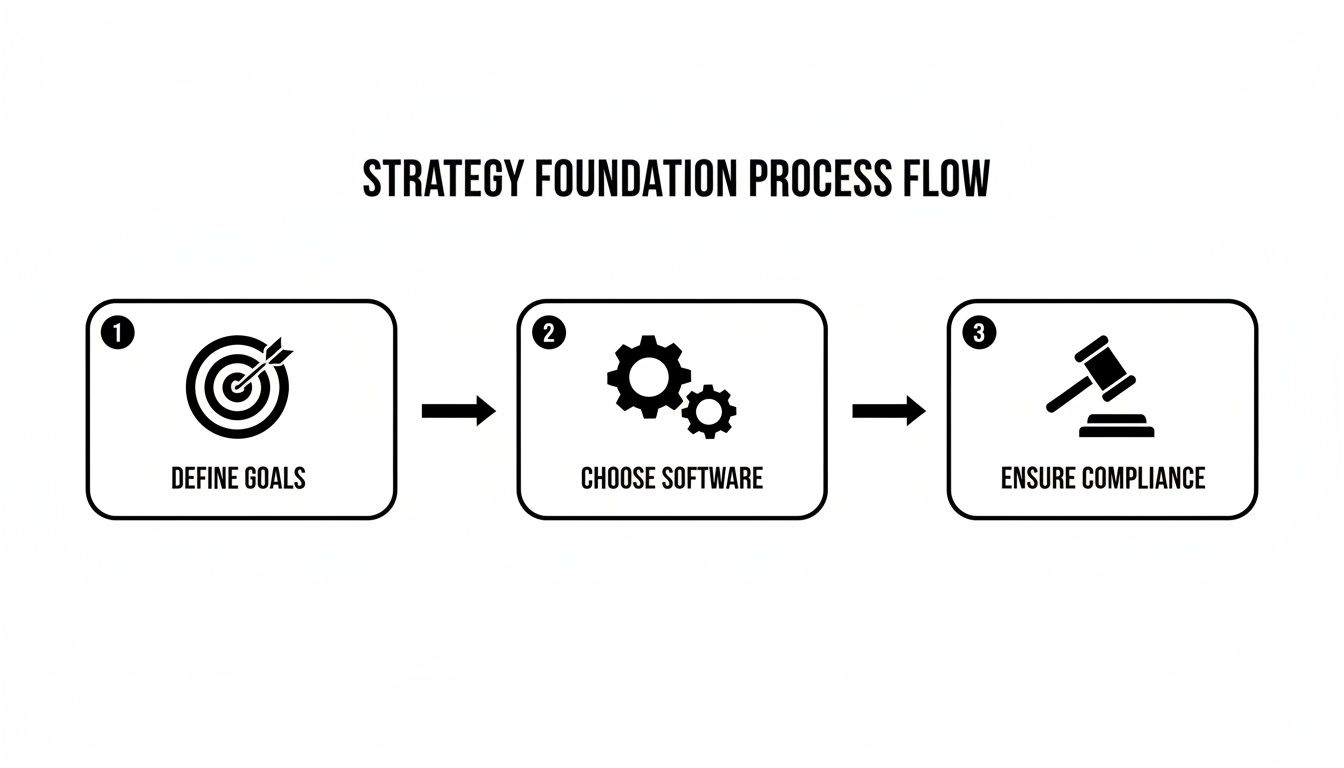
This diagram gets straight to the point. A great workflow isn't just about the messages; it's built on a clear strategy. Defining your goals, picking the right software, and making sure you're compliant are the absolute must-dos before you write a single text.
Picture this: a potential customer, let's call her Sarah, is on your website and fills out your "Request a Quote" form. The second she clicks "submit," your automation should spring into action. This is your moment to make a killer first impression.
Your very first move should be an SMS message. Why text first? Speed. A text message lands instantly, confirming you got her request and showing that you're on top of things. It stops her from wondering if the form even worked and clicking over to your competitor's site.
This one simple text does three crucial things: confirms you got it, sets expectations for what's next, and opens up a direct, personal line of communication.
While texting is all about speed and immediacy, email is where you can add detail and color. There were about 4.5 billion email users globally in 2025, and it’s still the king for sending more complex info and nurturing leads over the long haul.
So, your second action follows right behind the first.
By separating the instant confirmation (SMS) from the detailed follow-up (email), you give the customer exactly what they need at each moment without overwhelming them. It’s a one-two punch that is both efficient and professional.
To make this all happen automatically, you need to connect your tools. This is where an integration platform like Zapier is a lifesaver. It acts as the digital glue between your website form, an SMS platform like My AI Front Desk, and whatever email service you use.
For a hands-on walkthrough, you should check out our guide on how to set up texting workflows in My AI Front Desk. It will give you the exact steps to bring this lead conversion strategy to life using our platform, showing you how to build custom workflows that fit your business perfectly.
Your automated workflows are the engine, but the messages you send are the fuel that makes the whole thing go. A perfectly timed sequence can completely fall flat if the texts feel robotic or the emails are just plain boring. The real magic happens when you master the art of delivering the right message, on the right channel, at exactly the right moment.
This isn't just about stringing together clever words; it's about understanding the context of how people communicate. A text message needs to be short, sweet, and to the point—designed for a quick glance and an immediate tap. Email, on the other hand, is where you have room to breathe. It’s your space to build trust, dive into the details, and deliver some real value.
Finding the right rhythm for your messages is critical. Get it wrong, and you'll just annoy your leads until they hit "unsubscribe." Get it right, and you'll feel like a trusted advisor.
Generally speaking, the sweet spot for marketing texts is between 11 am and 4 pm. You're catching people during their lunch break or as the workday starts to wind down. Emails often hit their stride a bit earlier, between 8 am and 4 pm, when folks are clearing out their inboxes.
But it’s not just about the time on the clock. The sequence is everything.
A great cadence feels helpful, not desperate. Picture this: a lead fills out your form. They get an instant text confirmation, followed by a detailed email a few minutes later. Then you give them space. A day or two later, a gentle follow-up text like, "Hey, just checking in to see if you had any questions about the proposal I sent over," is the perfect touch. It respects their time while keeping your business top of mind.
You don't need to reinvent the wheel for every single interaction. Building a playbook of proven templates saves a ton of time and keeps your brand voice consistent. Feel free to adapt these for your own business.
Scenario 1: Missed Call Follow-Up
This instantly turns a missed call from a lost opportunity into a warm lead.
SMS: "Hi [Name], this is [Your Name] from [Company]. Sorry I missed your call! I'm with a client but will call you back shortly. Is there a good time in the next hour? You can also text me here."
Scenario 2: Appointment Reminder
A simple, friendly text can dramatically reduce no-shows.
SMS: "Hi [Name], a friendly reminder about your appointment with [Company] tomorrow at [Time]. Please reply YES to confirm or call us at [Number] to reschedule. See you soon!"
Scenario 3: Special Offer Follow-Up
Use both channels to create a sense of urgency and drive action. This is a fantastic way to reel in new business. If you're looking for more ideas, we've got a guide on 10 creative ways to generate leads for your marketing agency that can spark some inspiration.
Email (Initial Send): Subject: "Your Exclusive 20% Off Offer Inside!"
This should be a visually appealing email that clearly explains a limited-time offer and has a big, obvious call-to-action button.SMS (Final Day Reminder): "Hey [Name], just a heads-up that your 20% off coupon for [Product/Service] expires tonight at midnight! Don't miss out. Claim it here [Link]."
Let's be real: a great communication strategy isn't something you can "set and forget." It's more like a garden—it needs constant attention and the right data to grow stronger. To get your texting and email combo working like a well-oiled machine, you have to track the right numbers and be ready to pivot based on what they tell you.
This isn't about drowning in spreadsheets. It's about zeroing in on a few key performance indicators (KPIs) that tie directly back to your ultimate goal, whether that's filling your calendar with appointments or just closing more deals.
To get the full picture, you have to look at both channels together, not in separate silos. The magic is in seeing how they influence each other.
Here are the metrics I always keep an eye on:
You'll quickly notice a huge performance gap between texting and email, and that's completely normal. Industry stats consistently show SMS blows email out of the water for short-term engagement. SMS response rates can hit the 40-45% range, while a 6% response rate for email is often considered pretty good. You'll see the same story with click-through rates, where SMS can pull 20-28% while email is lucky to get into the single digits. You can discover more insights about these SMS and text marketing statistics on Mozeo.com.
A rookie mistake is judging SMS and email by the same standards. A 2% click-through rate might be acceptable for an email campaign. But if you're only getting a 2% CTR on a text message campaign? That’s a massive red flag that something is seriously wrong with your offer or your copy.
Once you have the numbers, the real work begins. Your data tells a story about where your workflow is firing on all cylinders and where it's falling apart.
For example, if you're getting fantastic engagement on your texts but see a massive drop-off when you send the follow-up email, that’s a clear signal. It’s time to seriously rethink that email's subject line or the content inside.
This is where A/B testing becomes your secret weapon. It’s a straightforward way to let the data guide your decisions instead of just going with your gut.
Constantly refining your process is how you build a smarter, more powerful lead conversion engine. Every little tweak adds up, boosting your return on investment over time. If you want to get deeper into the financial side, our guide on how to calculate ROI to measure your business success is a great next step.
Jumping into a strategy that combines texting and email can feel like a big move. It's totally normal to have questions before you dive in. Most business owners I talk to worry about the cost, the complexity, or just plain annoying their customers.
Let's clear the air and tackle those concerns head-on.
The great news is that bringing these two channels together is way more straightforward than it used to be. This isn't about creating some complicated, spammy mess; it's about building a smooth, helpful experience for your leads.
This is usually the first thing people ask, and the answer is almost always a pleasant surprise. The cost of texting with email is nowhere near as high as you might imagine, especially when you weigh it against the results. Modern platforms are built specifically for small businesses, with flexible plans that scale with your message volume and the features you actually need.
Honestly, the real cost comes from not doing it. When you look at the killer ROI you get from better lead engagement and higher conversion rates, the investment in a unified system pays for itself—fast. Think of it less as an expense and more as a strategic move toward efficiency and growth.
It’s a fair question, but whether you're annoying or not comes down to your approach. People get annoyed by irrelevant, pointless messages, not genuinely helpful communication. If you're thoughtful about your strategy, you’ll be just fine.
The trick is to respect what each channel is good for:
When you play to each channel's strengths and always give people an easy way to opt out, you're not being annoying—you're being helpful. You're putting them in control of how they hear from you.
Absolutely not. The idea that you need a computer science degree to automate your marketing is a total myth. Today's tools are designed for business owners, not developers. Many of them have slick, drag-and-drop workflow builders that make the whole process visual and easy to follow.
Tools like Zapier have been a complete game-changer here, letting you connect your favorite apps with just a few clicks—no code required. You can easily link your website form to your SMS service and your email provider, creating a powerful automated sequence in minutes. The tech barrier has pretty much been demolished, making this kind of powerful automation something anyone can do.
Ready to put these ideas into action? My AI Front Desk gives you the powerful, easy-to-use tools you need to build automated texting and email workflows that convert leads 24/7. Start your free trial today!
Start your free trial for My AI Front Desk today, it takes minutes to setup!


