
If you're looking at outbound calling software right now, you're probably dealing with one of two problems. Your team spends too much time waiting between calls, or your current dialer feels built for a much larger operation than yours.
That's where the ready mode dialer conversation usually starts. Small business owners hear that it can keep agents talking, cut dead time, and move through lead lists faster. All of that can be true. But the details matter, because a ready mode setup can be useful in one campaign and a poor fit in another.
I’ve worked with teams that bought advanced dialers too early, then spent more time managing pacing, abandoned calls, and workflows than improving results. I’ve also seen the opposite. A structured team with the right list, script, and process can get real value from a platform like ReadyMode. The key is knowing what it does well, where it gets complicated, and what kind of business should consider a simpler AI-based alternative instead.
A rep finishes one call, marks the outcome, and should be on to the next prospect right away. Instead, they spend the next minute dialing, waiting through rings, or listening to voicemail. Over a full day, that gap adds up. A ready mode dialer is built to shrink that gap by preparing the next live conversation before the agent asks for it.
A ready mode dialer is a high-speed outbound calling system that watches agent availability and routes answered calls to the next rep who is ready. The goal is simple. Keep talk time high and idle time low.

ReadyMode is commonly used as a predictive-style dialer. Instead of waiting for one call to end and then starting the next, the system places calls in the background based on how many agents are free, how quickly calls are being answered, and how often calls connect to a real person.
That matters because a live answer is the scarce resource. The software is trying to line up that live answer at the moment an agent becomes available.
A simple way to understand the flow is this:
For a team doing high-volume outreach, that can produce a much faster rhythm than manual dialing or slower dialer modes. If you are comparing options, this guide to auto dialer software for SMBs in 2025 helps show where a ready mode setup fits and where it can be more system than a smaller team needs.
Practical rule: Ready mode works best when calls follow a repeatable pattern and reps do not need much research time before each conversation.
Small business owners often hear the speed benefit first. That part is real. The harder part is control.
If the dialer places calls too aggressively, someone can answer before an agent is free. That creates an abandoned call. In a tightly managed call center, supervisors watch pacing closely for this reason, as noted earlier in ReadyMode's own guidance on dialing speed and abandonment.
Ready mode starts to look less like a basic productivity tool and more like what it often is: an enterprise calling system that rewards close supervision, clean lead lists, and disciplined campaign management. For the right team, that structure can pay off. For a smaller business, it can also become one more moving part to babysit.
A good analogy is highway traffic. More lanes can move more cars, but only if the entrances, exits, and speed limits are managed well. If not, the extra capacity creates confusion instead of flow.
That is the key idea to carry forward. A ready mode dialer is powerful because it compresses downtime between conversations. It is also easy to overbuy. If your team needs flexibility, easier setup, or tighter integration with everyday SMB workflows, AI-first tools such as My AI Front Desk may offer a simpler path with less dialer management overhead.
The biggest mistake I see is choosing a dialer mode based on what sounds advanced instead of what matches the sales motion. A ready mode dialer isn't “better” than preview or power dialing in every situation. It's better for a certain kind of work.
This visual helps clarify the environment.
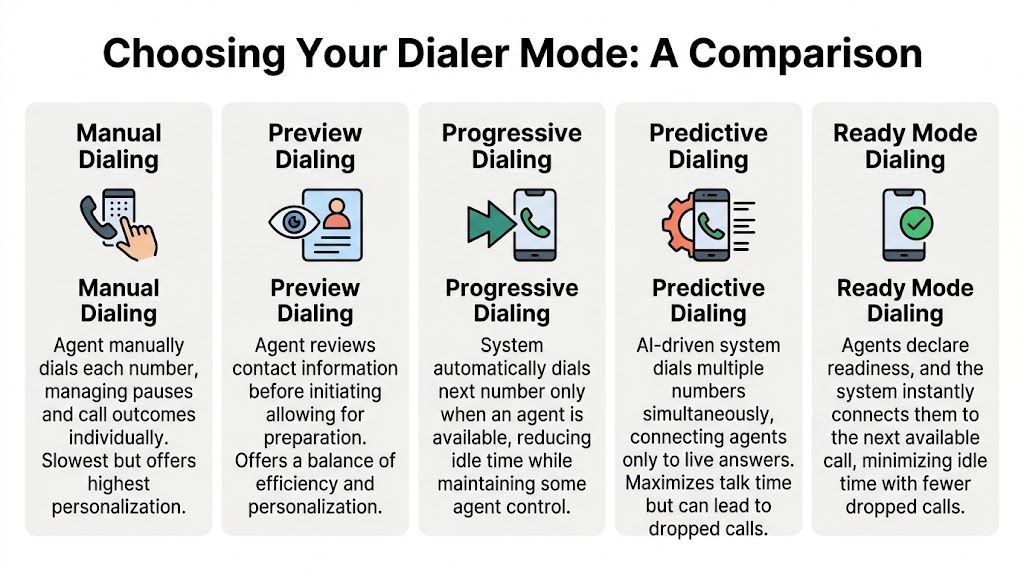
ReadyMode supports preview, power, progressive, and predictive dialing, according to its platform FAQ. Those modes solve different problems.
The agent sees the lead before the call starts.
Use this when the rep needs context. Think real estate, complex B2B outreach, financing conversations, or any sale where the opener changes based on the account. It's slower, but the rep has control.
The system dials one contact at a time for each available agent.
This mode removes manual dialing without removing pacing control. It works well for teams that want consistency but still care about lead quality and custom conversations.
The system moves agents to the next call automatically when they become available.
This is often a middle ground. It reduces idle time more than power dialing, but it doesn't go as far as full predictive pacing.
This is the high-volume option. Predictive dialers can deliver up to 500% higher contact rates than single-line dialers, and some users report a 4x increase in productivity because the system pre-dials while an agent is on a current call, according to ReadyMode's video on predictive dialers.
That sounds attractive, and for some teams it is. But you trade some control for speed.
| Dialer Mode | Agent Control | Call Pacing | Ideal Use Case |
|---|---|---|---|
| Preview | High | Slow and deliberate | Research-heavy outreach, nuanced sales |
| Power | Moderate to high | Steady, one call at a time | Follow-up teams, smaller sales groups |
| Progressive | Moderate | Faster, availability-based | Teams that want efficiency without full predictive pacing |
| Predictive or ready mode | Lower at the individual call level | Fast, system-driven | High-volume campaigns, appointment setting, list penetration |
Ask three questions:
A fast dialer helps when the sales process is repeatable. It hurts when each conversation needs preparation.
If you're comparing platforms beyond ReadyMode, this roundup of auto dialer software picks for SMBs in 2025 is useful because it frames choices around team size and workflow, not just features.
It’s 10:15 a.m. Your team has a fresh list of 2,000 leads, a simple script, and one clear goal. Book as many conversations as possible before lunch. In that situation, a ready mode dialer can feel like adding an extra lane to a busy road. Calls move faster, idle time shrinks, and reps spend more of the hour talking instead of waiting.
That same setup can create problems if the job requires judgment before every call. A rep who needs to review notes, check past activity, or adjust the opener for each contact will feel rushed. The tool is built for pace first. Small businesses need to be honest about whether pace improves the result.

Ready mode fits best when the first call follows a narrow path. The rep asks a known set of questions, handles a short list of common objections, and moves the contact to a defined next step. A good mental model is a restaurant kitchen during lunch rush. Standardized orders move quickly. Custom dishes slow the whole line.
That makes ready mode a practical choice for:
These campaigns reward consistency more than personalization. If your team is trying to improve call volume while keeping the conversation simple, a ready mode dialer can help. Teams that also want to sharpen the script and agent behavior can borrow ideas from these outbound calling techniques for modern sales teams.
Ready mode is often presented as a powerful answer for outbound scale. That’s true, but it is also an enterprise-style tool. It works best when you already have clean lists, stable staffing, clear scripts, and someone managing pacing closely.
Many small and mid-sized businesses do not have that setup yet.
If your outbound process still depends on owner involvement, flexible messaging, or a rep’s judgment call, ready mode can add complexity before it adds value. You may end up paying for speed while losing the context that helps a smaller team convert.
It is usually a poor fit for campaigns where reps need to:
In those cases, a slower dialer mode often produces better conversations. In some SMB environments, an AI calling workflow can be even more practical because it handles repetitive outreach without forcing your human team into a high-pressure dialing model. That is a different operating style from traditional ready mode systems, and often a better match for lean teams that care about flexibility, cost control, and easy integrations.
Use four questions.
| Question | If yes | If no |
|---|---|---|
| Is the first call short and repeatable? | Ready mode is a reasonable option | Use a mode with more rep control |
| Can a new rep follow the script without much improvisation? | The campaign is structured enough for faster pacing | The process likely needs preview or power dialing |
| Does success depend more on number of contacts than account research? | Ready mode can improve throughput | Personalization matters more than speed |
| Do you have time to monitor call outcomes closely? | You can manage pacing and quality better | A simpler workflow may be safer |
One more practical check helps. Look at your team’s Cold Calling KPIs. If contact rates matter far more than deep discovery quality, ready mode deserves a serious look. If conversion depends on research, timing, and customized messaging, it usually does not.
For many SMBs, that is the decision. Ready mode is powerful, but it can be more machinery than the job requires. The best system is the one that fits the way your team sells.
Most dialer problems aren't really software problems. They're management problems that show up inside the software.
If you're running a ready mode dialer, you need a small set of numbers that tell you whether the campaign is healthy. ReadyMode's reporting stack tracks lead conversion rates, win rates, and answer rates in real time, and one case study says Calldi achieved a 33% increase in agent productivity after implementing lead management and disposition systems inside the platform, according to ReadyMode reporting and insights.
Don't drown in dashboards. Focus on the measures that change decisions.
This tells you whether people are picking up. If it's weak, your first suspects are usually list quality, caller ID strategy, and call timing.
A high call volume means very little if the conversations don't move to the next stage. Conversion rate helps you separate “busy team” from “productive team.”
This is the downstream quality metric. It tells you whether the leads reaching agents are the right leads and whether the script is doing its job.
This is your pacing warning light. If it starts creeping up, the dialer may be too aggressive for current staffing or answer conditions.
Use a simple cadence instead of checking reports randomly.
For a broader framework, this guide to Cold Calling KPIs is worth reviewing because it connects raw call metrics to sales decision-making.
A good ready mode operation is disciplined, not just fast.
A lot of sales teams improve by tightening outbound fundamentals. This article on effective techniques for modern sales teams is helpful if you want a practical companion to the KPI side of management.
ReadyMode is capable software. For the right team, it can be a serious production tool. But many small businesses don't need enterprise-style complexity. They need something that works with their existing tools, supports a lean team, and doesn't assume they have a dedicated dialer manager.
That's where the gap shows up.
Verified guidance around Readymode highlights a recurring issue for smaller companies. Small businesses often struggle with enterprise dialers that lack simple Zapier-like integrations and multi-language support. Capterra reviews highlight setup complexity, and many SMB buyers walk away from predictive tools because of compliance fears and high per-agent minimums, as summarized in this Readymode help resource.
That doesn't mean the software is bad. It means the software was built with a different operating model in mind.
A small business owner usually isn't asking:
They're asking:
Modern AI outbound systems approach the problem differently. Instead of centering everything on agent pacing, they center it on workflow automation, conversation handling, and easier integration into a smaller business stack.
That matters if your business values:
If you want a broader view of how this category is evolving, this piece on conversational AI for sales gives a useful overview of how AI calling tools are changing outbound work beyond classic predictive dialing.
For businesses that are specifically comparing newer AI call platforms against older call-center-first tools, this AI call services comparison can help frame the differences around usability and automation rather than just dial speed.
The best small-business outbound system isn't always the one with the most dialer controls. It's the one your team will actually use well every day.
When a ready mode dialer underperforms, the symptom usually points to the fix. You don't need to reinvent the campaign. You need to isolate the bottleneck.
Symptom: Too many answered calls aren't reaching an agent smoothly.
Likely cause: The pacing is too aggressive for the current team size, answer pattern, or campaign conditions.
What to do: Reduce dialing speed, shorten the gap between status reviews, and make sure agents are wrapping calls consistently. If the team is slow with dispositions or post-call notes, the dialer can look “too fast” even when the actual issue is workflow lag.
Symptom: The system is dialing, but too few people answer.
Likely cause: Weak list quality, poor caller ID performance, or poor time-of-day targeting.
What to do: Audit the list, rotate numbers where appropriate, and test local presence strategies if your workflow supports them. If connect quality drops suddenly, check whether the issue is technical or carrier-related before changing the script.
Symptom: Reps finish calls and wait too long for the next live conversation.
Likely cause: Conservative pacing, weak data, or too many bad records in the queue.
What to do: Increase pacing carefully, clean the list, and review whether the campaign really belongs in ready mode. A predictive setup can't fix a thin or low-quality list.
Symptom: One rep converts, another struggles on the same campaign.
Likely cause: Script delivery, objection handling, or poor use of dispositions.
What to do: Review calls side by side and coach the behaviors, not just the outcome. This guide to troubleshooting phone call problems for small businesses is also helpful if you're sorting out whether the issue is operational, technical, or process-related.
Often, yes. In many call center platforms, ready mode is a predictive-style workflow that lines up the next live conversation for an available agent instead of asking each rep to dial manually.
The label can vary by vendor, which is where small businesses get tripped up. One platform may call it ready mode, another may fold it into predictive or progressive settings. The practical question is simpler: does the system control call timing for the team, or does each rep control it one call at a time?
It can be, but only in the right kind of campaign.
A three-person team doing appointment setting from a clean list may do well with ready mode because the work is repetitive and the pace is steady. A three-person team handling high-value B2B outreach usually needs more breathing room between calls for notes, research, and personalization.
That is why ready mode often feels like an enterprise tool first and a small-business tool second. It can produce volume, but it also asks for tighter process control than many smaller teams want to maintain.
The biggest risk is running the dialer faster than your team can absorb live answers.
When pacing gets too aggressive, some answered calls have no agent ready to take them. That raises abandoned call rates, hurts the customer experience, and can create compliance concerns. It can also damage caller ID trust, which makes future campaigns harder.
Start conservatively. Then adjust in small steps.
Treat the dialer like a restaurant adding tables to a dinner shift. If the kitchen can handle ten tickets at once, seating twenty guests at the same moment does not improve service. It only creates delays and frustration. Ready mode works the same way. Your list quality, agent speed, talk time, and after-call workflow all affect how fast the system should dial.
For a small business, this is often the breaking point. Traditional dialers assume someone will watch reports, tune pacing, review dispositions, and catch caller ID issues before they spread. AI-driven tools are appealing because they reduce that operational burden and fit more easily into SMB workflows, especially when the goal is not just more dials, but more useful conversations and follow-up.
No. It fits high-volume, repeatable campaigns best, such as lead qualification, reminders, and appointment setting.
It is usually a poor fit for outreach that depends on research, relationship building, or careful timing. In those cases, progressive dialing, manual dialing, or an AI-assisted outbound workflow often gives the team better control.
A ready mode dialer is best for a call line, not a custom workshop.
If your business has a large list, a clear script, and reps who can work at a fast rhythm, ready mode can help. If you need flexibility, simpler setup, easier integrations, or outreach that blends calls with automated follow-up, a newer AI option may be the better long-term choice.
If you want outbound calling that’s easier for a small business to run, My AI Front Desk offers an AI receptionist and AI outbound dialer built for lead conversion, lead acquisition, and automated follow-up workflows without the usual call-center-heavy setup.
Start your free trial for My AI Front Desk today, it takes minutes to setup!


