
Outsourcing customer service can cost as little as $8 per hour offshore and over $50 per hour onshore, with U.S.-based agents often running $25 to $100 per hour depending on the work. But for a small business, the hourly rate is only the starting point. The actual cost depends more on the pricing model, coverage hours, service complexity, and the fees buried underneath the quote.
If you're reading this, you're probably in a familiar spot. The phone rings while you're with a customer. A lead comes in after hours and nobody answers. Your team is stretched thin, and every missed call feels like money left on the table.
That pressure is what pushes many owners to look at outsourcing. On paper, it seems simple. Hire someone else to answer calls, messages, and support requests. Problem solved.
In practice, the cost of outsourcing customer service is rarely simple. One vendor quotes an hourly rate. Another charges per interaction. A third offers a flat monthly fee. Then there are setup costs, software costs, minimums, and management time that don't show up in the headline number.
A smart decision starts with one question. What will this really cost my business, not just per hour, but in total?
A plumbing company owner misses three calls before lunch because he's under a sink. A dental office manager spends the last hour of every day returning voicemails instead of confirming appointments. A law office has staff during business hours, but evenings and weekends are a black hole for new inquiries.
Those are the moments when outsourcing starts to look attractive. Not because it's trendy, but because the current setup is already costing money in lost leads, delayed responses, and distracted staff.
The sticker price can look compelling. Outsourcing to offshore locations like India or the Philippines typically costs $8 to $11 per agent per hour, compared with $28 to $38 per hour for North America, and that staffing gap can create 65% to 75% cost savings on agent labor according to Assembled's customer service outsourcing cost guide. That sounds like an easy decision until the practical questions start.
A low hourly rate doesn't tell you whether the vendor includes training, supervision, software, or after-hours coverage. It also doesn't tell you whether your business even fits that model.
Small businesses often buy outsourcing for the same reason people buy storage bins. The goal is relief. But if you don't check what fits inside, you end up paying for space you don't use or discovering too late that your biggest problems still sit outside the bin.
A cheap quote can still be an expensive decision if it doesn't match your call volume, hours, or workflow.
That matters even more when you're comparing human outsourcing with newer options. If you're trying to sort out whether a traditional team or an automated front desk makes more financial sense, this breakdown of AI receptionist costs vs in-house staff is a useful companion.
Most confusion comes from three places:
If outsourcing is worth it, it's because it improves response coverage, protects your team's time, and supports growth at a lower total cost than hiring internally. If it isn't, the reason usually isn't the rate. It's that the structure was wrong from the start.
The easiest way to understand outsourcing pricing is to compare it to transportation.
You can pay for a taxi by time. You can pay for a ride by trip. Or you can lease a vehicle for a fixed monthly amount. Customer service outsourcing works the same way. You're either paying for time, usage, or reserved capacity.
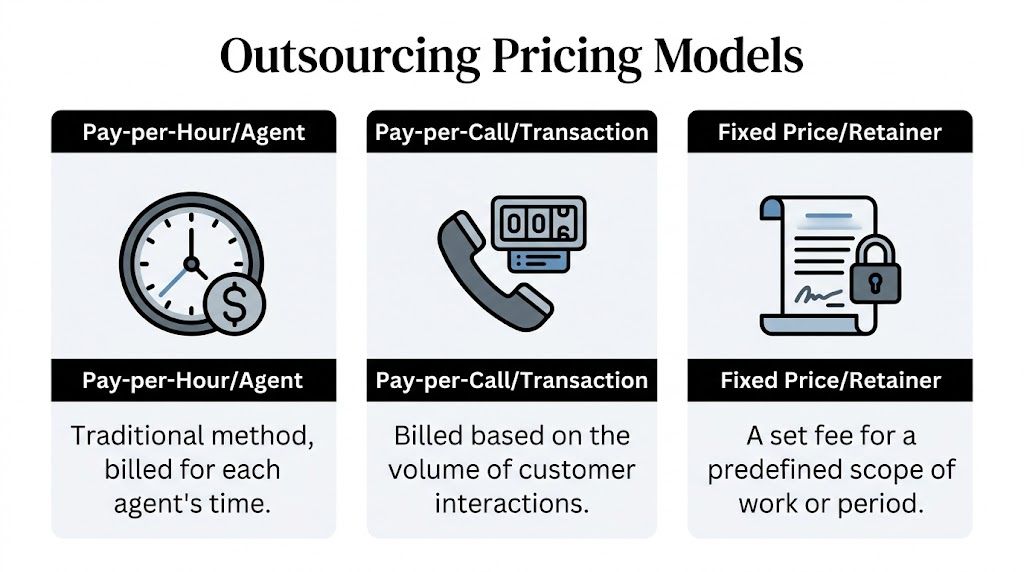
Customer service is the most outsourced function globally, with 38% of businesses adopting it and reporting 15% to 30% average cost savings. The market is projected to surpass $600 billion by 2025 according to MyOutDesk's outsourcing statistics roundup. The reason this category is so large is simple. Businesses can choose a model that fits how they operate.
This is the traditional model. You pay for each agent's time, usually at an hourly rate or a monthly full-time equivalent arrangement.
If you need coverage during defined hours and you know roughly how many people you need, this model is straightforward. It feels familiar because it resembles hiring staff. You're buying labor capacity, not guaranteed outcomes.
Best fit: businesses with predictable schedules and consistent support needs.
Watch for: paying for idle time. If call volume is light, you can still be billed for staffed hours.
A quick way to think about it:
| Situation | Why hourly can work |
|---|---|
| Steady weekday call flow | You know when you need coverage |
| Need for dedicated brand familiarity | Agents can stay close to your scripts and processes |
| Tight control over schedules | Easier to match hours to business operations |
This model charges for completed units of work. Depending on the vendor, that may mean a phone call, an email, a live chat, or a fully resolved issue.
It works like paying per trip instead of paying for the driver's whole shift. If your volume rises and falls, this can be easier to justify because the cost tracks activity more closely.
Best fit: businesses with uneven demand, seasonal spikes, or a desire to tie spending to actual usage.
Watch for: definitions. One provider's "interaction" may be very different from another provider's "resolution."
Practical rule: If you can't tell exactly what triggers a billable event, you can't compare quotes accurately.
This is the lease model. You agree to a flat monthly fee for a defined scope, a dedicated team, or a set service package.
Owners like this approach because it simplifies budgeting. The trade-off is that providers often build a buffer into the price to protect themselves against demand swings, training time, and service risk.
Best fit: businesses that want predictability more than flexibility.
Watch for: scope creep. If your needs change, the "fixed" price may not stay fixed.
There isn't one universal winner. The right model depends on how your demand behaves.
Many small business owners make the mistake of choosing the quote that looks cheapest on first glance. A better approach is to ask which model matches the way your business receives customer demand.
For owners comparing these structures against modern software-first alternatives, it helps to look at live pricing examples side by side. This customer communication pricing page is useful because it shows how a productized model differs from labor-based outsourcing.
Those three questions usually reveal more than the advertised rate.
Once you understand the pricing model, the next step is figuring out what pushes the quote up or down. Think of the cost of outsourcing customer service like a mixing board in a recording studio. Each slider changes the final output. Move one lever, and the whole quote shifts.

According to ASL Preservation Solutions' outsourcing cost breakdown, U.S.-based agents can cost $25 to $100 per hour, while agents in the Philippines average $18.50 per hour with a $6 to $38 range, and India averages $17.50 per hour with a $7 to $35 range. The same source notes that pay-per-interaction pricing often falls between $15 and $45 per call, email, or chat.
Location is the biggest cost lever because labor markets are different. Onshore teams usually cost more because wages, taxes, and overhead are higher. Offshore teams usually cost less because the labor market is structured differently.
That doesn't make one automatically better. It means you're trading price against factors like accent familiarity, time zone overlap, and local context.
Here's the simplest way to think about geography:
| Location type | Cost pattern | Typical reason businesses choose it |
|---|---|---|
| Onshore | Highest | Local familiarity, tighter oversight |
| Nearshore | Middle | Time zone alignment, bilingual needs |
| Offshore | Lowest | Cost efficiency, scalable staffing |
Phone support is usually the most expensive channel to staff well because it demands immediate availability. Email and chat can be more flexible because agents can often manage work in batches.
A vendor handling voice, text, email, and social messages is managing more moving parts than one answering only phones. More channels usually means more training, more systems, and more supervision.
If your business only needs after-hours call answering, that is a different service from full omnichannel support. Owners often ask for both without realizing they are pricing two different operations.
A basic appointment-booking script is one thing. Technical support, billing disputes, intake screening, and regulated workflows are another.
You don't need exact math to understand the pattern. The more judgment an agent needs, the more training and oversight the provider needs to supply. That raises your effective cost even if the headline rate looks modest.
Simple work gets priced like repetition. Complex work gets priced like expertise.
A business-hours service is one staffing problem. A nights-and-weekends service is a different one. Full-time coverage across all hours creates more scheduling complexity and more risk for the provider.
Owners often underestimate the quote. They think they're buying "someone to answer calls." The vendor is pricing a schedule, backup coverage, management, and continuity.
A useful self-check is to define your hours before requesting a proposal:
Before talking to vendors, write down four things:
That alone helps you avoid the most common pricing mistake, which is comparing one quote built for a narrow answering service to another built for a much broader support operation.
The quoted rate is the visible part of the iceberg. The actual total sits below the surface.

Small businesses often focus on the labor rate because that's the easiest number to compare. But Text.com's customer service outsourcing pricing guide notes several additional costs that can make traditional outsourcing harder for low-volume businesses, including setup fees around $500, QA management at $200 per month, and minimum commitments such as $1,200 per agent per month.
These costs usually appear after the initial sales conversation, not during it.
A provider isn't necessarily hiding these on purpose. In many cases, they separate "service" from "management" and "implementation." The result is the same. Your total monthly spend rises above the rate you thought you were evaluating.
Some costs don't appear on the vendor invoice at all.
Your team still has to answer questions, review transcripts, update scripts, handle escalations, and monitor quality. If the vendor changes agents often, your business repeats onboarding work. If the handoffs are clumsy, your staff spends time fixing problems instead of serving customers.
That internal management load is real cost, even if it doesn't show up as a line item.
The cheapest quote often assumes you'll absorb more training, oversight, and cleanup on your own team.
Use this checklist before you sign anything:
| Ask this question | Why it matters |
|---|---|
| Is onboarding included | Setup can shift the first month sharply |
| Are QA and reporting included | Supervision is often billed separately |
| Is there a minimum monthly commitment | Small businesses can overbuy capacity |
| Who handles updates to scripts and workflows | Ongoing changes take labor |
| What happens if our volume drops | Flexibility affects true cost |
The hidden-cost lesson is simple. Don't ask only, "What is your rate?" Ask, "What will I pay in month one, in a normal month, and during a slow month?" Those answers tell you far more than the headline number.
Most owners don't need a finance degree to evaluate outsourcing. They need a clean worksheet and honest assumptions.
The easiest way to think about total cost of ownership, or TCO, is this: what does this service cost after you include everything required to make it work well.
Use this structure in a spreadsheet:
Total outsourcing cost = base service cost + setup costs + software or platform costs + quality management costs + internal oversight time
The base service cost is what the vendor leads with. Everything else is what determines whether the deal is efficient.
If you want a planning tool for comparing staffing paths, this receptionist cost calculator is a useful reference point because it frames the decision as a full operating-cost question, not just a labor-rate question.
Start with your monthly reality.
This process matters because outsourcing often looks cheaper when owners compare it against salary alone. That's the wrong benchmark.
The right benchmark is the fully loaded cost of handling the same work yourself. That includes wages, supervision, tools, recruiting effort, and the opportunity cost of leadership time.
A lot of businesses calculate return too narrowly. They ask, "Is this cheaper than hiring?" That's useful, but incomplete.
A stronger ROI lens includes three buckets:
If outsourcing frees you to spend more time on work only you can do, the return may be larger than the invoice difference.
| Question | If the answer is yes | What it usually means |
|---|---|---|
| Are calls interrupting production or service delivery | Yes | There is likely hidden opportunity cost in doing nothing |
| Do inquiries arrive outside normal staffed hours | Yes | Coverage has revenue value, not just service value |
| Will someone on your team still manage the vendor | Yes | Add internal labor to TCO |
| Is volume inconsistent | Yes | Flexible pricing may outperform fixed staffing |
Many owners compare only in-house versus outsourced. A better comparison is:
That third option changes the economics because it can remove some of the labor intensity from the equation. You don't have to assume one path is always best. But you do need to compare all realistic alternatives on the same worksheet.
The goal isn't to find the lowest quote. It's to choose the model that produces reliable coverage, acceptable service quality, and enough financial upside to justify the switch.
For years, the decision was framed as a simple fork in the road. Hire staff in-house or outsource to a human team elsewhere. That framework is outdated.
There is now a third path. Businesses can use AI-powered reception and support systems for a large share of front-line work, then reserve human effort for exceptions, escalations, or specialized conversations.

According to Crescendo's outsourced call center pricing guide, projected 2026 pay-per-resolution models are expected to range from $1 to $7 per resolution, with an average of $4, and some providers offering $1.25. The same guide says AI can automate 60% to 80% of Tier 1 queries, cut human-agent minutes by 50%, and produce 40% to 60% lower total costs for businesses.
Traditional outsourcing still depends on labor blocks. Even when rates are attractive, you're often paying for staffing architecture. AI-backed systems shift more of the model toward automation and usage.
That matters most for businesses dealing with repetitive front-desk work such as:
Those tasks are exactly where small businesses often overpay when they buy human coverage for every interaction.
| Model | Strength | Main trade-off |
|---|---|---|
| In-house staff | Control and direct oversight | Highest management burden |
| Human outsourcing | Lower labor cost than local hiring | Variability in quality, training, and scalability |
| AI receptionist model | Continuous availability and software-style scaling | Requires thoughtful setup and escalation design |
This isn't an argument that humans no longer matter. It is an argument that not every incoming call or message requires a paid human minute.
A lot of confusion comes from mixing up AI implementation with AI usage. Some businesses assume that adopting AI means a heavy custom build, a consulting project, and technical complexity. In some cases that's true. If you want a broader strategic view, this guide to AI implementation costs helps separate one-time rollout thinking from ongoing operating economics.
For front-desk use cases, the question is more practical. Can the system answer common inquiries, capture lead details, schedule meetings, and hand off cleanly when a person is needed?
The financial advantage of AI is strongest when your business handles a lot of routine front-door communication.
AI-backed reception tends to make the most sense when:
For businesses still weighing software against people, this comparison of AI receptionist vs human receptionist is a practical way to frame the decision.
Agencies and operators also care about another angle. A white-label AI model can create a client service without the hiring, QA, and contract friction that comes with running a traditional outsourced support team. That doesn't eliminate the need for good process design, but it can remove much of the labor-heavy operating model that made customer service outsourcing hard for smaller firms in the first place.
The cost of outsourcing customer service isn't one number. It's a stack of decisions.
First comes the pricing model. Then the cost drivers. Then the hidden fees. Then the internal time your team still spends making the service usable. If you only compare hourly rates, you're looking at the smallest piece of the decision.
For some businesses, traditional outsourcing still makes sense. If you need human conversations, stable workflows, and dedicated support capacity, a well-scoped partner can be a good financial move. If you're evaluating regional staffing options, reviewing services like Hire LatAm Virtual Assistants can help you understand how geography, language alignment, and working-hour overlap affect fit.
Ask yourself these five questions:
Those questions usually cut through the noise fast.
If your business has low to moderate volume, variable demand, or a lot of repetitive front-desk communication, the smartest option may not be hiring locally or outsourcing traditionally. It may be choosing a model that removes unnecessary labor from the equation.
That's the shift many small businesses miss. They treat customer service as a staffing problem when it may be better solved as a system-design problem.
When you price customer service the right way, you're not just asking what it costs. You're asking what it frees you to do, what revenue it protects, and whether it can grow with the business without turning into another management burden.
If you want a simpler way to handle calls, capture more leads, and stay available without building a human-heavy support operation, take a look at My AI Front Desk. It gives small businesses an AI receptionist and outbound dialing system designed to improve responsiveness, reduce missed opportunities, and make customer communication easier to scale.
Start your free trial for My AI Front Desk today, it takes minutes to setup!


