
Ever wondered if you could send a text message right from your email? It's not only possible, it's surprisingly simple. All you need to do is compose a new email, but instead of typing in an email address, you'll use the person's 10-digit phone number followed by their mobile carrier's specific gateway address. For instance, a Verizon number would look like this: 5551234567@vtext.com.
The subject line of your email becomes the first part of the text, and the body of the email follows right after. Just like that, you've built a bridge from your inbox straight to someone's phone.
Imagine sending a quick appointment reminder or an urgent follow-up to a client without ever leaving your Gmail or Outlook window. This isn't just a neat tech trick; it's a genuinely practical way to make your business communication faster and more efficient.
Using an email-to-SMS gateway taps into a powerful, built-in feature that connects your email directly to any mobile phone. No extra software, no new apps to learn.
This approach also keeps all your communications in one place. Your text conversations get logged right alongside your email threads, creating a single, searchable record. For a small business, that's a huge win for organization and sanity.
The benefits here go way beyond simple convenience. You get to tap into the incredible power of text messaging—which boasts an open rate as high as 98%, compared to just 20% for email—all from the comfort of the workflow you use all day, every day.
Here’s what that looks like in the real world:
Think of the email-to-SMS gateway as a translator. Your email client speaks "email," and your customer's phone speaks "SMS." The gateway acts as the middleman, translating the message so both sides understand each other perfectly.
We dive deeper into this in our complete guide on texting using email for business communication, exploring how this simple trick can seriously boost client engagement.
This isn't about ditching your current tools. It's about making them work smarter. Integrating SMS into your email workflow lets you reach customers on their preferred channel without adding any complexity to your day.
This technique is especially powerful for service-based businesses that depend on timely updates. A roofer can text a client a photo of the finished job, or a plumber can send an "I'm on my way" message—all from the same email account they use for sending invoices and scheduling appointments. It’s a simple way to close the communication loop.
The whole email-to-SMS trick hinges on one critical piece of information: the mobile carrier's unique gateway address.
Think of this address as a specific digital doorway for each carrier. Sending your email to the correct gateway is what tells the system to translate it into an SMS and deliver it to the right phone. Get it wrong, and your message just vanishes into the ether.
Honestly, this is the most common place people get stuck when they first try this. But once you see how the format works, it's really just a simple copy-and-paste job. Every carrier has a slightly different format, but they all follow the same basic rule: 10DigitPhoneNumber@GatewayAddress.com.
To get you started, here's a list of the gateway addresses for the big players in the United States. If you just memorize the top three, you'll probably cover most of the people you need to text.
[10-digit number]@txt.att.net (SMS) or [10-digit number]@mms.att.net (MMS)[10-digit number]@vtext.com (SMS) or [10-digit number]@vzwpix.com (MMS)[10-digit number]@tmomail.net (SMS & MMS)You'll notice that some carriers, like AT&T and Verizon, have separate addresses for standard texts (SMS) and multimedia messages (MMS) that might include an image or a file. T-Mobile keeps it simple and uses one address for both. If you're planning to send an image, you absolutely have to use the MMS gateway.
Pro Tip: When in doubt, just use the MMS gateway if there is one. Most carriers will deliver a text-only message through their MMS gateway just fine, but it doesn't work the other way around—you can't send a picture through an SMS-only gateway.
Let's walk through a quick, real-world example. Imagine you need to send a confirmation text to a client. Their number is (555) 123-4567, and you happen to know they use Verizon.
You'd just open a new email and, in the "To" field, type this:5551234567@vtext.com
It’s that straightforward. No dashes, no spaces, no parentheses. Just the 10-digit number followed by the carrier's gateway domain. Your email's subject line will usually become the first line of the text message, with the body of your email following right after.
This is the big question, right? Most people don't list their mobile provider on their business card. Asking them directly is obviously the easiest way, but that's not always an option. If you can't ask, you still have a couple of good ways to figure it out.
Carrier Lookup Tools
There are a ton of free and paid services online that can identify a phone number's carrier for you. Just search for "free carrier lookup," and you'll find plenty of sites where you can plug in the number and get an instant result. These tools simply check public databases to find the provider tied to that number.
Taking a few seconds to do this lookup can save you the headache of wondering why your message was never delivered. It’s a small step that makes a huge difference.
Alright, let's get our hands dirty and actually send one of these things.
Imagine you run a local service business—maybe you’re a plumber or a personal trainer—and you need to shoot off a quick appointment confirmation. You’re already in your Outlook or Gmail, so why open another app? This is the perfect real-world scenario where sending an SMS from your email is a lifesaver. The process is dead simple, but a few small details make the difference between a professional, clear message and something that just looks like spam.
First things first, pop open a new email.
In the "To" field, you’ll type the customer’s 10-digit phone number immediately followed by their carrier’s specific gateway address. No spaces, no dashes. So, if your customer's number is (555) 123-4567 and they're on the AT&T network, you would type: 5551234567@txt.att.net.
Here's a pro tip: leave the email subject line completely blank. While some carriers might display it, others won’t, and it often chews into your 160-character limit. It’s just safer and cleaner to put all your content directly in the email body.
The body of your email is what becomes the text message itself. You’ll want to keep it short, professional, and straight to the point.
For our appointment confirmation, something like this works perfectly:
"Hi Alex, this is a confirmation for your appointment with us tomorrow, Oct 26, at 2 PM. Please reply to this text if you need to reschedule. Thanks!"
This message gets the job done. It's well under the character limit, gives Alex all the info he needs, and tells him exactly what to do if there’s a problem. If you want to dive deeper into crafting these messages, we've got you covered in our easy step-by-step guide to sending a text message via email.
This gateway trick isn't new, but it's surprisingly effective, especially for small businesses trying to convert leads. It really took off around 2005 when smartphones were just starting to become a big deal. By 2010, there were over 4.6 billion mobile subscriptions worldwide, making this a go-to method for businesses trying to reach customers without complex texting plans. You can find more cool stats on the history of SMS marketing over at Sender.net.
But what if you need to send more than just plain text? Maybe you want to send a picture of a completed repair job or a small PDF invoice. That’s where MMS gateways come in.
The difference is crucial. If you try to send a picture through an SMS gateway, it will likely fail without telling you.
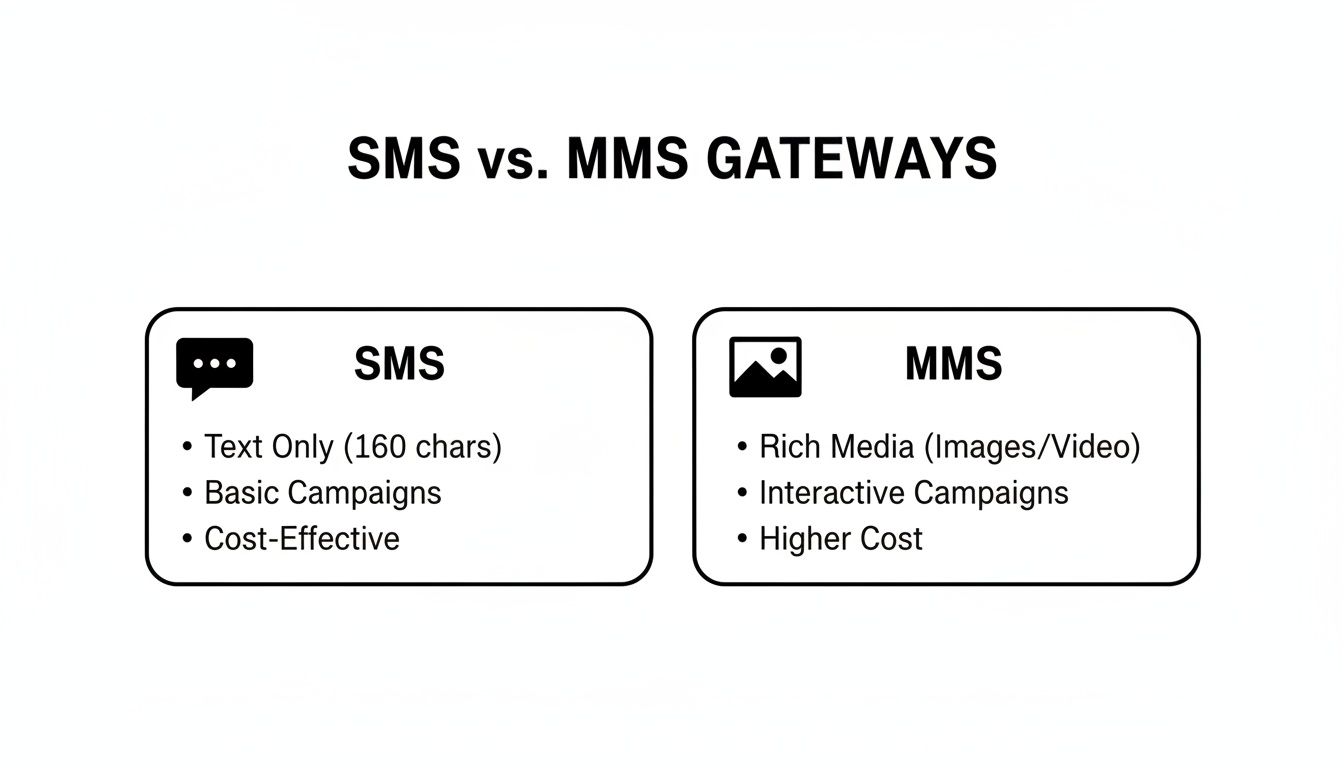
To send an image, you follow the same process but use the carrier’s MMS gateway address instead. For our AT&T example, that would be 5551234567@mms.att.net. Then, just attach the file to your email like you normally would, and hit send.
Manually sending a text through your email is a neat trick for one-off messages. But the real magic happens when you automate it.
When you connect this simple method to your other business tools, you create powerful, hands-free systems that can save you countless hours. More importantly, it ensures no lead or customer ever slips through the cracks. This is how you go from a clever hack to a scalable business strategy.
Imagine your most repetitive communication tasks just humming along in the background. That's exactly what integrating the email-to-SMS gateway with automation platforms can do for you.
Think of platforms like Zapier as the bridge between all the apps you use daily. You can set up what they call "Zaps" that watch for a specific trigger—like a new entry in your CRM or a form submission on your website. Once that trigger fires, the Zap automatically performs an action, like sending a perfectly formatted email to a carrier's SMS gateway.
This completely transforms how to send a sms via email from a manual chore into a dynamic part of your customer lifecycle. For instance, a new lead fills out a contact form on your site. Zapier can instantly grab their phone number, format the email-to-SMS message, and send a personalized welcome text. All within seconds. No one on your team has to lift a finger.
Here are a few practical ideas you could set up today:
[PhoneNumber]@[CarrierGateway] with a friendly introduction.The real goal of automation isn't just about saving time—it's about creating a more responsive and professional customer experience. An instant text makes a new lead feel valued and tells them you're on top of your game.
You don't have to stop at simple triggers, either. You can build out more complex sequences. A real estate agent, for example, could create a workflow that sends an initial welcome text and then follows up with a drip campaign of helpful emails and texts over the next several days.
To scale your outreach without it feeling robotic, it's a good idea to ground your strategy in broader marketing automation best practices when building these sophisticated systems.
For businesses that need even tighter integration, some platforms offer built-in solutions. For example, our guide on how to https://www.myaifrontdesk.com/blogs/automate-your-workflow-forward-sms-to-email can help you create a seamless two-way communication loop. This ensures that when a customer replies to one of your automated texts, that response gets captured right back in your system.
By setting up these kinds of automated systems, you build a reliable engine that works for your business 24/7. It's all about ensuring timely, consistent communication that helps you convert more leads and keep your customers happy.
While knowing how to send a text from your email is a fantastic trick, it's not a bulletproof system. Think of it more like a clever life hack than a dedicated software platform—it comes with its own set of unwritten rules and quirks. If you ignore them, you risk your messages showing up garbled, out of order, or not at all.
One of the biggest hurdles people run into is the strict 160-character limit. Anything longer, including that email signature you forgot to delete, will likely get chopped into multiple texts. Worse, they often arrive in the wrong sequence, leaving the recipient trying to piece together a confusing puzzle. It’s a small oversight that can make your communication look sloppy in a second.
Even if you keep it short and sweet, delivery is never a 100% guarantee. Mobile carriers have spam filters designed to block suspicious messages, and a text coming from a regular email address can sometimes raise a red flag. If your message doesn't make it through, the culprit is almost always the carrier's gateway.
Key Takeaway: The email-to-SMS method completely lacks delivery reports. Unlike a real texting platform, you won’t get a "failed" or "undelivered" notification. If the message is critical, you'll need to follow up through another channel to make sure it was received.
To give your messages the best shot at landing, stick to these ground rules:
When someone replies to your text, their message pops up in your email inbox, but it'll come from a bizarre-looking address like 5551234567@vtext.com. It’s vital to have a process in place for monitoring these replies so you can respond quickly. For a more streamlined way to handle two-way communication, you can explore the phone and texting features your AI receptionist can use to manage everything for you.
This gateway method has been a quiet workhorse for customer engagement for years. Back in 2010, daily global SMS traffic was already hitting 150 billion messages, and this technique played a part. Today, with 67% of businesses planning to increase their SMS budgets in 2025, the power of texting is undeniable. Its 98% open rate absolutely crushes email's average of 20-28%. These SMS marketing statistics really drive home just how effective direct-to-phone messaging is for engagement and conversions.
Even once you get the hang of sending texts from your email, a few questions always pop up. It's one thing to know the process, but understanding the nuances of cost, replies, and limitations is what will help you use it effectively. Let's clear up some of the most common questions we hear.
For you, the sender? Absolutely. Sending a text this way costs the same as any other email you'd send, which is to say, it's typically free. This makes it an incredibly budget-friendly way to send occasional texts without needing a paid SMS platform.
The catch is on the other end. The person receiving the message is subject to whatever rates their mobile plan has for incoming texts. While most plans these days include unlimited texting, it's still a good piece of etiquette to keep in mind.
This is where the magic happens. When someone replies to your text, their message travels right back through the carrier's gateway and lands in your email inbox. Simple as that.
The reply will show up as a standard email, with a "From" address that looks something like 5551234567@vtext.com. You can see the sender's phone number right there. Just hit "Reply" in your email client to continue the conversation, creating a neat, threaded record of your entire exchange.
This two-way street is what makes the email-to-SMS method so practical. It keeps your conversations organized right where you already work, so you're not constantly switching between apps to talk to customers.
Technically, you could add a bunch of gateway addresses to an email's "To" or "BCC" field, but you really, really shouldn't. This method was never built for bulk messaging or marketing blasts.
Why? Because mobile carriers and email providers have very sensitive spam filters. Sending the same message to dozens of numbers at once is a giant red flag that will get your email address blocked or blacklisted in a hurry.
Stick to using this for:
The classic 160-character limit for a standard SMS is still the law of the land here. If the body of your email goes over that limit, most carriers will try to chop it up into multiple messages.
This usually results in a jumbled mess for the recipient. The texts can arrive out of order, which looks confusing and unprofessional. Your best bet is to keep your messages short, sweet, and well under the limit.
Here’s a pro tip: on some networks, whatever you put in your email's subject line can actually count toward that 160-character total. To play it safe, just leave the subject line blank and put your entire message in the email body. It gives you full control over what gets sent.
Ready to stop missing calls and start converting every lead? My AI Front Desk equips your business with an AI receptionist that works 24/7 to answer calls, schedule appointments, and manage customer communications, so you never lose a customer again. See how it works.
Start your free trial for My AI Front Desk today, it takes minutes to setup!


