
If you're using Google Voice for your business, there's a good chance you've already run into the awkward moment. You call a new lead, they don't answer, and later they say your number looked unfamiliar, generic, or suspicious. You did everything right on your end. You had a real business, a real phone number, and a real reason to call. But the call still didn't look professional on the other side.
That's the core problem with google voice and caller id for business use. The number can work. The inbox can work. Basic call forwarding can work. But the moment you depend on that line to win trust, convert leads, and protect your brand, the gaps become obvious.
Google Voice started as a smart, flexible option for individuals and very small teams. Many businesses still use it because it's familiar, cheap, and easy to stand up. I understand why. For a solo operator testing a market, it can be enough for a while.
But Caller ID is where many businesses hit the wall. Not the number itself. The identity attached to it. That's the difference between looking like a real company and looking like a random call.
Google Voice handles identity differently from a traditional business phone carrier. If you don't separate the phone number from the caller name, it's easy to think something is broken when it's working as designed.
On outbound calls, Google Voice primarily controls the number that appears. That means your recipient usually sees the Google Voice number you chose, not necessarily your personal cell number.
That sounds simple, but businesses often expect more. They expect the receiving phone to show their business name too. That's a different layer.
Google Voice launched on March 11, 2009, and later became a full VoIP service in 2018 with WebRTC integration. It grew quickly to 3.5 million users by 2013, and part of its appeal was the ability to provide a unified U.S. phone number and let users choose preferred area codes for a consistent identity across calls (Wikipedia on Google Voice).
There are two separate things involved in caller identity:
This distinction matters. You can have the correct outgoing number and still have a poor business presentation.
A lot of owners assume there's a setting inside Google Voice that flips on their company name. There isn't a dependable native path for that in the way many business users expect.
Practical rule: If your concern is "Why doesn't my business name appear?" you're not dealing with a numbering problem. You're dealing with a CNAM problem.
Google Voice was built around convenience. One number. Multiple devices. Flexible routing. Easy access from the app or browser.
That model is useful when you want to keep your personal number private or answer calls across devices. It becomes less useful when your phone system needs to function as a branded front door for the business.
For many companies, Google Voice is really acting as a unified communications layer, not a full business identity system. That's why it can feel polished in one moment and amateur in the next.
Google Voice still gives you some practical benefits:
Those features are real. They help. They just don't solve professional name display.
When clients ask me why Google Voice Caller ID "isn't working," I usually narrow it down to one of three realities:
Google Voice can give you a usable business number. It doesn't reliably give you the kind of branded identity many service businesses need when every missed call can mean a missed job.
The first thing to fix is the part Google Voice does control well enough. Your outgoing number. If that number isn't showing consistently, everything else gets harder to diagnose.
Before worrying about branding, make sure all outbound business calls use the same Google Voice number.
A practical setup usually looks like this:
Google Voice business routing involves number provisioning first, then device linking. It supports linking up to six devices, and inbound calls are routed through Google's Session Border Controllers using SIP signaling. That routing works well under stable conditions, but parallel ringing success can fall from 98% to 70% on unstable Wi-Fi according to InvGate's Google Voice overview.
For most businesses, the best policy is simple. Use one number for all sales, support, and appointment-related calls.
Don't mix and match unless you have a specific reason. If one team member calls from a Google Voice number, another from a personal mobile line, and another from a forwarded office number, clients stop recognizing your business.
That confusion hurts follow-up rates. It also creates internal chaos when someone asks, "Which number did the customer call back?"
Test outbound calls to an iPhone, an Android phone, and a landline if you can. Caller presentation varies by network and device, so a single successful test can give false confidence.
Use these practical checks rather than hunting for a magic Caller ID switch.
This is the standard business-safe choice. It keeps your personal number private and gives customers one callback number.
Use it when:
Don't expect this alone to produce your business name on the recipient's phone. It only handles the number layer.
Some owners temporarily fall back to their cell number when Google Voice behavior gets messy. That usually creates more problems than it solves.
It blurs work and personal life. It makes call records harder to track. It trains customers to contact the wrong number.
If privacy matters, stay disciplined. One published business number is almost always cleaner.
There are moments when hiding your number makes sense, such as sensitive collections work or specific one-off outreach. For normal small business operations, anonymous outbound calling is usually a bad trade.
People ignore blocked calls. Existing customers get suspicious. New leads don't answer.
A lot of frustration comes from assuming the system is configured because calls are "going through." That's not the same as presenting correctly.
Run this checklist:
If you plan to keep Google Voice as part of the stack, the setup guide for Google Voice integration with an AI receptionist is useful because it shows how to route calls without forcing your team to answer everything manually.
A direct summary helps.
| Configuration choice | What works | What doesn't |
|---|---|---|
| Use one Google Voice number for all business calls | Keeps callbacks consistent | Doesn't solve business name display |
| Link multiple devices | Improves answer coverage | Can create confusion if staff use different habits |
| Test on several recipient devices | Reveals presentation issues early | Doesn't fix CNAM limitations |
| Fall back to personal number | May feel convenient short term | Damages professionalism and privacy |
The cleanest Google Voice setup is still only a partial answer. You can make the outgoing number consistent. You can't force it to behave like a fully branded business line everywhere.
This is the part most business owners discover too late. Your number may be right, your call may connect, and your process may be organized. Yet the person you're calling still sees a vague city label, a blank, or an unhelpful presentation that does nothing for trust.
The weak point is CNAM, short for Caller ID Name. That's the business-name layer many owners assume comes bundled with their phone number.
Google Voice's business Caller ID support is limited here. Outgoing calls often display the Google Voice number, but the name field may show a generic city label or nothing at all because Google Voice doesn't natively support CNAM registration in the way businesses usually need. That limitation matters because telephony reporting cited by Carolina Digital Phone suggests up to 70% of consumers avoid answering unknown or unbranded numbers (Carolina Digital Phone on reasons not to choose Google Voice).
That doesn't mean every Google Voice call fails. It means your branding isn't under dependable control.
A missing business name changes call outcomes in very practical ways.
A plumbing company calling back a form lead needs instant recognition. A law office returning an intake inquiry can't afford to look like a random number. A med spa confirming an appointment wants trust before the customer even answers.
When the recipient doesn't recognize the caller, several bad things happen:
For a small business, those aren't tiny inconveniences. They pile up into slower follow-up and more missed handoffs.
A business phone number is only half of your first impression. The other half is whether the call looks legitimate before the prospect taps Answer.
Owners often try the same sequence:
Those steps can improve familiarity at the number level. They don't create reliable branded name display.
That's why so many Google Voice discussions feel circular. The user keeps looking for a configuration answer to a structural limitation.
A business owner sees this pattern:
| Situation | What the owner expects | What often happens |
|---|---|---|
| Calling a new lead | Business name shows clearly | Number only, or generic label |
| Returning a missed call | Customer recognizes company immediately | Customer treats it like an unknown caller |
| Team outbound follow-up | Consistent branded identity | Different recipient devices show different presentation |
| Local service calls | Familiar local business presence | Local number without strong brand reinforcement |
This is why Google Voice works better for utility than for brand presentation. If your phone line is mostly for internal convenience, it's fine. If the phone line carries your reputation, the cracks show fast.
For professional outbound calling, especially in home services, healthcare-adjacent scheduling, legal intake, real estate, and other trust-sensitive categories, Google Voice asks you to accept too much uncertainty around identity.
You can absolutely use it to place a call. You just can't count on it to present your business the way a serious front desk should.
That difference matters most when you're calling people who don't already know your number.
Most Google Voice Caller ID complaints fall into two buckets. Either your outbound identity looks inconsistent, or inbound junk calls still get through even when the number seems local and familiar.
The frustrating part is that these issues often aren't caused by one bad setting. They're tied to how Google Voice handles identity and screening in the first place.
If customers report that your number displays with the wrong location, a generic place name, or no useful label, start by narrowing the problem.
Check these first:
There isn't a single fix inside Google Voice for all of that. You can verify your outgoing number, but you can't fully standardize how every downstream network presents it.
Inbound filtering is where many small businesses lose patience.
Google Voice lacks Caller ID Name filtering, which means spoofed telemarketer calls can still slip through by showing only a local-looking number. Instead of giving your staff a better identity signal, the system often leaves them deciding whether to answer based on digits alone. That's a real weakness for businesses trying to separate leads from noise, as noted in this Google Voice support discussion about missing caller ID name filtering.
That creates a time tax. Staff answer junk calls because they don't want to miss a customer. Or they stop answering unknown locals and accidentally miss real opportunities.
You can still reduce pain with a disciplined process.
Use call screening where it helps, but don't assume it can replace better business-grade filtering. Screening is useful for solo operators. It becomes clunky when a team needs speed.
Look for repeat area codes, repeated hangups, and duplicate one-ring calls. Even basic pattern spotting helps you block obvious offenders faster.
If one line handles ads, referrals, website inquiries, and vendor callbacks all at once, your team has less context per incoming call. A cleaner structure improves triage, even when the platform itself is limited.
If your staff keeps asking "Should I answer this one?" the phone system isn't giving them enough context.
Some businesses also deal with blocked or hidden calls. Medical, legal, and field service teams see this often.
If you need a broader operational reference on that topic, this guide to managing hidden caller ID is helpful because it frames the practical trade-offs between privacy, answer policies, and customer trust.
There comes a point where repeated tuning doesn't solve the underlying issue. That's usually when you notice these signs:
If spam recognition and caller safety are becoming a bigger operational issue, this article on how Samsung Caller ID and spam protection keeps your phone safe from unwanted calls is a useful comparison point because it shows what more proactive call identification can look like in practice.
At some point, troubleshooting stops being efficient. You're no longer fixing a setup. You're compensating for product limits.
Once Google Voice starts costing you trust, missed answers, and manual cleanup, the right move isn't another round of patchwork. It's to switch from a personal-first phone tool to a business communications workflow built around lead handling.
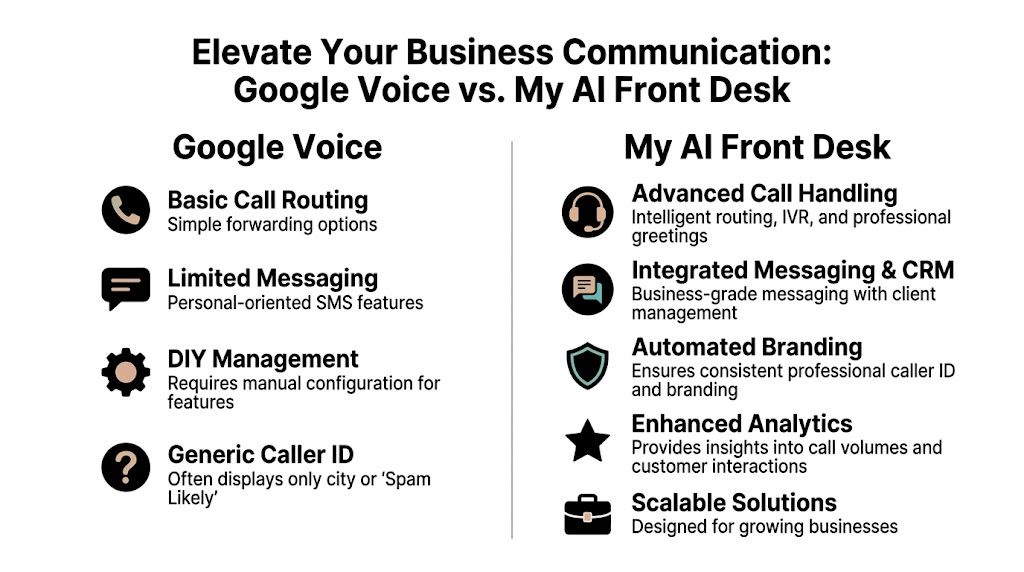
The key change is this. Instead of asking a lightweight phone number service to behave like a front desk, you use a system designed to receive, qualify, route, document, and follow up on conversations.
Google Voice gives you a number and basic call flow. A professional setup needs more than that.
It should give you:
A platform like My AI Front Desk features changes the discussion. It offers new number provisioning, area code selection, call forwarding, AI-powered voicemail, CRM integration, post-call notifications, analytics dashboards, unlimited parallel calls, texting workflows, and Google Calendar integration. Those are practical business operations features, not just calling features.
No platform can control every recipient handset or every carrier display outcome in exactly the same way. That's the wrong expectation.
The better approach is to improve the whole call journey so your business looks organized before, during, and after the call:
That combination matters because branded communication isn't just what flashes on screen. It's the consistency of the entire interaction.
| Feature | Google Voice (Free) | My AI Front Desk |
|---|---|---|
| Caller identity for business use | Outgoing calls may show the number, but business name display can be inconsistent | Supports a more professional business call workflow with branded handling and structured routing |
| Call handling | Basic forwarding and screening | AI receptionist, intelligent routing, and unlimited parallel calls |
| Voicemail | Basic voicemail functions | AI-powered voicemail with transcription and notifications |
| Texting workflows | Limited for business process automation | AI texting bot and text workflows tied to call context |
| CRM connection | Limited for advanced business use | CRM integration and post-call webhooks |
| Analytics | Basic logs and history | Analytics dashboard and shareable call links |
| Scheduling | Manual handoff in many cases | Google Calendar integration for booking flows |
| Multi-language support | Limited business-facing workflow options | Multi-language support |
| Scalability | Fine for simple solo use | Built for growing teams and heavier call volume |
Take a service business that gets calls from ads, referral sites, and repeat customers. With Google Voice, one missed call becomes a manual chain. Someone checks voicemail, texts back later, and tries to remember whether the caller was new or existing.
With a more complete setup, the line can answer immediately, collect intake details, trigger a notification, write to the CRM, and keep the team focused on the jobs that only humans should handle.
That's the operational difference. The phone line stops being just a ring destination and starts becoming part of your revenue process.
The goal isn't to replace people. It's to stop using people for repetitive call triage that software can handle more consistently.
You don't need to rebuild your whole communications setup in one day. The cleanest path usually looks like this:
For many businesses, a major gain isn't just fixing caller presentation. It's making sure every answered call, missed call, voicemail, and follow-up has a defined path.
Not reliably in the way most businesses mean it. You can control the number more easily than the business name display. That's why many owners feel like they configured everything correctly but still don't get a professional presentation.
To a point, yes. Google Voice logs the calling party phone number, called party phone number, date, time, and duration for each interaction, and users can search with operators like from:[name/phone]. But free plans don't include native transcriptions, call recordings, or easy third-party exports, which limits deeper analysis for business workflows (Google Voice technology and data handling details).
Because a growth-minded team usually needs context, not just logs. They need to know what was said, whether a lead booked, who followed up, and what should happen next.
If you're sorting out those concepts internally, this primer on customer relationship management basics is worth reading because it explains why contact records alone don't create a real sales process.
Yes. That's one of Google Voice's real strengths. You can use a separate business-facing number so customers don't see your mobile line. The issue isn't privacy. It's whether the business identity looks polished enough at scale.
Usually when the phone line becomes revenue-critical. If missed calls, weak call presentation, manual callbacks, or lack of CRM visibility are slowing your team down, you've outgrown a simple forwarding tool.
Prioritize structured intake, call routing, voicemail transcription, CRM connection, post-call notifications, and a clear handoff between AI and staff. This guide to phone answering services for small businesses is a useful starting point if you're comparing what a modern business answering workflow should include.
If Google Voice still fits your current stage, use it with clear expectations. If Caller ID issues, missed trust signals, and manual call handling are already affecting leads, take a look at My AI Front Desk for a business phone workflow that adds AI reception, routing, voicemail handling, texting, CRM connectivity, and structured follow-up around your calls.
Start your free trial for My AI Front Desk today, it takes minutes to setup!


