
A custom voicemail greeting is simply a recorded message that swaps out the generic, robotic default on your phone system. It’s your chance to make a great first impression, offer up helpful info, and tell callers exactly what to do next, even when you can't pick up the phone.
That robotic, out-of-the-box voicemail message isn't just a little impersonal—it's actively costing you leads and customers. When a potential customer takes the time to call your business, they're looking for a real person and a quick solution. Hearing a sterile, automated "You have reached..." is an instant turn-off for most people.
For a lot of callers, that generic message is a huge red flag. It makes them think their message will just fall into a black hole. So what do they do? They hang up and call your competitor. Every single one of those hang-ups is a lost opportunity and revenue that just evaporates. Understanding the danger of missed calls is the first step to plugging this leak in your sales process.
Let's look at the real-world difference between a generic and custom greeting.
The data is clear. A simple switch in your voicemail can have a massive impact on how many callers you actually get to talk to.
A warm, professional custom voicemail greeting completely flips the script. It immediately tells the caller that you're a real, attentive business that actually cares about their call. Instead of hitting a dead end, your voicemail suddenly becomes a helpful extension of your customer service.
The numbers don't lie. Research shows that callers are 80% more likely to leave a message when they hear a welcoming, professional custom greeting instead of a generic default one.
This statistic really drives home a simple truth: perception is everything. A thoughtful message reassures callers that you got their call, you value it, and you'll get back to them. It builds a foundation of trust from the very first interaction, even when you're not there to have it yourself.
But it doesn't have to stop there. Modern tools are completely changing what a voicemail can do. Instead of being a passive message-taker, solutions like My AI Front Desk can turn your voicemail into an active part of your sales team.
Think about it. Your custom greeting could not only welcome a caller but also offer to book an appointment right into your calendar on the spot. This takes the experience from "missed call" to "converted lead" without you having to do a thing. This kind of proactive approach makes sure you never miss an opportunity, turning what used to be a business liability into a powerful asset.
A great custom voicemail greeting does more than just say, "Sorry we missed your call." A powerful script acknowledges the caller, sets clear expectations, and points them toward the next step, turning a missed call into a real business opportunity. The goal is to be concise yet thorough, confident but still approachable.

First things first: stop apologizing. Your tone should be positive and direct. You aren't sorry you're busy—you're busy because your business is in demand. Project that confidence and competence in your message. You want to assure the caller they’ve reached the right place and that their call matters.
This shift from an apologetic mindset to an assured one is subtle, but it has a huge impact. It frames the entire interaction positively, making callers more open to your instructions and more likely to take the action you want, whether that’s leaving detailed information or heading to your website.
Every effective voicemail script, no matter the specific situation, needs a few key ingredients. Think of it as a simple formula for getting the results you want.
This simple structure provides clarity and pushes them to act. Remember, a confused caller is a caller who just hangs up.
The most crucial element is a strong call-to-action. Don't just ask them to "leave a message." Tell them exactly what information you need to help them efficiently when you call back.
Your voicemail needs will naturally change depending on the time of day, the season, or what your business is focused on at the moment. Having a few go-to scripts ready lets you adapt quickly and always maintain a professional image.
1. The Standard After-Hours Greeting
This is your workhorse script for any calls that come in outside of your business hours. It's meant to be straightforward and informative.
2. The Holiday or Vacation Closure Message
When you’re going to be away for a while, your message needs to manage expectations and provide an alternative contact for anything urgent.
3. The Lead Intake and Qualification Script
This is where your voicemail transforms into a powerful sales tool. It's designed to capture high-intent leads and collect the key information your team needs to follow up effectively.
Each of these examples is built to be clear, confident, and actionable. By tailoring your custom voicemail greeting to the specific context of the call, you create a much better customer experience and dramatically increase your chances of turning that missed call into a valuable lead.
Alright, you've got your script polished and ready to go. Now for the fun part: bringing that custom voicemail greeting to life.
You’re at a fork in the road here. You can either record it yourself for a personal, human touch, or you can use an AI voice generator for that crisp, perfectly professional sound. The right move really just depends on your brand's personality and what you're trying to accomplish.
Recording your own voice builds an immediate, authentic connection with callers. A lot of customers really respond to that. On the flip side, using AI gives you a flawless, studio-quality greeting that's incredibly easy to change whenever you need to.
You don't need a fancy recording studio to get a quality sound. Your smartphone is more than capable, as long as you nail a few key details to make sure the final version sounds clean and professional.
First thing’s first: find a quiet space. This is non-negotiable. Background noise—office chatter, passing cars, even the low hum of an AC unit—will instantly make your greeting sound amateur. A small, carpeted room or even a walk-in closet can work wonders to kill echo and ambient noise.
Here are a few more pro tips for a great DIY recording:
For businesses that want perfect clarity and the ability to make updates on the fly, AI voice generation is the way to go. This technology has come a long way from the robotic voices of the past. Today’s AI can produce incredibly lifelike, expressive voices that can represent your brand perfectly.
The voicemail market is projected to hit a $2.5 billion valuation by 2025, and a huge part of that growth is coming from AI advancements. Things like AI transcription and personalized greetings that mimic human warmth are quickly becoming standard. You can learn more about how AI is shaping messaging trends and see the data for yourself.
Tools like My AI Front Desk are plugged into top-tier voice libraries, giving you access to over 100 premium voices. This means you can find the exact voice to match your brand, whether you need someone who sounds authoritative, super friendly, or energetic.
Here’s a look at what a modern AI voice platform offers.
As you can see, you get deep control, letting you fine-tune things like the voice's stability and clarity to get the precise tone you’re after.
One of the biggest wins with AI is consistency. If you need to update your hours for a holiday or mention a new sale, the AI generates the new script in the exact same voice. This keeps your brand experience seamless. Even better, you can use pronunciation guides to make sure the AI nails your company name, tricky industry terms, or unique street names. That level of polish is tough to get right every time with manual recordings, making AI a seriously powerful tool for any business focused on a flawless professional image.
Your custom voicemail greeting is more than just a message—it's the first gear in a smart, automated machine. Having a great recording is one thing, but making it work seamlessly within your call management workflow is where the real power lies. This is where an AI receptionist turns a simple greeting into a lead-converting powerhouse.
The goal is to stop passively taking messages and start actively managing opportunities. When you upload your new audio file or pick an AI-generated voice, you're not just setting up a voicemail. You're launching a process. The magic comes from what happens next.
From concept to the final product, the creative process for your greeting really comes down to three fundamental steps.
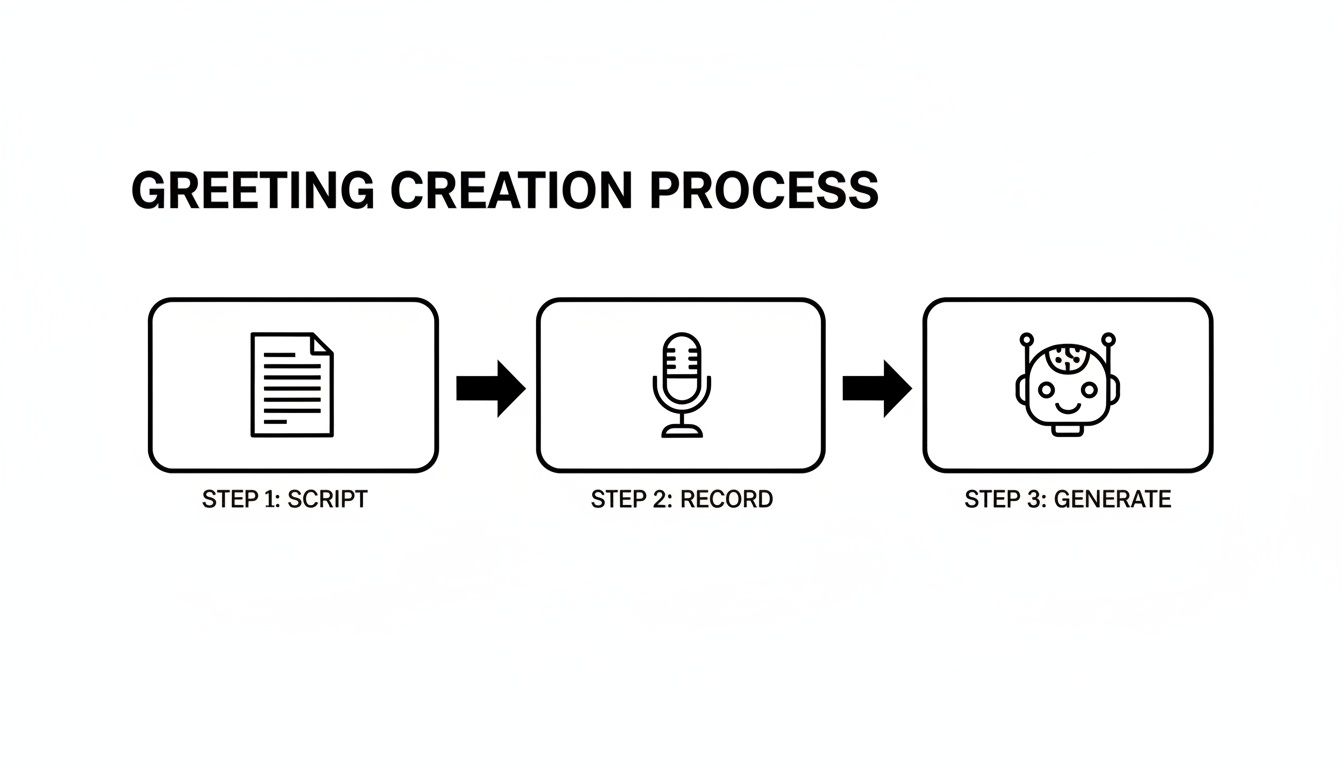
As you can see, whether you decide to record your own voice or use an AI-generated one, it all starts with a solid script. The path you take from there really just depends on the brand image you want to project and what works best for your day-to-day operations.
The biggest win with an AI receptionist is automation. Imagine a system that automatically swaps your greetings based on the time of day. With Active Times Control, your friendly "during business hours" message can instantly switch to an "after-hours" version the second you close up shop, no manual effort required.
For My AI Front Desk users, this kind of integration allows a small business to handle unlimited parallel calls and use features like auto-hangups to resolve issues faster. In fact, 52% of users report major time savings after implementing AI-powered self-service features.
This is just one example of the wider benefits of automation in business, which helps make your entire operation more efficient and ready to scale.
The next step is to link your call data directly to the tools you rely on every day. Think of your AI receptionist as the central hub for all your incoming phone communications.
Here’s what that looks like in practice:
For instance, a plumbing company’s AI could ask for the caller's address and the type of emergency. That information is then sent straight to the on-call technician's phone and logged in the company CRM, all before a human even needs to get involved.
By connecting your greeting to a workflow, you’re not just taking messages; you're starting the sales and service process instantly. This proactive approach ensures no lead falls through the cracks and dramatically shortens your response time.
This kind of integrated system makes your business more responsive, professional, and efficient. Every missed call becomes a productive interaction.
A killer custom voicemail greeting is a great first step, but what happens right after the beep is where the real money is made. Honestly, how fast you follow up is often the only thing that matters when turning a missed call from a lost lead into a closed deal. This is your chance to stop just collecting messages and start actually talking to people.

Think about it from the caller's perspective. They call your business, hear your professional greeting, and leave their message. But before they even set their phone down, a text message from you pops up on their screen. That instant reply does way more than just say, "got your message." It immediately opens up a new, and frankly, often better, way to communicate.
This works so well because you're meeting customers on their terms. They might not have time for a phone call right now, but they can definitely glance at a text and shoot back a quick reply. That one small action keeps the momentum going and proves your business is on the ball.
Getting an automated texting workflow in place is an absolute game-changer. The moment a caller leaves a voicemail, your system can fire off a pre-written SMS right to their phone. And this isn't just some boring notification—it's a real, strategic touchpoint.
Your automated text can do things like:
This completely flips the script on the dreaded game of phone tag. You're giving the caller instant satisfaction and a sense of control, which dramatically improves how they see your business. You can check out how My AI Front Desk pulls this off with its AI-powered voicemail and messaging features.
The goal is to make every missed call feel like the start of a productive conversation, not a dead end. When you text a caller right away, you keep them in your world and stop them from just calling your competitor.
This kind of integrated system also makes sure no lead ever slips through the cracks. It's not just about the instant text. A missed call that goes to voicemail can automatically create a new task for you or your team.
For instance, the caller's info can be dropped straight into an outbound calling list inside your AI system. This guarantees a follow-up call will happen, even when you're swamped. By building this safety net of automated texts and scheduled callbacks, your custom voicemail greeting becomes the front door to a bulletproof lead management process that gets you more responses and more business.
Even with the best game plan, you're bound to have questions when you sit down to create or refresh your custom voicemail greeting. Getting the little things right is what separates a message that actually brings in business from one that just gets skipped. Here are a few of the most common things business owners ask, along with some straight-to-the-point answers.
One of the first things people want to know is about length. How long is too long?
Keep it short and sweet. The sweet spot is somewhere between 20 and 30 seconds.
That’s just enough time to give the essential info without making your caller lose patience. If your message drones on, you're practically begging them to hang up before the beep. Just stick to the basics: your company name, a brief reason you can't answer, and what you want them to do next.
Once you’ve got the length figured out, another big decision is whether to record it yourself or use a polished AI voice. Both have their place, and the right call really boils down to your brand and your goals.
This is a real strategic choice, not just a technical one. Using your own voice can add a personal, authentic feel that really builds trust. If you're a solo entrepreneur or your business is all about relationships, hearing your actual voice can make callers feel like they’re connecting with a real person.
But let’s be honest, an AI-generated voice brings some serious advantages, especially when it comes to professionalism and making your life easier.
The most important part of any greeting, though, is what you ask the caller to do. Just saying "leave a message" is a huge missed opportunity. You have to be specific.
Tell them exactly what you need. Something like, "Please leave your name, number, and the best time to call you back." Even better, point them toward another channel, like your website's booking page. If you need a little more inspiration, check out our guide on professional voicemail greetings examples.
Ready to turn those missed calls into actual leads? My AI Front Desk provides all the tools you need, from AI-powered greetings to automated text follow-ups. Get started with your AI receptionist today.
Start your free trial for My AI Front Desk today, it takes minutes to setup!


