
Of course. It’s one of those things you don’t think about until you need it, but the answer is a resounding yes, you absolutely can text to an email. This nifty feature builds a bridge between the instant gratification of a text message and the record-keeping power of traditional email.
You can shoot a quick text from your phone, and it lands right in someone’s email inbox. It's a surprisingly simple process that unlocks some serious communication potential, especially for small businesses.
Sending a text directly to an email inbox is more than just a cool party trick; it's a strategic move that merges the immediacy of SMS with the permanence of email. For small businesses, this is huge. Imagine a field technician sending a quick photo update straight to the office's project folder, or creating an instant, documented trail of client messages without having to juggle a bunch of different apps.
The magic behind this is something called an SMS gateway. Just think of it as a translator. It takes your text message (SMS) and converts it into an email format that servers can understand and deliver. Every mobile carrier, from Verizon to T-Mobile, runs its own gateway, giving your messages a specific path to follow.
The number one reason to pay attention to texting is its insane engagement rate. SMS messages boast open rates as high as 90-98%, which completely blows email's average of around 42% out of the water.
The data doesn't lie: nearly all texts are opened within minutes of being received, driving response rates over 45% compared to a sluggish 6% for email. For any business that relies on quick client feedback, that’s a massive advantage. You can dig into even more of these compelling SMS marketing statistics for 2026.
For businesses, the ability to text to an email centralizes communication. It ensures that urgent messages sent via text are not lost and are properly archived within the company’s email system for future reference.
There isn't just one way to do this. Throughout this guide, we'll walk through the four main methods for sending a text to an email address, each with its own pros and cons.
Getting a handle on these different methods can seriously level up your communication game. For a deeper dive, be sure to check out our complete guide to texting using email for business communication.
Believe it or not, one of the simplest ways to text an email address is through a built-in feature that every major mobile carrier offers: an SMS-to-email gateway.
Think of this gateway as a secret email address that’s linked to every single phone number on a carrier’s network. When you send a text message to this special address, the carrier’s system catches it, converts it into an email, and shoots it straight to the recipient's inbox.
The best part? It works right from your phone's regular messaging app. You don’t need any special apps, a Wi-Fi connection, or a complicated setup. This makes it a total lifesaver in situations where you have cell service but little to no data.
For a deeper dive into how this stacks up against other methods, check out our guide to sending an email to text for your business.
The only trick to this method is knowing the correct gateway format, which is different for each mobile carrier. The format is almost always the person's 10-digit phone number followed by the carrier's unique domain. So yes, you'll need to know who their provider is for this to work.
To make it easy, I've put together a quick reference table for the most common carriers in the United States.
Just find the right format, pop in the phone number, and you're ready to send.
Once you have the address, the rest is a breeze.
Just open your messaging app and start a new text. In the "To" field where you'd normally put a phone number, type the full gateway email address. For example, if you're trying to reach someone on Verizon, you would enter 1234567890@vtext.com.
The body of your text message will become the body of the email. But what about a subject line? Many carriers will automatically grab the first few words of your text and use that as the subject.
Pro Tip: If you want to set a specific subject line, type it out first, then hit "Enter" to create a line break before writing your main message. The gateway will often treat that first line as your subject and everything after it as the email body.
Keep in mind that standard SMS limits (usually 160 characters) often apply. A longer message might get split into multiple emails or even cut off, so this method is built for speed and brevity, not for sending lengthy reports.
For a real-world example, imagine a field technician is out on a job in a rural area with spotty data but a solid cell signal. To let the main office know they're done, they can simply text "Job #542 complete. Photos to follow." to a group email like office-updates@mycompany.com. The message arrives in the team's inbox almost instantly, creating a clean, timestamped record without needing to hunt for a Wi-Fi signal.
If you’d rather not manually type out an email address every time you send a text, you can automate the whole process. By using your phone’s built-in forwarding features, you can create a “set it and forget it” system that automatically sends incoming texts straight to your email.
This is a fantastic trick for solo entrepreneurs or small business owners who want to keep all their client communications in one place. Imagine you’re a contractor and a client texts you about a project change. With auto-forwarding, that text is instantly saved in your email, making it easy to search for or file away later. No more digging through your phone to find that one important message.
For iPhone users, the setup is a little quirky. There isn’t a direct "forward all SMS to email" button on the iPhone itself. Instead, the magic happens through the deep integration between your iPhone and a Mac computer. You’ll need a Mac logged into the same Apple ID to act as the bridge.
Here’s the basic idea of how it works:
This approach is definitely more of a workaround than a built-in feature, and it only works for texts coming through the Messages app. The big catch is that you need to be invested in the Apple ecosystem with both an iPhone and a Mac to make it happen.
This method really highlights the difference between platforms. While powerful for Apple users, Android often offers more direct, on-device solutions for this kind of automation, which we'll get into next.
Thanks to Android's open nature, you’ll find more direct ways to forward texts to your email. The exact steps, however, can change depending on who made your phone (like Samsung or Google) and which version of Android you're running.
Some older devices had this feature baked right into their messaging apps, but it’s becoming less common. You might get lucky and find an option in your settings to automatically forward messages, but don't count on it.
This inconsistency is why most Android users turn to third-party apps from the Google Play Store. Apps like "SMS Forwarder" or "AutoForward SMS" are built for exactly this. They give you a ton of control, letting you:
These apps can be incredibly handy, but always think about privacy. You're giving an app access to all of your text messages. It’s crucial to pick a reputable app with a clear privacy policy, especially if you're dealing with sensitive business info. It’s a great solution for personal backups, but it requires careful consideration before using it as a primary business tool.
As your business grows, manually forwarding texts or relying on your carrier’s basic SMS-to-email gateway just isn’t going to cut it. You’ll quickly find yourself overwhelmed. The real power move is to integrate your texting into a larger, automated system. This is where dedicated business platforms step in, completely changing how you handle inquiries by turning simple texts into robust lead management workflows.
Think about it: a potential customer texts your business number with a question. Instead of that message just buzzing on your personal phone, an automated workflow springs into action. This system can instantly create a new contact in your CRM, shoot an email to your sales team with the full conversation, and even add a follow-up task to their calendar. This isn’t just about getting a text into an email inbox; it’s about building an intelligent machine that captures, organizes, and nurtures leads 24/7.
This diagram shows the basic flow of how these automated systems connect your text messages to your email.
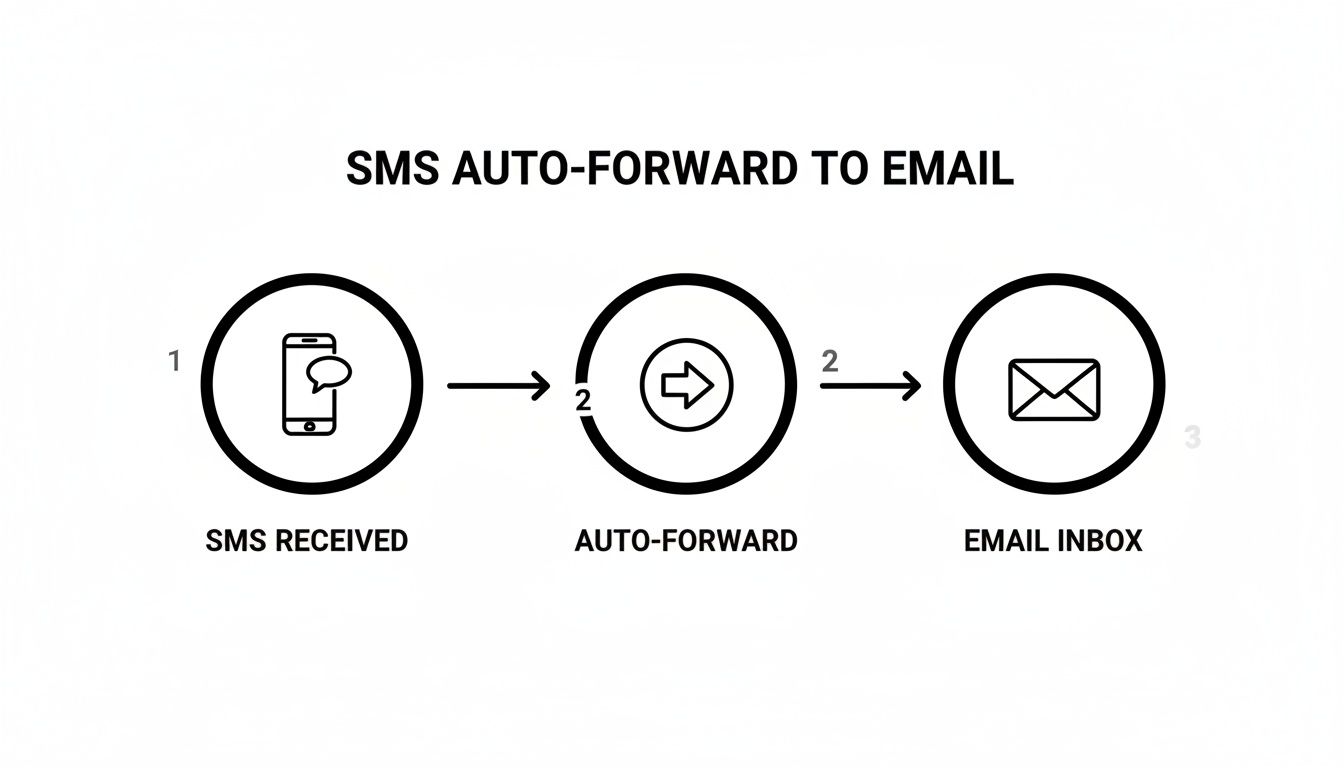
While the visual keeps it simple, the real magic happens in the intelligent steps between the text arriving and the email being sent.
Platforms like My AI Front Desk are designed to master this exact kind of integration. Our system does much more than just forward a message. It uses an AI Texting Bot to handle the initial back-and-forth, answering common questions, qualifying the lead, and gathering key contact info before a human ever has to step in.
Once that initial conversation wraps up, the system automatically packages the entire interaction into a clean, easy-to-digest summary.
This kind of process ensures no lead ever falls through the cracks. While manual methods are prone to human error or delays, an automated workflow is consistent, fast, and always on.
With My AI Front Desk, you're not just getting a notification. You're getting a qualified lead, complete with the full conversational context, delivered right to your team's inbox and ready for conversion. It effectively turns your business phone number into an automated sales tool.
Let's take a local plumbing service that gets dozens of texts a day. Before automation, the owner was constantly glued to his phone, texting back clients and then trying to remember to manually punch their info into a spreadsheet. It was chaos, and good leads were definitely lost in the shuffle.
By setting up an automated texting tool, the entire game changes.
Imagine how many leads disappear simply because they prefer sending a quick text over a formal email. This 'text-to-email' bridge is a game-changer, especially when you consider SMS open rates hit a staggering 98%, compared to just 20-30% for email. By 2026, it's projected that 45% of consumers will make purchases right after receiving an SMS, while email response rates limp along at 6%. Our AI Texting Bot makes this connection seamless, automatically turning texts into detailed emails so you never miss an opportunity.
As you start using business texting tools for lead management, it’s also smart to track key metrics like understanding Email ROI and Click-Through Rate to see how effective your follow-up email campaigns are. You can also learn how to set up texting workflows in My AI Front Desk and start building your own automated system today.
Knowing you can text to an email is one thing. Doing it professionally is a whole different ballgame—it's what separates a slick customer experience from a confusing, clunky one. When you start weaving texting into your business communications, you have to hold that professional standard high. It’s all about building trust and protecting your brand's reputation.
The absolute first rule? Be crystal clear with your clients. If you're giving out a number they can text for support or quick questions, you need to manage their expectations from the get-go. Let them know their text is being converted into an email and will be handled by your team during business hours.
A simple auto-reply works wonders here: "Thanks for your text! We've received it and will respond via email within 24 hours."
Just because a conversation kicks off with a text doesn't mean all professional norms fly out the window. The message might end up in an email inbox, but its origin is casual. Nailing that balance is key.
If you’re using text-to-email for lead follow-up, checking out some high-converting expired listing script examples can give you great ideas for crafting messages that work well across both text and email. And remember, professional phone etiquette is just as crucial; our guide on how to answer the phone professionally has you covered.
The moment your business sends or receives text messages, you're stepping into a regulated space. It's so important to be aware of the rules, like the Telephone Consumer Protection Act (TCPA), which governs business texting. The core principle here is consent. You absolutely must have explicit permission from people before you start sending them promotional texts.
Always get documented consent before adding a client to any automated texting list. This isn't just about staying compliant—it's about respecting your customers' privacy and strengthening that relationship.
Even the most well-oiled machines can have hiccups. If your text-to-email messages suddenly stop working, here are a few things I always check first:
phonenumber@vtext.com).Once you start exploring the idea of sending texts to your email, a few questions always pop up. It's smart to get the lay of the land—from costs to security—before you bake this into your daily business communication. Let's run through the most common things people ask.
Getting these details sorted out will help you move forward with confidence and sidestep any potential headaches.
Mostly, yes. When you use your phone carrier’s SMS gateway or the built-in forwarding on your phone, there usually aren’t any extra fees. It just counts as a standard text message against your mobile plan.
But when you step up to more professional, business-focused tools, that's where you might see some costs. Some third-party forwarding apps you find in the app store run on a subscription model, offering more robust features for a small monthly fee.
Platforms built for business, like My AI Front Desk, also operate on a subscription. While there's a cost involved, they pay for themselves quickly with powerful automation, better reliability, and a whole suite of features that the manual methods just can't touch.
This is a big one, and the answer really hinges on the method you're using. When you fire off a text through a carrier gateway, that message is flying across the network as an unencrypted SMS. That makes it a terrible choice for sending anything sensitive like credit card details, passwords, or personal health information.
For any real business communication, you’re far better off using a professional platform built with security in mind. These services are designed to handle customer data inside a protected environment, keeping you compliant and building trust with your clients.
Always be upfront with customers about how you handle their information and make sure you have their clear consent before you start any kind of automated business texting. It’s not just good practice—it's often the law.
This is where the basic, free methods really fall flat and the professional tools earn their keep. Trying to reply directly to an email that came from a carrier gateway rarely works, if it ever does. The conversation just dies.
Business platforms, however, are built for this kind of two-way street. A system like My AI Front Desk can take an email reply from someone on your team and instantly fire off an automated text back to the customer. This keeps the conversation going on the channel they prefer (texting) while your team can manage it all from a central place like an email inbox or CRM.
Trying to send multimedia messages (MMS) with photos or videos to a carrier's gateway email is a bit of a gamble. The carrier will try to convert the media into an email attachment, but the whole process is shaky at best.
If you need to share files reliably, a dedicated business communication platform is the only way to go. These systems are made to handle attachments professionally, often by sending a secure, trackable link inside the text message that delivers the high-quality media without any of the guesswork.
Ready to put your lead capture and communication on autopilot? With My AI Front Desk, you can instantly convert incoming texts into neat email summaries for your team, so no opportunity ever slips through the cracks. Learn more and get started today!
Start your free trial for My AI Front Desk today, it takes minutes to setup!


