
Are you still trying to juggle agent schedules and unpredictable call volumes with a spreadsheet? The short answer is: there's a much better way. Call center scheduling software is designed to automate this entire puzzle, using real data to perfectly align your staffing with customer demand. Think of it as moving beyond a static calendar to a smart system that optimizes shifts, forecasts your needs, and makes sure the right people are working at the right times.
For decades, call center managers were stuck with manual spreadsheets and a whole lot of guesswork. It was a recipe for disaster, often leading to costly mistakes like having too many agents on hand during slow periods or, even worse, not enough during a rush. This balancing act isn't just about filling slots; it's a core piece of your workforce management (WFM) strategy that has a direct line to your profits, customer satisfaction, and team morale.
Modern scheduling software acts like an intelligent command center for your operations. It takes the chaotic process of matching agents to fluctuating demand and turns it into a data-driven science. By digging into historical call patterns, these tools can accurately predict future volume, ensuring you're ready for anything—whether it's a seasonal spike, a big marketing promotion, or an unexpected surge.
This switch from being reactive to proactive is a total game-changer. You can see its value in the market's explosive growth, with analysts projecting the global on-call scheduling software market to jump from $3.6 billion in 2024 to nearly $40 billion by 2033. This massive expansion is driven by the real-world need to manage hybrid teams and automate tricky rostering. It's clear that businesses aren't just seeing these tools as a nice-to-have, but as a critical investment. You can learn more about the market's direction and what it means for you in IMARC Group's detailed report.
When you automate your scheduling, you see immediate, tangible results. Instead of burning hours juggling time-off requests, skill sets, and shift swaps, managers can finally get back to coaching and supporting their teams. The main advantages are pretty clear:
The real power of call center scheduling software isn't just about plugging names into a schedule. It's about creating an operational rhythm that adapts on the fly. It turns a static plan into a living, breathing response to what your customers need, right now.
At the end of the day, these platforms are non-negotiable for any modern contact center, especially if you're managing remote or hybrid teams across different time zones. They deliver the structure, flexibility, and insight you need to run a tight ship while keeping both your agents and your customers happy.
Moving from a basic shared calendar to a dedicated scheduling platform is a huge leap. It's not just about plugging names into time slots; it's about getting a strategic tool that actually optimizes your entire workforce. The best software is an engine built to handle demand, empower agents, and give you real-time control over the floor.
The market for these platforms is blowing up, and for good reason. Just look at the numbers.
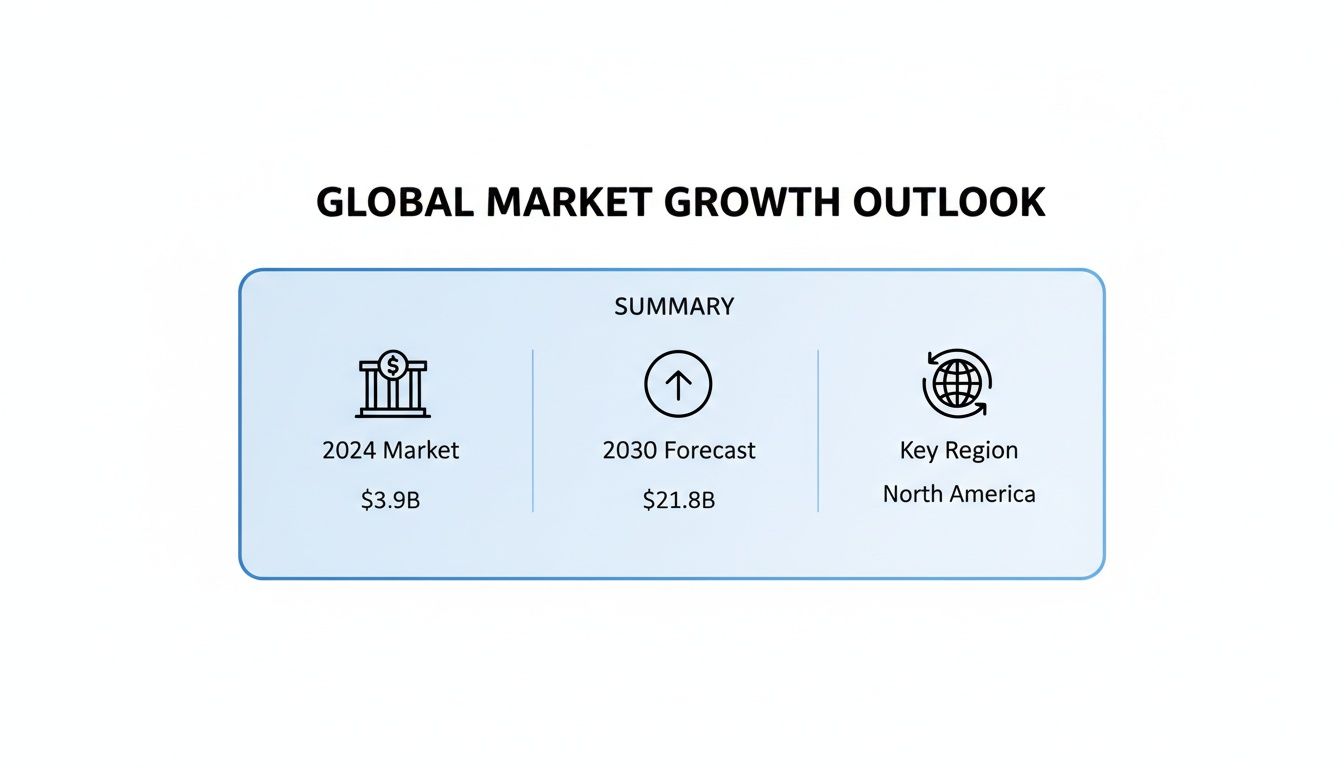
This jump from $3.9 billion in 2024 to a projected $21.8 billion by 2030 isn't just a trend. It’s a massive shift. Businesses are ditching manual spreadsheets and investing heavily in intelligent workforce management to get a serious competitive edge.
So, what separates a simple tool from a game-changer? It comes down to a few critical features.
A solid schedule starts with a killer forecast. Modern software leaves simple historical averages in the dust by using AI and machine learning to chew through complex data.
This means the system can spot subtle patterns a manager might easily miss. For example, it can account for things like:
An accurate forecast means you're never caught flat-footed. You avoid both the profit-killing costs of overstaffing and the customer frustration that comes with being shorthanded.
Your customers reach out on the phone, through email, over live chat, and on social media. Your scheduling software has to keep up.
Multi-channel scheduling is all about getting agents with the right skills on the right channels at the right time. You can put your most tech-savvy agent on live chat during peak hours while assigning your most empathetic communicators to handle sensitive phone calls. This stops bottlenecks cold and creates a consistent experience, no matter how a customer contacts you.
A schedule is just a piece of paper if nobody follows it. Real-time adherence is the feature that watches what agents are actually doing versus what they're supposed to be doing.
A schedule is a plan, but adherence is the reality. The ability to see and react to deviations in real-time is what separates a well-run call center from a chaotic one. It allows managers to pivot from firefighting to proactive coaching.
If an agent is late getting back from break or a call runs way over, the system flags it instantly. This lets managers make intraday adjustments on the fly—like reassigning tasks or calling in backup agents—to keep service levels from dipping. It turns scheduling from a static document into a living, breathing process. Seeing how different tools work together in the full list of My AI Front Desk features shows how this creates a much more responsive environment.
Let's be real: your agents are your most important asset. The best scheduling software gets this and includes features that give them flexibility, which is proven to boost morale and slash turnover.
These tools don't just make agents happier; they also lift a huge administrative weight off managers' shoulders. The impact here is huge. Good scheduling software improves agent utilization, cuts down on "shrinkage" (lost productive time), and raises service levels. Industry data shows these tools can trim overtime costs by 10–30% and bump up schedule adherence by 5–15 percentage points. When you consider that labor accounts for up to 80% of call center costs, even small efficiency gains add up to massive savings.
Choosing the right call center scheduling software can feel overwhelming. Every vendor promises the moon, and it's easy to get bogged down in endless feature lists and slick sales pitches. To cut through the noise, you need a structured way to evaluate your options—one that goes beyond a simple checklist.
Instead of just comparing feature sets, let's focus on three core pillars that determine if a tool will actually work for your business: scalability, integration, and the deployment model. These criteria will help you find a platform that fits your operation like a glove, rather than forcing your team into a tool that just doesn't feel right.
The team you have today might look very different in two years. A solution that feels perfect for 50 agents could crumble under the weight of 200. Real scalability isn’t just about adding more seats; it’s about the software’s ability to handle growing complexity without slowing down.
Think about these factors:
Picking a scalable platform from the start means you won't have to go through this whole painful procurement process again in just a few years. It saves a massive amount of time and money down the line.
Your scheduling software can't be an island. It has to talk to all the other critical systems you rely on every day. Without solid integration capabilities, your team will be stuck manually transferring data between platforms—a recipe for mistakes and wasted time.
At a minimum, focus on its ability to connect with your Customer Relationship Management (CRM) and Human Resources (HR) systems. A tight CRM integration can pull historical interaction data to make your forecasting way more accurate. Meanwhile, an HR integration automates things like managing leave balances, adding new hires, and keeping employee details current.
A scheduling tool's true power is unlocked when it becomes the central hub for workforce data, not just another isolated silo. Seamless integration turns disconnected data points into actionable operational intelligence, allowing for smarter, faster decisions.
This connected approach ensures all your systems are working from a single source of truth, eliminating data conflicts and giving you a clear picture of everything related to your workforce.
The old debate between on-premise and cloud-based software has a pretty clear winner these days. The massive shift to remote and hybrid work has thrown fuel on the fire, accelerating the move to cloud platforms that offer flexibility and access from anywhere.
The market data tells the same story. Cloud-based scheduling software adoption shot up between 2018 and 2024, with industry reports calling it the fastest-growing deployment model. This is all driven by the need to support agents in multiple locations and integrate with other cloud tools—the very reasons businesses are ditching their old legacy systems. North America has led the charge, making up 31.6% of the on-call scheduling software market in 2021, thanks to a high concentration of vendors and early adopters.
As our in-depth software comparison guide explains, keeping an eye on these market trends can help inform your own strategy. If you want to dig into the numbers, you can learn more about these scheduling market findings on grandviewresearch.com.
Ultimately, looking at potential solutions through the lens of scalability, integration, and deployment helps you make a strategic investment. It forces you to look beyond the sticker price to the total cost of ownership, ensuring you pick a partner that will grow with you and drive real, lasting improvements.
Switching to new call center scheduling software is a big deal. It’s not just a tech upgrade; it’s a fundamental shift in your operations that touches everyone from frontline agents to the C-suite. A successful rollout absolutely depends on a solid strategy that sees the challenges coming and focuses on a smooth transition. Without a clear plan, even the best software on the market will fall flat.

The real work starts long before you flip the switch. A smart approach means careful planning across a few key phases, kicking off with getting your data and system settings right. This initial legwork is non-negotiable if you want to build a reliable foundation for your new scheduling world.
Before you move a single byte of data, you need to do a full audit of your current processes. This is where so many projects get tripped up. Teams often underestimate just how messy their existing data is, and that oversight can lead to major delays and completely unreliable forecasts from day one.
Your pre-launch checklist has to include:
A classic mistake is treating implementation like it's just an IT project. It's not. It’s a change management project. You have to get early buy-in from agents and managers by getting them involved in the setup and testing. It's the only way you'll get high adoption rates.
Once your data is clean and your rules are defined, you can start the migration. This phase is about more than just copying files; it's about making sure the new system actually works the way you need it to in your specific environment. Rushing this stage is a guaranteed recipe for chaos after launch.
A structured migration and testing plan is your best friend here:
This test-and-tweak approach takes the risk out of the full launch by letting you solve problems on a much smaller scale.
A "big bang" launch where everyone switches over at once is tempting, but it can be incredibly disruptive. A much safer bet is a phased rollout, where you bring teams onto the new system in controlled stages. This lets your support staff manage the change without getting completely swamped.
As you roll it out, training becomes your top priority. Make it role-specific and practical. Agents just need to know how to see their schedules, bid on shifts, and request time off. Managers, however, need the deep dive on forecasting, tracking adherence, and approving schedule changes. Follow it up with ongoing support—like a dedicated help desk or easy-to-find user guides—to make sure your team feels confident from the get-go. This is how you actually get the ROI you were promised.

While most call center scheduling software is built to manage your internal team, there’s a huge piece of the puzzle it often misses: the scheduling work driven by your customers. Think about it. Every single call to book, change, or cancel an appointment pulls a live agent away from handling more complex, high-value problems.
This is exactly where a smart layer of AI automation can make a world of difference.
A tool like My AI Front Desk isn't trying to be a massive workforce management suite. Instead, it zeros in on this one high-volume task. By adding a 24/7 AI receptionist, you automate one of the most repetitive inbound call types, freeing up your human agents to focus on what they do best. It’s not about replacing people; it's about giving them backup to handle the predictable stuff.
The real magic happens when the AI can manage the whole appointment process on its own, from start to finish. When a customer calls, the AI has a natural conversation, checks your business's Google Calendar in real-time, and offers available slots. That alone cuts out the tedious back-and-forth that eats up an agent's time and opens the door to human error.
Once a customer chooses a time, the AI takes care of everything else:
The true value here is turning every inbound scheduling call into a win, 24/7. You stop missing opportunities just because a call comes in after hours or when your agents are swamped. That’s revenue you might have otherwise lost for good.
This approach shows how automation can solve a core problem from the outside in. While your traditional software manages your team, the AI handles the customer demand, making the whole operation run smoother.
When you integrate an AI assistant like this, the benefits ripple out. With appointment booking handled automatically, managers can build more precise schedules for their human agents. They have a much clearer picture of the inbound call volume that actually requires a person.
This lets you forecast staffing needs more accurately and use your team more strategically.
It's not just an efficiency play, either—it’s a customer satisfaction booster. Callers get what they need instantly, without sitting on hold. As you think about how these technologies fit together, it's worth exploring how AI automation is revolutionizing the call center experience on a larger scale. By offloading key tasks like scheduling, you’re building a more responsive and efficient business from the very first hello.
Investing in new call center scheduling software isn't just a gut decision; you need cold, hard numbers to back it up. Measuring the return on investment (ROI) is how you build a solid business case, justify the cost, and show everyone the real-world impact it's having on your operations. It all starts with tracking the right key performance indicators (KPIs) before and after you make the switch.
The goal is to draw a straight line from the software's features to your business outcomes. Did that fancy new forecasting tool actually slash your overstaffing costs? Did letting agents bid on shifts automatically bring down your attrition rate? Answering these questions with data is what turns a line-item expense into a strategic asset.
The quickest wins usually show up in your core operational efficiency. These are the metrics that tell you how well you're managing your people and resources to keep up with customer demand.
Start with these fundamentals:
Tracking these numbers gives you a clear, quantitative picture of how the software is tightening up your day-to-day operations.
The best ROI arguments connect the dots. When you can show that a 5% bump in schedule adherence led to a 10% drop in average wait times, you’re not just throwing numbers around—you're telling a powerful story about operational excellence.
Beyond just efficiency, the right scheduling software can have a massive effect on customer satisfaction and employee retention—two areas with serious financial implications.
Zoom in on the metrics that reflect what your customers and agents are experiencing:
By measuring the improvements across operations, service, and your agents' well-being, you paint a complete picture of the software’s value. If you want to build an even stronger case, you can follow a proven framework for calculating the complete ROI of your business investments. This approach will help you solidify your pitch to stakeholders.
When you start digging into call center scheduling software, a few questions always pop up. Getting good, straight answers is key to making a smart decision and picking a platform that actually helps your team instead of adding another headache. Here are some of the most common things managers ask.
It’s easy to get these two mixed up, but they really operate on different scales. The simplest way to think about it is that scheduling is one piece of a much larger puzzle.
Scheduling software is hyper-focused on one job: creating and managing agent shifts. Its entire purpose is to make sure you have the right number of people working at the right times to handle your expected call volume. That's it.
On the other hand, a full Workforce Management (WFM) suite is the whole package. It includes scheduling, of course, but it wraps in a ton of other functions to give you a complete view of your operations.
A true WFM platform typically brings in:
So, scheduling software solves the immediate "who works when" problem. A WFM suite is designed to optimize your entire workforce from top to bottom.
Every project has its own quirks, but a standard implementation for call center scheduling software usually lands somewhere between 6 and 14 weeks. A few key things can push that timeline one way or the other.
The biggest variable is complexity. If you're a smaller team with pretty basic scheduling rules, you'll be on the faster end of that range. But if you’re a large, multi-site operation with tangled integrations, you'll need more time for proper configuration, testing, and training.
Don't underestimate how much messy data can derail your timeline. Trying to migrate years of inconsistent historical data can add weeks to the project. Cleaning up your data before you start is one of the single best things you can do to ensure a smooth launch.
Other factors that can stretch the timeline include the number of integrations you need with systems like your CRM or HR platform, and how much time your own team can dedicate to the project. Having dedicated people ready for testing and training makes a world of difference.
Absolutely. It’s one of the most powerful—and often overlooked—benefits of getting scheduling right. When agents feel like they have some control over their work-life balance, job satisfaction goes through the roof.
This isn't just a vague feeling; it comes from specific features built for agents. Think about tools like automated shift bidding, simple digital shift swaps with coworkers, and self-service portals for time-off requests. They remove a ton of administrative friction and give your team a real voice in their schedules.
That flexibility and transparency are direct weapons against agent burnout, which is a massive driver of turnover. When you give them a system that respects their time and simplifies their life, you're building a healthier, more positive workplace. That's a proven recipe for keeping your best people around longer.
At My AI Front Desk, we solve a key piece of the scheduling puzzle by automating customer appointment booking 24/7. Find out how our AI receptionist can free up your agents' time and capture more business at https://myaifrontdesk.com.
Start your free trial for My AI Front Desk today, it takes minutes to setup!


