
A caller reaches out at 7:12 p.m. They need a quote, want to book a job, or have a problem they want solved tonight. Your team is done for the day, the phone rolls to voicemail, and the caller leaves a quick message that says just enough to sound important but not enough to act on easily.
By the time someone checks that voicemail the next morning, the caller may already have hired someone else.
That is the quiet problem with old voicemail. It does record messages, but it does very little to help you respond fast, route urgency correctly, or turn a missed call into a booked customer. For a small business or agency, that gap matters. A missed call is often not just a missed conversation. It is a missed lead, a delayed estimate, or a project that goes to a competitor who answered first.
An automated voicemail system changes that job entirely. Instead of acting like a digital answering machine, it becomes part of your operating workflow. It can capture the message, turn it into text, notify the right person, trigger a follow-up, and connect the lead to your CRM, calendar, or texting flow. That is where the true value lives.
A traditional voicemail box creates friction at the worst possible moment. The caller is ready to act. Your business is unavailable. The system asks them to wait, speak clearly, and trust that someone will get back to them later.
Many small business owners already know this pain firsthand. A plumbing company misses an after-hours leak call. A law office gets a weekend intake message with no clear next step. A marketing agency receives a new business inquiry while everyone is in back-to-back client meetings. The caller did their part. The business still loses momentum.
The danger is not only the missed call itself. It is the delay that follows. Someone has to listen, decode the message, decide who owns it, and manually follow up. If the voicemail is vague, buried, or sitting in a full inbox, the opportunity gets colder by the hour. If you want a broader look at the business cost of this problem, this piece on the danger of missed calls lays it out well.
Old voicemail was built to store messages. Small businesses today need systems that move work forward.
That difference sounds subtle, but it changes everything:
Practical takeaway: If your voicemail only records audio, you still have a manual follow-up problem.
An automated voicemail system matters because it closes the gap between “someone called” and “something happened.” That is the shift that helps small teams save time and capture more leads without hiring more front-desk staff.
The easiest way to understand an automated voicemail system is to compare it to physical mail.
A traditional voicemail box is like a basic P.O. box. Messages go in. Later, someone checks it.
An automated voicemail system is like a staffed mailroom with sorting rules, labels, alerts, forwarding, and delivery instructions. The message still arrives, but the system helps decide what should happen next.

An automated voicemail system is a phone workflow that can do more than record audio. It may:
That last point is where readers often get confused. They think voicemail and automation are separate things. In modern systems, they are connected. The voicemail is just one event inside a larger workflow.
For example, if a caller presses “2 for service,” leaves a message, and mentions a burst pipe, the system can treat that differently from a general question about office hours. One goes to urgent service follow-up. The other can wait until morning.
Voicemail did not start as a fancy AI product. It started as a fix for a communication bottleneck.
Voicemail systems emerged in the late 1970s, when business phone communication had become inefficient. At the time, only 1 in every 4 business calls resulted in successful completion, and Gordon Mathews founded VMX and sold the first commercial digital voicemail system to 3M in 1979, according to this history of voicemail’s early development.
That history matters because it shows a pattern. Business communication tools keep evolving to remove delay, reduce manual work, and make sure messages do not get lost.
The current version of that pattern is automation. A modern setup might combine voicemail handling, texting, scheduling, intake forms, and CRM updates into one flow. If you are exploring broader business automation, voicemail is often a practical place to start because it sits at the front door of your sales and service process.
A modern system does not need to feel technical from the caller’s side. The caller just experiences a smooth handoff.
Inside your business, though, several things may happen at once:
That is why many small teams move from a basic mailbox mindset to a workflow mindset. If you want to see one example of that model, this overview of AI-powered message taking shows how voicemail can be handled as structured business data rather than just audio.
An automated voicemail system is easiest to evaluate when you stop thinking about “features” as checkboxes and start thinking about what each one removes from your team’s day. Every strong feature either saves time, reduces confusion, or speeds up follow-up.
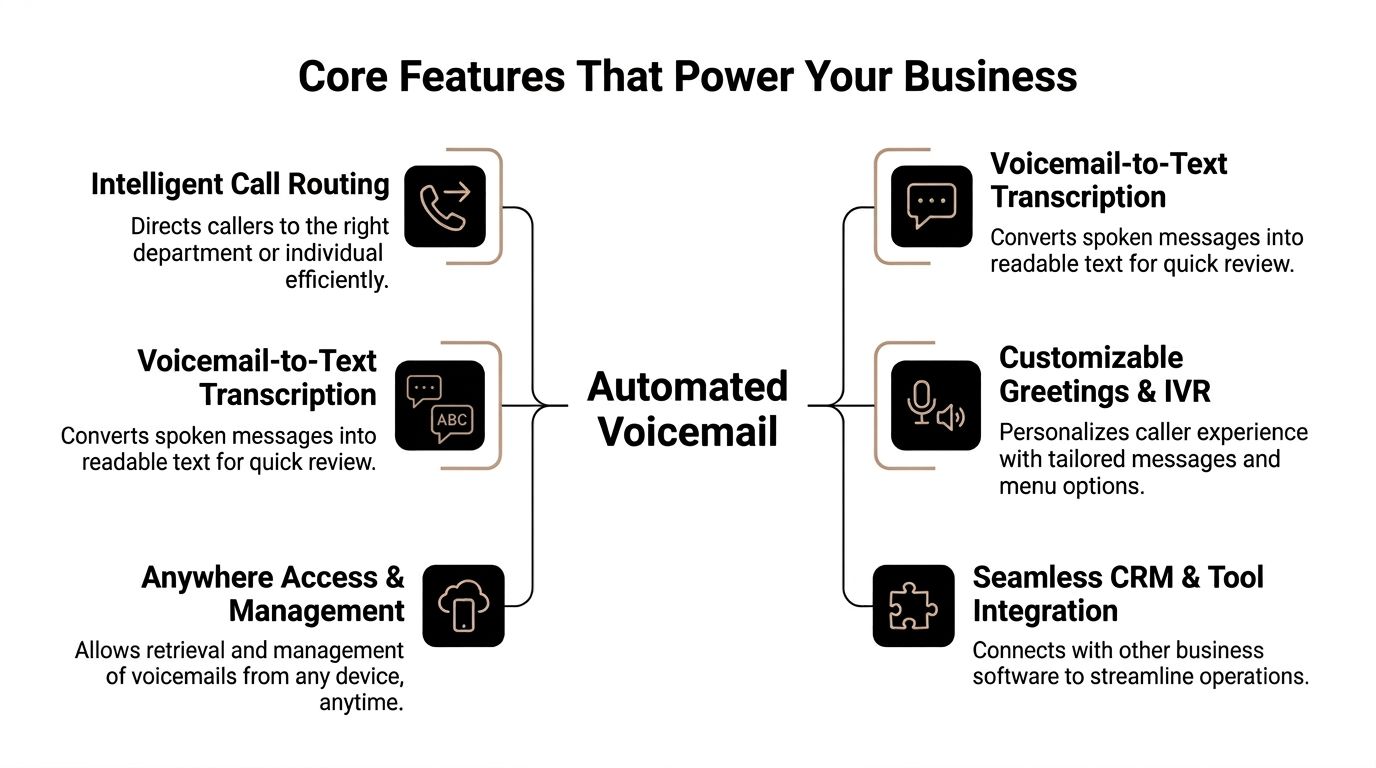
This is usually the first feature owners appreciate because the benefit is immediate.
Instead of forcing someone to stop what they are doing and listen to every message in order, the system converts audio into text. That turns voicemail from something you “process later” into something you can scan quickly.
Automated voicemail systems with voicemail-to-text technology let teams process messages up to 5x faster than listening, and a manager can scan five transcribed voicemails in the time it takes to listen to one, as described in this explanation of automated voicemail transcription workflows.
For a small team, that changes triage.
A short transcript helps you answer questions like:
If you run an agency, transcription is the difference between hearing “new website project, call me back” and instantly reading that a prospect wants a redesign, has a launch deadline, and is asking for a proposal this week.
Tip: Readability matters more than novelty. The primary gain is not that the message became text. The primary gain is that your team can act on it faster.
Many readers assume voicemail ends the interaction. It does not have to.
In a modern workflow, the system can trigger a callback flow after the voicemail is left. That follow-up might be a live team member returning the call, an automated text asking the caller to book a time, or an AI voice assistant re-engaging the lead and gathering missing details.
This works especially well when the original message is incomplete. A caller may say, “Need help with my AC. Call me.” A callback workflow can fill in the blanks by asking the right next question, such as preferred appointment window, service address, or urgency.
The value here is operational, not magical. Your team no longer has to build every next step from scratch. The system can start the process, and your staff can step in where human judgment matters most.
Most voicemail systems notify the same way. A light blinks, an inbox fills, or an email lands somewhere generic.
Smart notifications are different because they are based on context. The system can notify the right person through the right channel with the right amount of information.
For example:
That keeps your owner, office manager, and technicians from all checking the same pile of messages. It also reduces the all-too-common “I thought someone else handled that” problem.
A good notification should answer three questions right away:
| Question | What the notification should tell you |
|---|---|
| Who called | Name, number, and any known contact record |
| Why they called | Transcript, menu choice, or short summary |
| What should happen now | Reply, dispatch, schedule, or review later |
This is the traffic control layer.
Interactive Voice Response, or IVR, lets callers choose where they need to go. They may press a number or respond by voice. The system then routes the interaction based on those choices.
That sounds simple, but the impact is huge. A caller looking for sales should not land in service. A person with an emergency should not sit in the same queue as someone asking for store hours. Intelligent routing keeps different call types from clogging each other.
For a small service business, a basic menu can already create order:
The call feels more organized for the customer, and your team gets cleaner intake on the back end.
Analytics in voicemail should not be vanity reporting. You do not need a dashboard full of charts just to admire call volume.
You need patterns you can use.
Useful voicemail analytics help answer practical questions:
Agencies often get extra value from this. If you run ads, direct mail, or local search campaigns, voicemail data can show whether calls are coming in at the wrong times, being routed poorly, or left unanswered too often.
None of these features matter alone as much as they matter together.
Transcription helps your team read faster. Routing sends the inquiry to the right place. Notifications make sure the right person sees it. Callback logic starts follow-up. Analytics help you improve the whole system over time.
That combination is what turns an automated voicemail system into a lead-capture engine instead of a passive inbox.
Small businesses do not lose leads because they are careless. They lose leads because the front desk function is often spread across people who already have other jobs.
The owner answers calls between estimates. The office manager handles phones while juggling billing. The agency founder checks missed calls after client meetings. That setup works until call volume spikes, or until the most important call of the week arrives at the wrong time.

A missed call is not always avoidable. Losing the follow-up usually is.
An automated voicemail system keeps the process moving when your team is busy, off-site, or closed. That means a prospect still gets a clear path forward instead of a dead-end recording.
A few examples make this concrete:
This matters during promotions, emergencies, seasonal rushes, and local ad campaigns.
Automated systems with IVR can process over 1,000 calls per minute, which gives even a small business a way to handle volume spikes without matching that demand with manual staffing, according to this breakdown of IVR scalability in automated voice systems.
You may never need that ceiling. But the point is not the maximum number. The point is that the system does not get overwhelmed the way a person or small front office does.
Callers notice structure.
They can tell when your business has thought through what happens after hours, during lunch, or when everyone is busy. A clear greeting, a logical menu, and a prompt follow-up text all signal that your company is organized.
That matters even when no one answers live.
Key takeaway: People often judge responsiveness before they judge price. If your follow-up feels smooth, your business feels reliable.
This is not about sounding “big.” It is about sounding competent.
A one-location business can still offer:
That removes the scrappy feel that sometimes comes from missed calls, personal cell phone voicemails, and handwritten callback lists.
If you are comparing tools that handle this kind of front-line communication, an AI receptionist for small businesses is one model to look at because it combines call handling with the follow-up layer that many teams are missing.
Most articles stop at features. Significant transformation happens when your automated voicemail system connects to the rest of your business tools.
That is when voicemail stops being a phone function and starts acting like a workflow trigger.
A new lead calls after hours and leaves a message asking for an estimate.
Without integration, someone listens later, copies the number, creates a contact by hand, and hopes the note is accurate.
With integration, the flow can look like this:
That saves time, but the bigger win is consistency. Leads no longer depend on one person remembering to enter them. Agencies like this model because every inbound inquiry becomes a trackable record tied to campaign reporting and follow-up ownership.
Some callers do not want to wait for a callback. They just want the next step.
A strong automated voicemail system can send a text after the call with a booking link, intake form, or short confirmation. That removes friction immediately.
A home service example works well here. A caller leaves a message asking about an installation quote. Instead of waiting until the next day for a human callback, they receive a text inviting them to choose an appointment time or submit photos for faster quoting.
That keeps momentum alive while the intent is still fresh.
If your team already collaborates in messaging apps, you can also route notifications internally. A useful guide to setting up Slack integration can help teams think through how alerts should move into the channels people watch.
Tip: Use text for simple next steps, not for long conversations. Booking links, confirmations, and “we got your message” notes work well.
Scheduling is where automation starts to feel tangible.
A caller says they want to come in next week, or they need a consultation, or they want a callback in the afternoon. If your system connects to Google Calendar, the booking process does not need to wait for office staff to manually trade messages.
The practical flow looks like this:
For businesses that rely on appointments, this reduces the classic phone-tag loop of “call us back to schedule.” It also keeps calendars cleaner because the same tool that handles the inbound request can support the follow-up action.
The important question is not “Does it have voicemail?” It is “What can happen after the voicemail?”
Look for tools that connect with the systems you already use:
One example is My AI Front Desk, which supports AI-powered voicemail, Zapier connections, texting workflows, CRM integration, Google Calendar integration, and post-call notifications. That combination is useful when you want voicemail to feed directly into lead handling instead of living in a separate silo.
Switching from traditional voicemail to an automated voicemail system does not need to be complicated. It does require a clear buying lens. If you shop only by price or by the greeting demo, you can end up with a system that sounds polished but still creates manual work for your team.
The smarter approach is to compare how each option handles the full workflow.
| Feature | Traditional Voicemail | Automated Voicemail System |
|---|---|---|
| Message handling | Stores audio for later listening | Captures audio and can trigger follow-up workflows |
| Review speed | Manual listening, one message at a time | Transcripts and structured delivery make review faster |
| Routing | Usually one inbox or extension-based only | Can route by department, urgency, or caller choice |
| Notifications | Basic message alert | Context-based notifications by email, text, or app |
| Lead capture | Depends on staff checking messages | Can create records and support immediate next steps |
| Scheduling | Manual callback required | Can connect to calendars and booking flows |
| Scalability | Limited by staff time | Better suited to high-volume or after-hours handling |
| Reporting | Minimal | Supports analytics and workflow visibility |
The reason modern systems outperform old ones is not just software polish. The underlying technology changed years ago when voicemail moved from analog-era limitations into digital systems.
The shift from analog to digital in the late 1980s improved sound quality, storage, and features like personalized greetings and PBX integration. Cost reductions from Dialogic’s 1982 PC boards also made voicemail more widely accessible, which laid the groundwork for today’s AI-driven systems, as outlined in this history of the analog-to-digital voicemail transition.
That history explains why your current setup may feel outdated. It probably is not just old. It belongs to a simpler generation of message handling.
When you compare providers, ask practical questions.
Implementation usually goes better when businesses keep the first version simple.
If you are setting up voicemail behavior specifically, this tutorial on how to allow voicemails in My AI Frontdesk shows the kind of operational detail worth thinking through no matter which platform you use.
Practical rule: If a first-time caller cannot figure out what to do in a few seconds, simplify the greeting or menu.
Business owners usually ask the same few smart questions once they move past the feature list.
It is often easier to measure than owners expect, but not always in one neat spreadsheet.
The first gains usually show up in three places:
You do not need a complex model to start. Track missed calls, response speed, and how many voicemail leads get a next action. If those numbers improve, the system is doing useful work.
These are not the same thing.
A true automated voicemail system handles inbound communication and follow-up logic. Ringless voicemail is typically an outbound delivery tactic. It may place messages in voicemail boxes without a live conversation.
That distinction matters because the business use case and customer experience are different. Ringless voicemail can show strong delivery numbers, but it also comes with reputation and compliance concerns.
According to this discussion of ringless voicemail trends and tradeoffs, RVM has 80-90% delivery rates, hybrid AI systems using personalized voice cloning can lift response rates by an additional 40%, and FCC complaints about intrusive RVM drops rose 22% in 2025. For most small businesses, that makes an interactive, permission-based system a more durable fit than a pure drop strategy.
Usually, no. The technology behind it is advanced, but the setup decisions are business decisions more than technical ones.
You are mainly deciding:
That is process design, not engineering.
Start with the parts that remove the biggest operational bottleneck.
Typically, that means:
Once those pieces work, you can layer in texting, richer analytics, and more advanced automation.
An automated voicemail system works best when you treat it as part of your lead-handling process, not as a side utility. If your phone is one of the main ways customers reach you, voicemail should not be the least intelligent part of that experience.
If you want to turn missed calls into structured follow-up instead of a growing backlog of audio files, explore My AI Front Desk. It offers AI receptionist workflows, voicemail handling, texting, calendar and CRM connections, and tools that help small businesses respond faster without adding more front-desk overhead.
Start your free trial for My AI Front Desk today, it takes minutes to setup!


