
Your phone rings while you're with a customer, on a ladder, under a sink, in the back office, or halfway through payroll. You glance down, see an unknown number, and let it go. By the time you check it, the caller is gone.
For a lot of small businesses, that's normal. It shouldn't be.
I've seen owners spend hours tuning ads, improving websites, and chasing referrals while the biggest leak sits in plain sight: answering phone calls inconsistently. Not badly. Just inconsistently. One missed estimate request, one after-hours emergency, one new patient, one price shopper who was ready to book, and the day gets more expensive than it looked.
The fix usually isn't better manners on the phone. It's building a call-handling system that works when you're busy, closed, distracted, or already on another line.
A missed call often happens during a completely ordinary moment. A technician is finishing a job. The front desk is helping someone in person. The owner is driving between appointments. The phone rings, nobody gets to it, and the caller moves on.
That single miss can cost far more than it looks like at the time.
For many small businesses, the phone is still a buying channel. People call when they want availability, pricing, help, or a fast answer before choosing who to hire. If that call goes unanswered, the business has not just missed a conversation. It has failed at lead capture, customer support, or both.
I see this pattern constantly. Owners focus on marketing performance, staffing, and job delivery, but the handoff between interest and response breaks down. One missed estimate request, one urgent service need, or one referred prospect can turn into lost revenue in minutes.
Missed calls are expensive for different reasons, depending on who is calling:
These losses rarely show up cleanly in your reporting. There is no line item for the customer who called a competitor next or the referral who decided your business was hard to reach.
Practical rule: If customers can buy, book, or request service by phone, every unanswered call is a process failure.
Phone problems are easy to misread because the visible calls are not the whole story. Owners remember the voicemail they returned and the patient customer who waited. They do not see the callers who never left a message, never called back, and never entered the CRM.
That is what makes the danger of missed calls for small businesses larger than the call log suggests.
A business does not need rude staff or bad intentions to create this problem. It needs a normal day with normal interruptions. One person is tied up. Another is at lunch. A third is already on the line. The result is the same. demand arrives, and nobody catches it.
The goal is not to answer more calls when someone happens to be free.
The goal is to build a system where every legitimate caller reaches a useful response on the first attempt, whether that response comes from a trained employee, a clear routing process, or an AI receptionist that can capture details, qualify the lead, and move the conversation forward.
That shift matters. It turns the phone from a constant interruption into an operating system for lead capture, retention, and faster response without adding headcount to every hour of the day.
A lot of advice about answering phone calls is stuck in another era. It focuses on sounding cheerful, greeting by the third ring, and keeping a polished tone.
None of that is wrong. It just isn't enough.
A primary challenge for a small business isn't whether the person answering sounds pleasant. It's whether the business can respond reliably at all hours, during rush periods, and when nobody is free. Existing advice leans heavily on human etiquette, but it misses the scaling problem. Data cited in this discussion of professional phone answering shows 68% of SMBs struggle with after-hours calls, leading to 40% of leads being missed outside the 9-to-5 window.
Callers don't grade you like a finishing school instructor. They want help, clarity, and momentum.
If your team answers with perfect etiquette but can't give a straight next step, the call still underperforms. If you answer late, ask the caller to repeat everything, then promise a callback that never comes, the tone doesn't save you.
The modern rules are simpler and stricter.
The first answer doesn't need to solve every problem. It needs to do three things well:
| Goal | What good looks like | What goes wrong |
|---|---|---|
| Capture intent | You identify why they're calling fast | You let the caller ramble with no structure |
| Set direction | You route, book, quote, or explain the next step | You say someone will "get back to them" |
| Protect trust | You sound informed and consistent | Different staff give different answers |
This is why generic etiquette guides only go so far. A system needs operating rules, not just pleasantries. If you want a traditional baseline for staff training, this guide on how to answer the phone professionally is useful. But the bigger issue is making sure your standard holds when the owner is unavailable and the office is stretched.
Businesses get better at phone handling when they stop treating each call as an improvised event.
A strong process answers questions like these:
The caller remembers whether the business moved things forward, not whether the greeting sounded elegant.
That shift matters. Once you see phone handling as a workflow, consistency becomes possible. It also becomes teachable, measurable, and far easier to automate without losing quality.
Most bad phone handling isn't rude. It's improvised.
A caller asks about pricing, and the employee starts guessing. Someone wants to book, and the calendar isn't open. A service question comes in, and the person answering gives a vague answer because they don't want to be wrong. That's how leads slip away.
Scripts fix that, but only if you use them correctly. A good script doesn't turn people into robots. It gives them a safe, repeatable structure so the caller gets a clear answer every time.
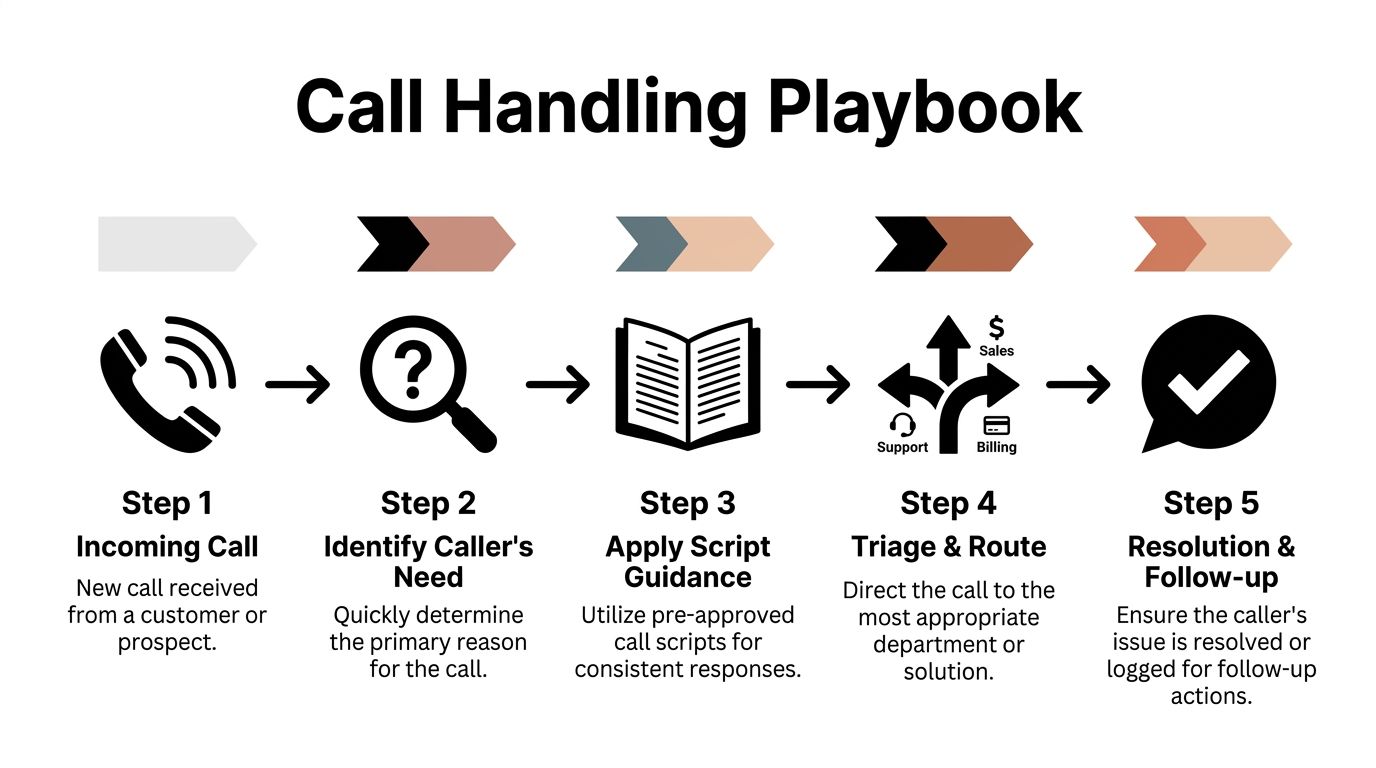
Most small businesses need only a handful of core call types covered well.
Use a greeting that is short, calm, and easy to deliver consistently.
Template
"Thanks for calling [Business Name], this is [Name]. How can I help you today?"
That works because it opens the door without wasting time. Avoid long intros that force the caller to wait through your script.
Price shoppers aren't a nuisance. They're often qualified buyers trying to decide whether to keep moving with you.
Template
"I can help with that. Pricing depends on the job and what you need, but I can give you a general range and help you with the next step. What are you looking to get done?"
The mistake is either refusing to discuss pricing at all or blurting out a number with no context. Give enough to keep the caller engaged, then move them toward a quote, visit, consult, or booking.
This call should end with commitment, not confusion.
Template
"Absolutely. I can help schedule that. What day works best for you, and is morning or afternoon better?"
Then confirm the essentials:
These calls often need a filter before they need an answer.
Template
"I can point you in the right direction. Can you tell me briefly what's going on so I can make sure this gets handled the right way?"
That one line does a lot. It calms the caller, gathers facts, and keeps the person answering from overcommitting too early.
A script alone isn't enough. You also need a decision tree.
A basic triage playbook looks like this:
Identify the caller type
New lead, existing customer, vendor, spam, urgent issue, routine question.
Tag the call intent
Price, booking, complaint, service question, follow-up, reschedule.
Choose the action
Answer now, collect intake, transfer, schedule, send text, create callback task.
Close with a commitment
Appointment confirmed, estimate requested, issue escalated, text sent, follow-up logged.
| If the caller says | Your system should do |
|---|---|
| "How much does this cost?" | Give the approved range, ask one qualifying question, offer quote process |
| "I'd like to schedule" | Open booking flow, collect contact details, confirm date and time |
| "I'm upset about my last visit" | Acknowledge frustration, gather account details, route for priority follow-up |
| "Do you serve Spanish-speaking customers?" | Move to bilingual handling or a translated workflow immediately |
Script the parts that must stay consistent.
Do not script every sentence of natural conversation. That's where calls start sounding stiff.
Field note: The best scripts sound like guardrails, not theater. They keep the call on track without making the caller feel managed.
Good scripts also prepare for transfer or automation later. That means using exact phrases, collecting the same details every time, and avoiding vague closes like "someone will get back to you."
End every script with one concrete outcome:
If you're serious about answering phone calls well, your playbook should fit on a few pages. Not a binder. Not a manual nobody opens. Just a concise set of responses and routing rules that your staff can use, and that an automated system can later follow with the same consistency.
The hardest calls aren't the simple ones. They're the emotional ones.
These are the moments where teams go off script, get defensive, rush the caller, or promise something they can't deliver. That's also where trust is won or lost.
The pressure gets worse when the caller is frustrated or multilingual. A common challenge in answering phone calls is adapting fast enough for those callers. Fast adaptation is important because 72% of callers hang up if they aren't understood within 30 seconds, and in diverse markets 35% of business calls can be non-English, according to OnSilent's discussion of phone communication challenges.
Typical bad response
"Well, you'll have to talk to the manager. I don't know what happened."
That response creates distance. It tells the caller nobody owns the problem.
Better response
"I'm sorry you're dealing with that. Let me get the key details so I can make sure this goes to the right person quickly."
Why it works:
After that, gather specifics in a fixed order. Name, phone number, date of service, and a short summary. Keep control by asking one question at a time.
Some callers aren't rude. They're testing firmness. Others are shopping five businesses and trying to force a discount on the spot.
Typical bad response
"We're cheaper than most places, and maybe we can work something out."
That line weakens your position and creates a low-trust negotiation.
Better response
"I can help you understand the pricing options. The right price depends on the scope, so let me ask a couple of quick questions and point you to the best fit."
That response keeps the conversation open without surrendering authority. It also shifts the focus from haggling to qualification.
Those phrases sound calm, not evasive.
Some people know they need help but can't explain it well. If your team gets impatient, the call dies.
Typical bad response
"I don't understand what you need."
Better response
"That's okay. Let's narrow it down together. Are you calling about a new service, an existing issue, or scheduling?"
This works because confusion usually drops when you offer categories. The caller doesn't need to generate the perfect explanation from scratch.
If a caller sounds scattered, give them choices. Don't demand precision before you've helped them organize the problem.
Here, many businesses lose otherwise valid leads. The caller makes an effort, the business struggles to understand, both sides get tense, and the call ends before anything useful happens.
Typical bad response
"Can you say that again? I still don't understand."
Repeated enough times, that line signals failure.
Better response
"One moment. I'll help in the language that works best for you," or "I can continue this by text with the details as well."
The key is fast adaptation. Delay creates embarrassment and drop-off.
| Situation | Wrong instinct | Better move |
|---|---|---|
| Angry caller | Defend the business | Acknowledge, collect facts, route clearly |
| Price pressure | Discount immediately | Clarify scope, then discuss options |
| Confused caller | Ask broader questions | Offer categories and guide them |
| Language friction | Repeat louder and slower | Switch channels or language support fast |
Achieving control without friction is the key skill. Strong call handling isn't about "winning" the conversation. It's about reducing effort for the caller while protecting the business from sloppy promises and emotional reactions.
That is emotionally tiring work when humans do it all day. Staff get worn down. Tone slips. Patience varies. Some people are excellent at de-escalation. Some aren't.
That's one reason structured systems matter so much. They reduce dependence on mood, memory, and improvisation. Difficult calls still need care, but they don't need chaos. The core skill is control without friction.
Once you've seen the weak points in human-only phone handling, the case for AI becomes practical, not theoretical.
The issue isn't whether people matter. They do. The issue is that people have limits. They get busy, need sleep, step away, focus on in-person customers, and can only take one conversation at a time. A phone system built around constant human availability will break under normal business conditions.
An AI receptionist solves the coverage problem by turning your phone process into something repeatable and always available.

High AI pickup rates come from a specific setup: unlimited parallel call handling, low-latency models, intelligent routing through CRM and calendars that can resolve 90%+ of inquiries autonomously, and multi-channel workflows such as mid-call texting that can boost conversion by 36%, based on Vida's analysis of call answer rate systems.
Don't start by asking AI to do everything. Start with the calls that are repetitive, urgent, and easy to standardize.
Good early use cases include:
These are high-volume tasks that drain staff attention but still need a fast, polished answer.
A lot of owners hear "AI receptionist" and picture a clumsy phone tree. That's outdated.
A modern setup should map directly to the problems you already know you have.
The fix is Unlimited Parallel Calls. Instead of forcing one caller into voicemail because the line is occupied, the system can handle multiple inbound conversations simultaneously.
For businesses with unpredictable bursts, that changes the math. You're not staffing for the worst fifteen minutes of the day. You're letting the system absorb the spike.
Use Active Times Control so the AI covers after-hours periods, overflow windows, or full-day support depending on your workflow.
Some businesses want AI all day as the first line. Others only want it after hours and during lunch or field work. Both models work if the handoff rules are clear.
Google Calendar Integration is particularly valuable here. The caller asks for an appointment, the system checks availability, offers time slots, and confirms the booking during the conversation.
That removes a huge source of friction. The caller doesn't need to wait for a callback. Your staff doesn't need to play phone tag.
Use Intake Form Workflows and CRM Integration. That gives you a repeatable way to collect the same facts on every lead, then push those details into your workflow automatically.
Instead of scribbled notes or half-remembered callbacks, you get structured information. That helps both sales and service teams.
The right move isn't always to keep talking. Texting Workflows can send links, confirmations, directions, or next steps during the call based on what the caller asks.
That creates momentum. The phone call starts the interaction, and text carries it forward.
The best systems don't pretend AI should replace every human conversation.
They should handle the routine layer cleanly, then route exceptions with context.
A practical handoff policy might look like this:
| Call type | Best first handler | Next action |
|---|---|---|
| New inquiry | AI | Collect details, book, or route |
| Simple scheduling | AI | Confirm appointment and text details |
| Complaint escalation | AI first intake | Notify human with context |
| Complex service issue | AI triage | Transfer or create callback task |
| VIP or urgent account | Rule-based routing | Send to designated team member |
That approach protects your staff from repetitive interruptions while preserving human attention for cases where judgment matters most.
Businesses often fail with AI because they configure the tool like a demo, not like an operating system.
Common mistakes include:
AI doesn't fix a broken process by magic. It makes a clear process available at all times.
When businesses evaluate tools for answering phone calls, they should think in layers:
Voice layer
Fast, natural conversation with reliable pickup.
Decision layer
Scripts, routing rules, intake prompts, escalation thresholds.
Action layer
Calendar booking, CRM logging, texting, notifications, webhooks.
Review layer
Recordings, transcripts, analytics, training updates.
If you're comparing vendors or building a broader automation strategy, it's also worth reviewing resources on AI Agents to understand how conversational systems plug into real workflows beyond simple chat or voice response.
One option in this category is My AI Front Desk for small businesses, which includes tools such as unlimited parallel calls, call forwarding, new number provisioning, calendar scheduling, CRM integration, multi-language support, texting workflows, call recordings, analytics, and active-time controls.
The biggest benefit isn't just "more technology." It's fewer dropped balls.
Staff stop interrupting deep work for routine calls. Owners stop checking voicemails between jobs. Leads stop waiting hours for a basic response. Existing customers reach a consistent front door even when the office is stretched.
In many businesses, AI also improves the caller experience because it is steady. It doesn't get flustered, rushed, distracted, or short-tempered late in the day. It asks the same qualifying questions, follows the same booking logic, and closes with the same next step.
That consistency is what turns phone handling from a staffing headache into a system.
A phone system can feel busy and still underperform.
I see this all the time with small businesses that finally get call coverage under control. The owner looks at call volume, sees a lot of activity, and assumes the system is working. Meanwhile, too many callers hang up, too few leads make it into the calendar, and existing customers call back because the first interaction did not move anything forward.
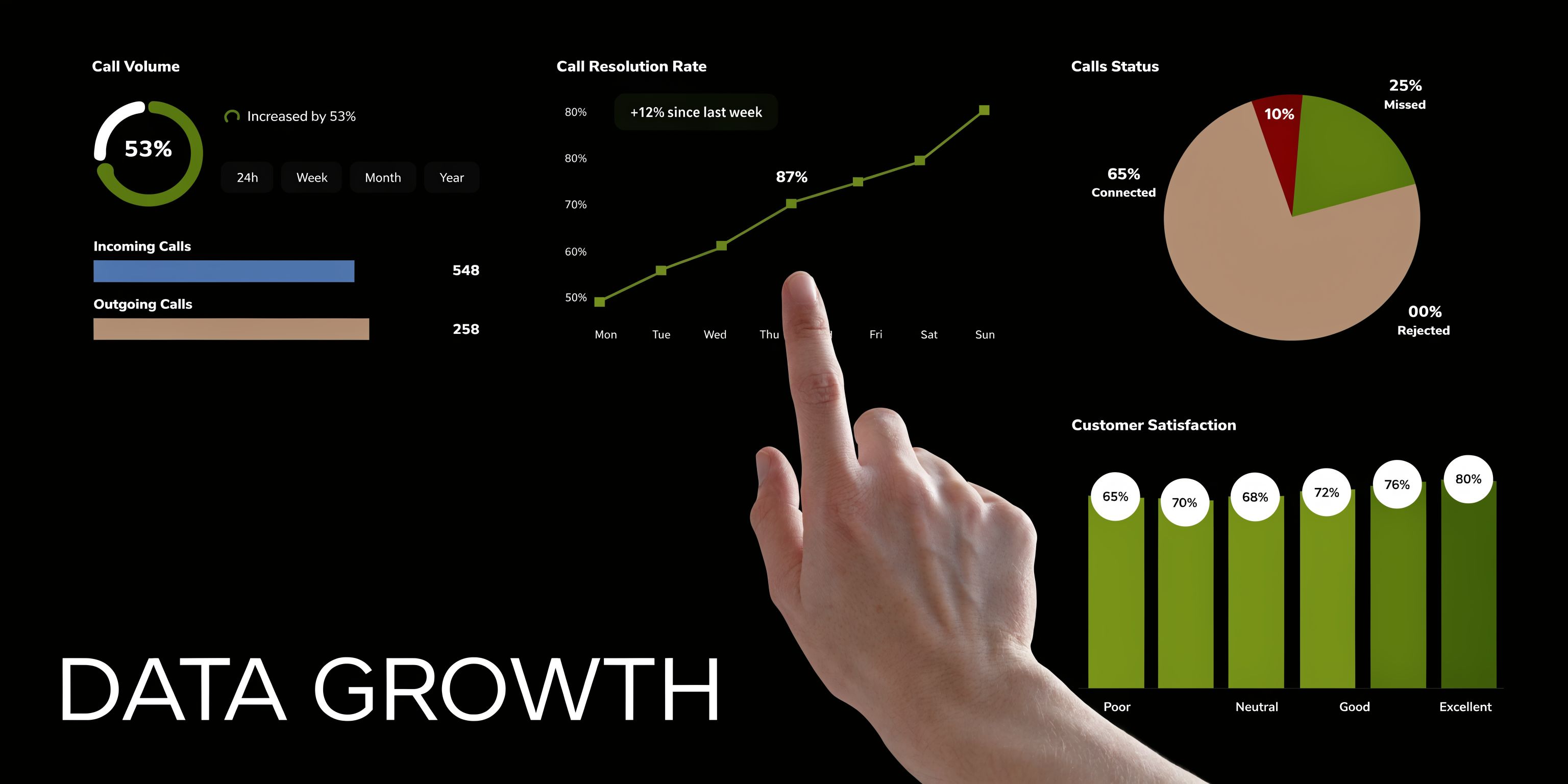
The right question is simple. Did the call produce a useful outcome?
That shifts your reporting away from vanity metrics and toward operating metrics. A healthy phone system answers consistently, collects the right details, routes accurately, and turns intent into a booked appointment, a qualified lead, or a resolved issue. If you already understand why missed calls create revenue loss, this practical guide on how to never miss a customer again shows what that looks like in day-to-day operations.
Start here.
If callers cannot reach a live person or an AI receptionist that can help, every downstream number gets worse. Track answer rate by time of day, day of week, service line, and marketing source. Patterns matter. A dip at lunch, after 4 p.m., or during field hours usually points to a coverage gap, not bad luck.
Speed shapes caller behavior.
A business can technically answer a high percentage of calls and still lose good leads if people wait too long before hearing a useful response. Watch how quickly calls are picked up, especially during peak periods. Fast answer times usually improve first impressions and reduce hang-ups.
Duration only matters in context.
Short calls can be a good sign if the caller got an answer, booked fast, or reached the right department immediately. They can also signal confusion, poor greeting quality, language mismatch, or a script that asks the wrong questions. Long calls can reflect strong service, or they can expose rambling intake, unclear policies, and repeated explanations.
Review outliers first. They usually show you where the friction lives.
This measures how often callers quit before getting help.
High abandonment often comes from slow pickup, confusing menus, weak routing, or a response flow that does not match what the caller needs. If abandonment rises outside business hours, the fix may be coverage. If it rises during business hours, the fix is usually process.
For growth, this is the number that carries the most weight.
Track outcomes that matter to the business:
A call answered without a next step is often just a better version of a missed call.
Dashboards help, but only if someone uses them to make operating decisions. I recommend pairing summary metrics with recordings, transcripts, and outcome tags. That combination shows both what happened and why.
| Metric | If it's weak | What to check |
|---|---|---|
| Answer rate | Calls still slip through | Routing coverage, active hours, overflow rules |
| Time to answer | Callers wait too long | Staffing gaps, simultaneous call handling, after-hours setup |
| Short duration | Calls end before anything happens | Greeting clarity, intent recognition, script fit, language support |
| Low conversion | Plenty of calls, few outcomes | Intake questions, booking process, call-to-action, handoff quality |
| High repeat calls | Customers call again for the same issue | Resolution quality, follow-up messages, note accuracy |
One caution here. Do not evaluate your phone performance on averages alone. A weekly average can hide a serious problem that only happens after hours, during lunch, or when one staff member is out. Segment the data so you can see where the system breaks under normal business conditions.
Monthly reporting is too slow for phone operations.
A simple review cadence works better:
AI makes this process easier because the records are consistent. Every call can be tagged, transcribed, scored, and pushed into the same workflow. That gives you a cleaner view of where leads drop off, where callers ask the same questions, and where your script needs work.
The businesses that improve fastest are rarely the ones with the fanciest setup. They are the ones that review the numbers, listen to real calls, and keep tightening the system until more conversations turn into revenue.
For many small businesses, the phone feels like a nuisance. It interrupts work, creates pressure, and exposes every staffing gap you have.
It doesn't have to work that way.
A well-run phone system captures leads, protects existing customers, and keeps your team focused on work that needs human attention. That starts with simple things: clear scripts, better triage, and stronger handling of difficult conversations. Then it scales when you add automation that answers every time, collects the right details, and moves callers toward a real outcome.
That's the shift. Stop treating missed calls as an unavoidable cost of being busy. Treat them as a fixable operations problem.
If your current setup still depends on one person being available at the perfect moment, it's fragile. A resilient system gives callers help even when you're unavailable, after hours, or already on another line. That's how answering phone calls becomes a growth function instead of a constant leak.
If you want a practical example of what that change looks like, this piece on never miss a customer again is a useful next read.
If your business depends on inbound calls, don't settle for voicemail and callbacks as the default. My AI Front Desk gives small businesses a way to answer every call, qualify leads, book appointments, and keep communication moving even when the team is busy or off the clock.
Start your free trial for My AI Front Desk today, it takes minutes to setup!


