
Want to know if your AI receptionist is actually helping your business grow? Start tracking these 7 key metrics to measure its impact on revenue, efficiency, and customer satisfaction:
Why track these metrics? They give you hard data on what's working, what needs fixing, and how to optimize your AI receptionist for better results. For instance, businesses using AI systems with high call answer rates and fast response times often see revenue growth of 15–30%.
Quick Tip: Use an analytics dashboard to monitor these metrics in real time, set performance benchmarks, and make data-driven improvements.
Let’s dive deeper into each metric and how they can transform your AI receptionist into a tool that drives growth.
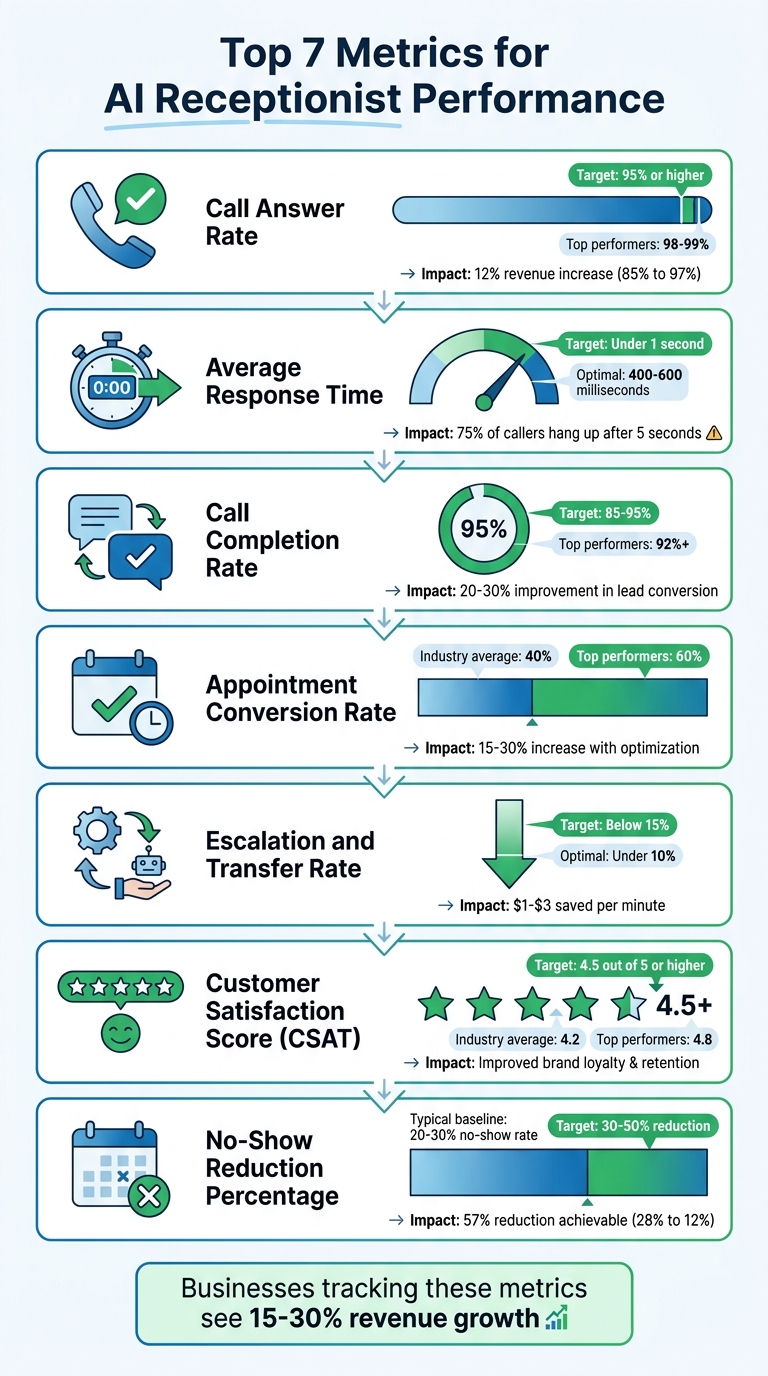
7 Key AI Receptionist Performance Metrics with Target Benchmarks
The Call Answer Rate is a critical metric that directly influences both revenue and customer satisfaction. This percentage reflects how many incoming calls your AI receptionist successfully answers, calculated as: (answered calls ÷ total calls) × 100%. Every missed call represents a missed chance to engage with a potential customer, making this metric essential to track.
A high Call Answer Rate ensures that your AI receptionist is consistently available to address customer inquiries. According to 2024 industry benchmarks, top-performing AI systems achieve 98–99% answer rates, far surpassing the 80–85% range typical of human receptionists. If your rate falls below 95%, it could point to issues like network delays, incorrect business hours settings, or system overloads that prevent calls from being answered.
Platforms like My AI Front Desk maintain high answer rates by offering features such as unlimited parallel calls and active times control, ensuring no caller is left waiting or sent to voicemail. Advanced AI tools, including GPT-4 and Claude, combined with pronunciation guides and multi-language capabilities, enable accurate and efficient responses from the very first ring.
A high Call Answer Rate doesn’t just mean more calls answered - it also speeds up the connection process. An AI receptionist capable of answering 98% of calls within 2 seconds can reduce average handle times by 20–30% compared to human teams, ensuring faster service and greater efficiency.
Proper configuration plays a big role in maintaining this efficiency. Features like adjustable call duration and auto hangup help streamline operations without sacrificing quality. Additionally, real-time analytics dashboards can track call patterns, allowing businesses to quickly address issues like peak-hour call overload. This proactive approach minimizes wait times and improves lead conversion rates.
Research from 2023 involving 500 small and medium businesses found that using AI front desks led to a 27% increase in answered calls, which contributed to a 15% boost in lead volume. Promptly answered calls are more likely to turn into booked appointments, especially when paired with tools like Google Calendar integration. Post-call notifications further ensure that teams can follow up immediately, reducing the risk of losing potential leads.
"Every single abandoned call is a missed opportunity. It could be a lost sale, an unhappy customer who will call back even more frustrated, or worse, a customer who is now looking up your competitor's number." - My AI Front Desk
Missed calls can have a significant financial impact on small businesses. For instance, raising the answer rate from 85% to 97% has been shown to yield up to a 12% increase in revenue, according to a U.S. small business case study. Features like texting workflows allow businesses to capture leads that might otherwise be lost.
Additionally, with tools like 24/7 support and call forwarding techniques, AI receptionists can handle after-hours calls that might have gone unanswered. Since most callers don’t leave voicemails, having an analytics dashboard to identify issues - such as area code mismatches or peak-hour bottlenecks - makes it easier to make necessary adjustments and recover lost opportunities efficiently.
Average Response Time tracks how quickly an AI receptionist responds after a caller finishes speaking. Ideally, this should be under 1 second. If it stretches beyond 2 seconds, the risk of losing callers increases. Research shows that 75% of callers will hang up if they experience wait times longer than 5 seconds. This makes speed a critical factor in maintaining smooth and efficient call handling.
The best AI systems deliver responses in under 500 milliseconds, matching the natural conversational flow of 400–600 milliseconds. This speed matters - voice assistants operating within this range see a 20% uptick in task completion rates. A quick AI receptionist not only shortens call durations but also manages 20–30% more inquiries compared to slower systems, significantly boosting overall efficiency.
For example, My AI Front Desk achieves these lightning-fast response times by leveraging cutting-edge AI models like GPT-4, Claude, and Grok. It also offers tools like pronunciation guides and a voice library of over 100 premium options. Its real-time analytics dashboard ensures that any delays are quickly identified and resolved, keeping operations smooth and caller experiences seamless.
Quick responses do more than just save time - they actively improve customer engagement. Reducing response time from 2.5 seconds to 0.8 seconds can increase first-contact resolution rates by 15%. Faster interactions also lead to a 15–25% boost in lead conversions, as natural and fluid conversations help build trust. When callers feel heard and engaged, they’re more likely to book appointments or share critical information. Plus, every second shaved off response time can enhance satisfaction by 10–20%.
AI systems capable of responding in under 1 second see 40% fewer dropped calls, even during busy periods. Features like unlimited parallel call handling ensure that no caller is left waiting, redirected to voicemail, or stuck on hold. This level of responsiveness guarantees consistent service, no matter the call volume.
Call Completion Rate represents the percentage of incoming calls that an AI receptionist successfully handles to a natural conclusion - without being prematurely disconnected or unnecessarily transferred. The formula is straightforward: (Number of Completed Calls / Total Incoming Calls) × 100. For instance, if 850 out of 1,000 calls are completed, the rate is 85%. Industry standards typically fall between 80% and 95%, with top-tier systems reaching 92% or more.
Accuracy is the backbone of strong completion rates. When an AI system accurately understands what callers need and delivers appropriate responses, it prevents frustration and reduces the chances of hang-ups. Advanced AI models like GPT-4, for example, boast over 95% accuracy in recognizing caller intent. This high level of precision minimizes miscommunication and ensures smoother interactions. Tools like pronunciation guides also play a role by improving the system’s ability to correctly interpret names or specific instructions. My AI Front Desk combines these advanced models with customizable pronunciation features to consistently achieve completion rates exceeding 90%.
A high completion rate has a clear and direct effect on lead conversion. When 85% to 95% of calls are fully resolved, more prospects are successfully qualified, appointments are booked, and inquiries are addressed. Small businesses have reported seeing lead conversion rates improve by 20% to 30% after boosting their call completion rates. For example, businesses transitioning from a 70% completion rate with manual handling to 93% with AI-driven workflows - like texting and intake forms - have seen significant gains.
Dropped or incomplete calls can translate into lost leads and wasted resources. By striving for completion rates above 90%, businesses can cut down on expensive manual follow-ups and reduce dropped calls by as much as 40%. Features designed to handle peak-hour call volumes also help maintain steady service quality. Up next, we’ll explore how appointment conversion rates further demonstrate the effectiveness of these systems.
Turning interactions into revenue hinges on how effectively you convert inquiries into scheduled appointments. The Appointment Conversion Rate tracks the percentage of interactions that result in booked appointments. The formula is straightforward: (Number of Appointments Booked / Total Qualified Interactions) × 100. For instance, if your AI receptionist manages 1,000 calls and books 400 appointments, the conversion rate is 40%. Industry averages hover around 40%, but top-tier systems can achieve 60% or more.
Getting the details right is key to securing appointments. Advanced AI models, such as GPT-4 and Claude, significantly reduce booking errors - like scheduling the wrong time or service - by up to 30% compared to simpler systems. Take the example of a law firm using My AI Front Desk: they boosted their appointment conversion rate from 28% to 37% across 850 calls by integrating Google Calendar and intake forms. They also cut no-show rates by 15%. Features like multi-language support further ensure that even complex inquiries are handled smoothly, avoiding the frustration that might deter potential clients.
Quick response times are essential for keeping potential customers engaged. AI systems with response times under two seconds maintain a natural conversational flow, reducing drop-offs and increasing booking rates by 25%. During busy periods, these systems can handle multiple calls simultaneously and resolve inquiries in under a minute. This speed not only improves accuracy but also enhances overall operational efficiency, ensuring that no opportunity is missed.
A strong appointment conversion rate reflects effective lead management. When 40% to 60% of qualified calls turn into bookings, businesses experience measurable revenue growth. For example, My AI Front Desk users have reported a 50% lead-to-appointment conversion rate, thanks to CRM integrations and post-call notifications. Additionally, personalized scheduling experiences drive caller satisfaction, with 90% of users reporting positive feedback. Booking appointments during the first call eliminates barriers - 78% of customers choose the first company to respond, and leads contacted within five minutes are 21 times more likely to convert than those reached later.
High conversion rates also mean fewer missed opportunities and less reliance on manual follow-ups. AI receptionists available 24/7 ensure that after-hours calls are no longer lost to voicemail - an expectation for 80% of consumers. Tools like call forwarding, texting workflows, and Zapier integration help businesses capture revenue that might otherwise slip through the cracks. For example, My AI Front Desk offers 200+ free minutes monthly, handling 170 to 250 calls and saving 10–15 hours each week on scheduling tasks. Between 2023 and 2024, businesses using AI receptionists with calendar integrations saw conversion rates increase by 15% to 30%. These gains in efficiency and revenue potential lay the foundation for even greater performance improvements.
Once you’ve reviewed conversion metrics, it’s time to look at escalation rates - this tells you how well your AI handles more complex or unique queries. The Escalation and Transfer Rate measures the percentage of calls your AI receptionist transfers to a human agent. It’s calculated as (Number of Escalated or Transferred Calls / Total Calls) × 100. Ideally, this rate should stay below 10% to 15%, indicating that your AI is managing most interactions on its own. If the rate exceeds 20%, it may point to gaps in training or overly complicated queries that need addressing. Fine-tuning your AI’s escalation process ensures that only the most challenging inquiries reach human agents, keeping operations efficient.
A low escalation rate is a strong indicator of your AI’s ability to resolve routine queries without mistakes. Leading AI models like GPT-4, Claude, and Grok are capable of independently managing 80% to 90% of calls by interpreting context accurately and delivering reliable answers. For example, in 2023, "Local Plumbing Pros", a client of My AI Front Desk, successfully reduced their transfer rate from 28% to just 9% within 90 days. This adjustment allowed them to handle 1,200 calls monthly while cutting missed opportunities by 34%.
Digging into escalation data helps pinpoint where your AI system might need improvement. For instance, systems with response times under two seconds and robust analytics dashboards can identify patterns in escalations, enabling you to automate more scenarios using tools like Zapier or API workflows. These optimizations often lead to 20% to 30% quicker overall resolutions by minimizing delays caused by unnecessary transfers. When your AI efficiently handles routine calls, your human agents can focus on more complex, high-value tasks, which directly benefits lead conversion and customer satisfaction.
Keeping your escalation rate in the sweet spot - between 5% and 20% - ensures smooth call handoffs. Features like post-call notifications and Google Calendar integration help prevent dropped calls and frustrated customers. My AI Front Desk users have reported a 15% to 25% boost in conversion rates thanks to controlled escalations. Tools like shareable call links and CRM integrations also play a big role, helping maintain customer satisfaction scores above 4.5 out of 5. Industry data backs this up: AI receptionists with escalation rates below 12% saw a 28% improvement in overall call resolution in 2024. Top-performing systems often hit rates under 10% with proper adjustments.
Lowering escalation rates doesn’t just improve customer experience - it also trims operational costs. Businesses can save $1 to $3 per minute by reducing unnecessary transfers. Analytics dashboards make it easier to track and address inefficiencies, often cutting them by 30%. For example, My AI Front Desk offers 200+ free minutes per month, enabling businesses to handle 170 to 250 calls while refining their systems to achieve sub-10% escalation rates. This not only saves time and money but also allows staff to focus on revenue-generating tasks.
Customer Satisfaction Scores (CSAT) are a crucial metric for assessing how well your AI receptionist meets caller expectations. These scores are typically gathered through post-call surveys asking questions like, "How satisfied were you with the interaction?" on a 1–5 scale. High scores indicate that your AI is building trust, while low scores point to potential frustration. Leading AI receptionists consistently achieve scores above 4.5 out of 5, with the industry average hovering around 4.2.
Accuracy plays a huge role in customer satisfaction. When your AI receptionist understands inquiries correctly and provides relevant answers, callers feel valued and understood. Advanced AI models like GPT-4 and Claude boast accuracy rates exceeding 90%, which studies show can increase CSAT by 15% to 25%. Tools such as pronunciation guides and multi-language support further enhance accuracy by reducing miscommunication. For instance, a marketing agency reported a 20% jump in their CSAT - from 70% to 90% - after deploying an AI receptionist capable of responding accurately and within five minutes. This improvement also boosted lead qualification likelihood by an impressive 21x.
While speed is important, it must go hand-in-hand with quality. Response times under two seconds and resolutions within three minutes are key drivers of higher satisfaction. Studies reveal that every second shaved off latency can enhance CSAT by 5%. Additionally, calls resolved in under three minutes see satisfaction rates of 85%, compared to just 70% for longer interactions. For example, between January and June 2023, a dental chain used an AI receptionist to increase its CSAT from 82% to 94% across 5,000 interactions. By enabling texting workflows and post-call webhooks, they also reduced no-shows by 28% and generated an additional $450,000 in revenue[info]. Quick and effective resolutions not only boost satisfaction but also lay the groundwork for better lead conversion.
High CSAT scores can directly impact your bottom line. Satisfied callers are three times more likely to convert into paying customers, making CSAT a reliable predictor of revenue growth. Businesses with CSAT exceeding 4.0 often see conversion rates climb by 25% or more. My AI Front Desk enhances this process by combining satisfaction tracking with conversion analytics, allowing businesses to identify which interactions lead to successful conversions. Features like intake form workflows and CRM integration ensure a smooth transition from an initial call to a closed deal, maximizing the value of every positive interaction.
Monitoring CSAT can help identify and address inefficiencies before they escalate. For example, low scores tied to specific call types might highlight areas needing improvement, such as additional training or process adjustments. In Q1 2024, Roto-Rooter implemented an AI receptionist with custom pronunciation guides and Google Calendar integration, raising their CSAT from 3.9 to 4.6 out of 5 across 1,200 calls. This 22% improvement led to an 18% increase in booked appointments[info]. Features like unlimited parallel calls, auto hangup, and active time controls reduce wait times and errors, often delivering a 20% lift in CSAT. By cutting missed calls to under 5% and eliminating scheduling mistakes, businesses not only improve satisfaction but also drive revenue growth.
No-Show Reduction Percentage tracks how much missed appointments have decreased compared to a baseline. The formula is simple: ((Baseline No-Show Rate - Current No-Show Rate) / Baseline No-Show Rate) × 100. For many service businesses, no-shows typically hover between 20% and 30%, which translates to a direct hit on revenue. An AI receptionist can significantly lower this percentage by automating confirmations, reminders, and scheduling. Cutting no-shows is a key way to ensure every interaction contributes to your revenue goals. Let’s explore how precision and efficiency help achieve this.
Reducing no-shows starts with accurate appointment details. When an AI receptionist captures dates, times, and customer information flawlessly, it eliminates errors that lead to missed appointments. Studies highlight that AI scheduling can reduce no-shows by 15% to 25% compared to human receptionists, who are more prone to miscommunication or data entry mistakes. Features like multi-language support and pronunciation tools further enhance accuracy, ensuring every customer gets the correct confirmation details.
Speed plays a critical role in securing appointments. AI receptionists, with response times of under two seconds, enable quick bookings that help lock in customer commitment. Research shows that resolving bookings in under 60 seconds can reduce no-show rates by 10% to 20%, as customers are more likely to follow through when the process is smooth and hassle-free. Additionally, AI systems can handle multiple calls simultaneously, eliminating hold times, while auto hangup features ensure the scheduling process wraps up efficiently.
Lower no-show rates directly impact revenue and customer satisfaction. For example, a dental clinic using My AI Front Desk cut their no-show rate from 28% to 12% - a 57% drop - by integrating Google Calendar and AI-powered text reminders tailored to call context. This change led to a 35% boost in lead conversion, as analytics revealed that personalized text reminders played a major role. Businesses that achieve higher show-up rates often see more repeat customers and increased revenue, creating a cycle of growth and efficiency.
Every no-show represents wasted time and lost revenue. By tracking no-show patterns in an analytics dashboard, businesses can identify trends - like specific appointment types or time slots with higher no-show rates - and adjust AI reminder workflows accordingly. Companies report up to 30% fewer missed opportunities after implementing AI confirmation systems, which also reduce operational costs by 15% to 20%. Features like post-call webhooks and notifications keep teams informed about scheduled appointments, enabling proactive calendar management and maximizing productive time.
Keeping tabs on these metrics is key to making your AI receptionist as effective as possible. The best way to do this is by combining automated dashboards, call recording reviews, and regular performance evaluations. Start with a dashboard that provides real-time data for essential metrics like call answer rate, response time, call completion rate, appointment conversion rate, escalation rate, customer satisfaction, and no-show reduction. For example, My AI Front Desk's Analytics Dashboard offers clear visual insights, making it easy for managers to identify trends. Set up automated alerts for specific thresholds - such as response times exceeding 10 seconds, call answer rates dropping below 85%, or escalation rates going over 20%. Post-call webhooks can flag these issues for immediate attention.
To dig deeper, review call recordings to uncover the reasons behind the numbers. Dashboards tell you what happened, but recordings explain why. For instance, if customer satisfaction scores are low, you can analyze recordings to identify the root cause. Aim to review 5–10% of interactions weekly using shareable call links. Use a standardized checklist based on your seven key metrics to assess whether the AI responded promptly, handled requests effectively, and maintained appropriate timing. One My AI Front Desk client saw a 28% drop in their no-show rate (from 18% to 13%) within six months by pairing regular dashboard monitoring with weekly call reviews. This improvement resulted in 40% more completed jobs.
Next, integrate tracking tools with your existing systems for seamless data management. Connect your AI receptionist to CRM platforms using tools like Zapier Integration to automatically log interactions, leads, and conversions. Set up post-call notifications to alert team members when specific conditions arise, such as a frustrated caller or an escalation request. Additionally, configure intake forms to collect detailed caller information that feeds directly into your analytics, ensuring a clear data trail from the first point of contact to the final outcome.
Establish a structured review schedule to keep everything on track. Conduct weekly 30–60 minute reviews of dashboard metrics and sample recordings. Follow this with monthly comprehensive analyses to compare performance against benchmarks. Finally, hold quarterly business reviews to examine long-term trends. This approach ensures consistent monitoring without overwhelming your team.
"Understanding and utilizing your call center's performance metrics is crucial for strategic decision-making." – My AI Front Desk
Businesses using AI analytics dashboards often report operational efficiency gains of 25–40%, thanks to real-time metric tracking.
To ensure accuracy, validate AI-generated metrics through human reviews. Spot-check recorded calls weekly to confirm that calls marked as "completed" actually resolved customer issues and that response times match the data. Pair quantitative dashboard insights with qualitative feedback from customer satisfaction surveys sent via text immediately after calls. This combination of data ensures your AI receptionist consistently delivers measurable performance improvements.
When setting performance goals for your AI receptionist, tailor them to the size of your business. For smaller businesses with 1-10 employees, aim for a 90-95% call answer rate to start, while larger operations with 50+ employees should strive for 99%. Keep average response times under 2 seconds - top-tier AI models like GPT-4 and Claude can often respond in under 1 second, ensuring smooth and natural interactions.
These performance targets align with the key metrics mentioned earlier, helping you measure the impact of your AI receptionist effectively.
For call completion rates, aim for 85-95%. Solo entrepreneurs managing simpler workflows might begin at 80% and gradually improve. In terms of appointment conversion, service-based businesses typically see rates between 20-40%. Startups should target 15-25% initially, with the potential to grow to 35% or more when incorporating tools like CRMs. Keep escalation rates below 10% to limit the need for human intervention.
Customer satisfaction scores are another key metric. Aim for at least 4.5 out of 5, with top-performing AI receptionists achieving scores as high as 4.8. Current industry data shows AI voice agents can reach an 88% satisfaction rate, outperforming human agents, who average 82%. For no-show reduction, target a 30-50% improvement over your pre-AI baseline. Features like automated reminders and calendar integrations can help decrease no-show rates from 18% to around 13% within six months.
"The goal isn't just to be fast; it's to be fast and effective." – My AI Front Desk
To ensure sustained success, focus on gradual progress. Begin by tracking your current performance over a 30-day period, then set goals to improve your weakest areas by 10-20%. For example, a marketing agency that adopted AI saw their lead conversion rates jump from 15% to 38% and customer satisfaction improve from 70% to 90% by prioritizing faster response times and consistent follow-ups. Adjust your targets quarterly, keeping in mind seasonal trends - no-show rates often increase during the holidays, while call volumes may vary depending on your business cycle.
Now that you've outlined clear performance goals, it's time to make the most of tracking the right metrics.
By focusing on key performance indicators like Call Answer Rate, Average Response Time, Call Completion Rate, Appointment Conversion Rate, Escalation and Transfer Rate, Customer Satisfaction Scores, and No-Show Reduction Percentage, you can transform your AI receptionist into a tool that not only enhances efficiency but also drives revenue. These metrics provide a clear view of how your AI is performing and pinpoint areas that need improvement, helping you streamline communication and make smarter, data-backed decisions.
"What gets measured gets managed." – My AI Front Desk
Tracking metrics isn't just about numbers - it’s about understanding how your AI is impacting your bottom line. For instance, knowing that your AI converted 38% of leads instead of 15%, or saved $12,000 this month by scheduling after-hours appointments, gives you actionable insights that eliminate guesswork and enable strategic adjustments.
"Feelings don't pay bills. You need cold, hard data on what's driving revenue." – My AI Front Desk
Using an analytics dashboard is essential for keeping tabs on these metrics. Tools like My AI Front Desk provide detailed call analytics, post-call updates, and CRM and support integration, allowing you to centralize your data. This makes it easier to set benchmarks, address weak points, and focus on targeted improvements.
Businesses that actively measure and refine their performance often see significant results. For example, a marketing agency boosted customer satisfaction from 70% to 90% by using data to continuously improve their processes. By treating your metrics as part of a feedback loop, your AI receptionist can achieve similarly impressive outcomes when you act on the insights the data provides.
Commit to applying these strategies over the next 30 to 90 days, and you’ll see measurable progress.
When it comes to improving customer experience and boosting operational efficiency, three metrics stand out: response time, call answer speed, and first call resolution. These are not just numbers - they represent how quickly and effectively your team interacts with customers.
Focusing on these areas ensures that customer interactions are smooth, timely, and effective - key ingredients for happy customers and a thriving business.
To get started, gather data on your current customer interaction metrics. Key areas to track include response time, call duration, first contact resolution, and lead conversion rates. Use analytics tools or even manual tracking methods to ensure accuracy. These numbers will act as your benchmarks, allowing you to measure how things change after implementing the AI receptionist and assess its overall impact effectively.
If your transfer rate is high, it might be time to take a closer look at how calls are being handled. Start by refining your call-handling processes. Work on reducing response times and ensuring your AI receptionist is properly qualifying leads. By cutting down on unnecessary transfers, you can make operations smoother and boost efficiency across the board.
Start your free trial for My AI Front Desk today, it takes minutes to setup!


