
Missed appointments and unanswered calls are costing businesses billions annually. AI is changing that by automating appointment scheduling, reducing no-shows, and improving efficiency. Here's how:
AI scheduling systems solve these problems by:
The results? Businesses save time, cut costs, and improve customer satisfaction. For example, AI can reduce no-shows by up to 45% while saving over 20 hours of manual work weekly. With 68% of customers expecting 24/7 booking options, AI ensures no opportunities are lost after hours.
Want to save money and keep customers happy? AI-powered scheduling might be the solution.
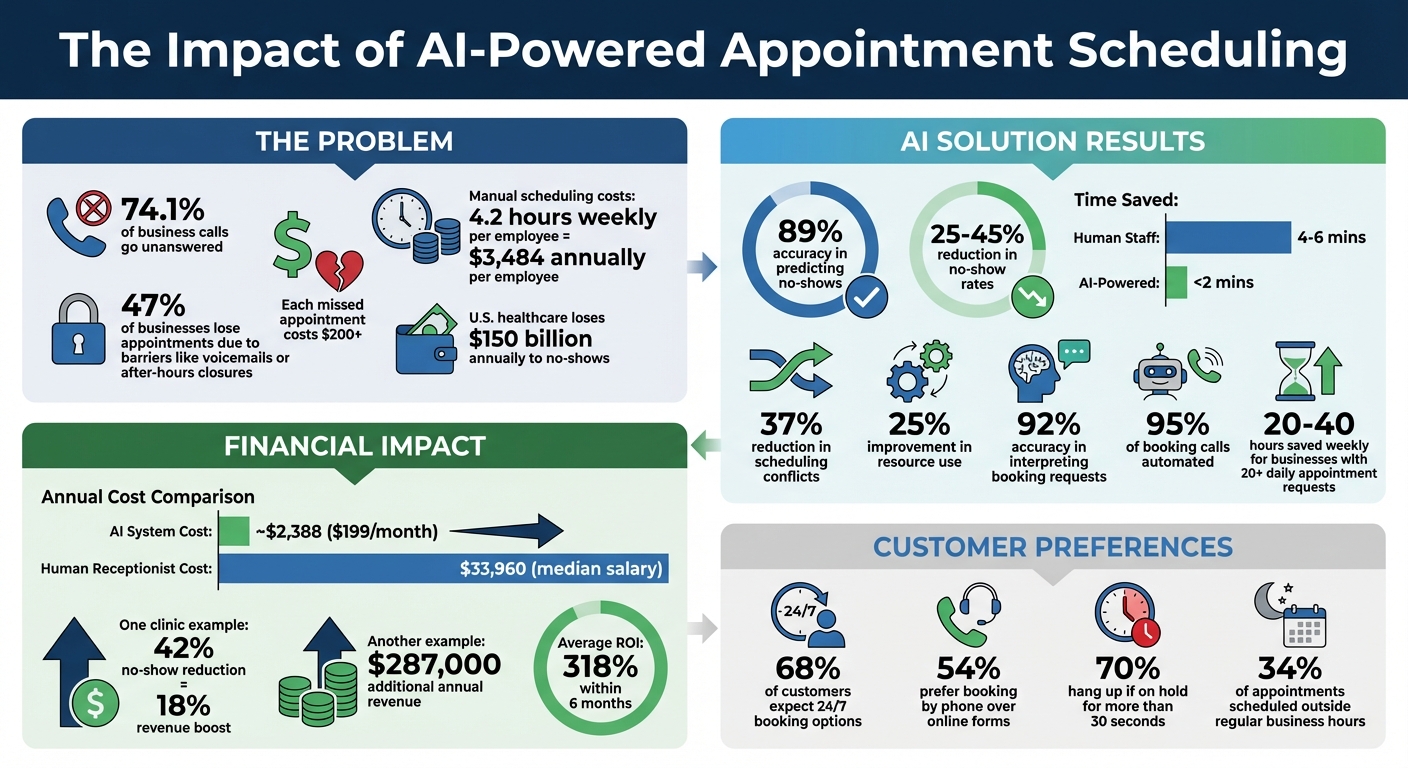
AI Appointment Scheduling Statistics: Cost Savings and ROI Impact
AI is reshaping appointment scheduling by seamlessly aligning customer requests with real-time availability. Behind the scenes, these systems juggle multiple variables to create what feels like a smooth and effortless booking experience. Let’s break down how these algorithms tackle common scheduling challenges.
AI scheduling systems excel at syncing with digital calendars like Google Calendar, Outlook, and iCal through two-way synchronization. This feature ensures calendars are always up to date, eliminating double-bookings and keeping things running smoothly. When a customer requests an appointment, the AI evaluates several factors in real time, such as staff availability, service duration, and the priority of the request.
The system distinguishes between two types of constraints: "hard constraints" (non-negotiable rules like business hours) and "soft constraints" (preferences like choosing a specific technician). This dual-layered approach creates schedules that honor both operational requirements and customer preferences. If a cancellation occurs, the AI steps in to reschedule and fill the open slot automatically. In fact, machine learning has been shown to reduce scheduling conflicts by 37% and improve resource use by 25%.
AI doesn’t just match time slots - it also works to predict and prevent no-shows. By analyzing factors like customer history, it calculates a "no-show score", achieving an impressive 89% accuracy in identifying at-risk customers.
For example, in 2017, Johns Hopkins Community Physicians introduced a machine-learning system at two clinics to address a 20% no-show rate. The algorithm flagged high-risk patients, enabling targeted outreach, and filled those slots with urgent cases. This strategy added over 70 pediatric appointments per week and reduced the no-show rate among high-risk patients by 16%. As Scott Levin, Associate Professor of Emergency Medicine at Johns Hopkins, explained:
"The new approach... has allowed the clinic to add over 70 pediatric appointments to their schedule per week, improving outpatient access for more children while also reducing the no-show rate 16 percent for patients who are highly likely to miss scheduled appointments."
To further minimize no-shows, AI sends automated reminders via SMS, email, and voice calls. These reminders are tailored to each individual’s response patterns, cutting no-show rates by 29% to 30%. If a no-show seems likely, the system automatically fills the gap using a smart waitlist and follows up to encourage rescheduling.
While predictive analytics tackle attendance issues, Natural Language Processing (NLP) makes booking easier for customers. NLP allows AI-powered receptionists to handle requests through phone calls, texts, and chat, mimicking human-like conversations. The technology identifies intent (e.g., booking, rescheduling, or canceling), extracts key details (like names, dates, and service types), and understands context (e.g., whether "next Friday" means this week or the following week).
For instance, if a customer says, “I need an appointment next Tuesday afternoon,” NLP translates this into structured data that can be matched against the live calendar.
NLP systems are highly accurate, correctly interpreting 92% of booking requests. They also detect urgency keywords like "emergency" or "ASAP" to prioritize critical cases. This capability boosts customer satisfaction rates to 92%, compared to 88% for human-handled bookings. Additionally, for the 54% of customers who still prefer calling over online forms, NLP-powered AI receptionists provide fast, efficient service - no hold times, no voicemails. On average, AI agents complete bookings in under 2 minutes, compared to 4–6 minutes for human staff.
AI-driven scheduling systems bring measurable advantages that enhance efficiency, increase revenue, and improve customer satisfaction, all while positively impacting business operations.
Did you know that manual scheduling takes an average of 4.2 hours per week per employee? AI eliminates this time-consuming task by automating up to 95% of booking calls and requests. From checking calendars to sending confirmations, the system handles it all without human involvement. For businesses managing 20 or more appointment requests daily, this can save 20 to 40 hours each week.
AI also processes unlimited calls simultaneously, removing hold times entirely. This is especially helpful for dental offices, which typically miss 30% to 35% of incoming calls during regular business hours without AI assistance. In addition, AI systems use real-time synchronization to avoid scheduling conflicts and optimize resources. When cancellations happen, the system instantly adjusts schedules to fill gaps based on urgency and availability. This means staff can shift their focus from phones to more valuable tasks like patient care or solving complex issues. These operational efficiencies reduce costs while driving revenue growth.
AI-powered scheduling has a noticeable financial impact. By using predictive analytics and automated reminders, it can cut no-show rates by 25% to 45%.
Consider this example: A clinic network with a 28% no-show rate and $180,000 in monthly losses introduced an AI scheduling platform. Within three months, their no-show rate dropped to 16% - a 42% reduction. This also decreased wasted provider time by 60% and boosted overall revenue by 18%. Another primary care network saw similar results, reducing no-shows by 31%, unfilled slots by 24%, and administrative scheduling time by 62%. The result? An additional $287,000 in annual revenue.
AI also captures revenue that might otherwise be lost. Research shows that 68% of customers prefer businesses offering 24/7 booking. AI ensures every call is answered immediately, preventing high-intent leads from going to competitors. The cost comparison is eye-opening: a human receptionist earns a median salary of $33,960 per year and works limited hours. In contrast, an AI system costs about $2,388 annually (based on a $199/month plan) and operates 24/7.
Streamlined booking processes lead directly to happier customers. AI systems answer calls within 2–3 rings and complete bookings in less than a minute - far faster than the minutes or even days it can take to return calls with traditional methods. Speed is crucial: a 5-minute delay in responding to an online lead can reduce conversion rates by 80%, and nearly 70% of customers hang up if placed on hold for more than 30 seconds.
AI also personalizes the experience by analyzing historical data to recommend preferred staff, locations, or time slots, making clients feel valued. With multilingual support, businesses can better engage with diverse markets. Automated reminders via SMS or email keep appointments top-of-mind and allow easy modifications, fostering trust and reliability.
The results speak for themselves: businesses report a 318% ROI within six months due to improved retention. AI systems also capture the 34% of appointments scheduled outside of regular business hours, meeting the demand for 24/7 availability.
AI scheduling systems integrate effortlessly with tools you already use, reducing manual work and avoiding double bookings. These connections simplify data management and improve every step of the appointment process.
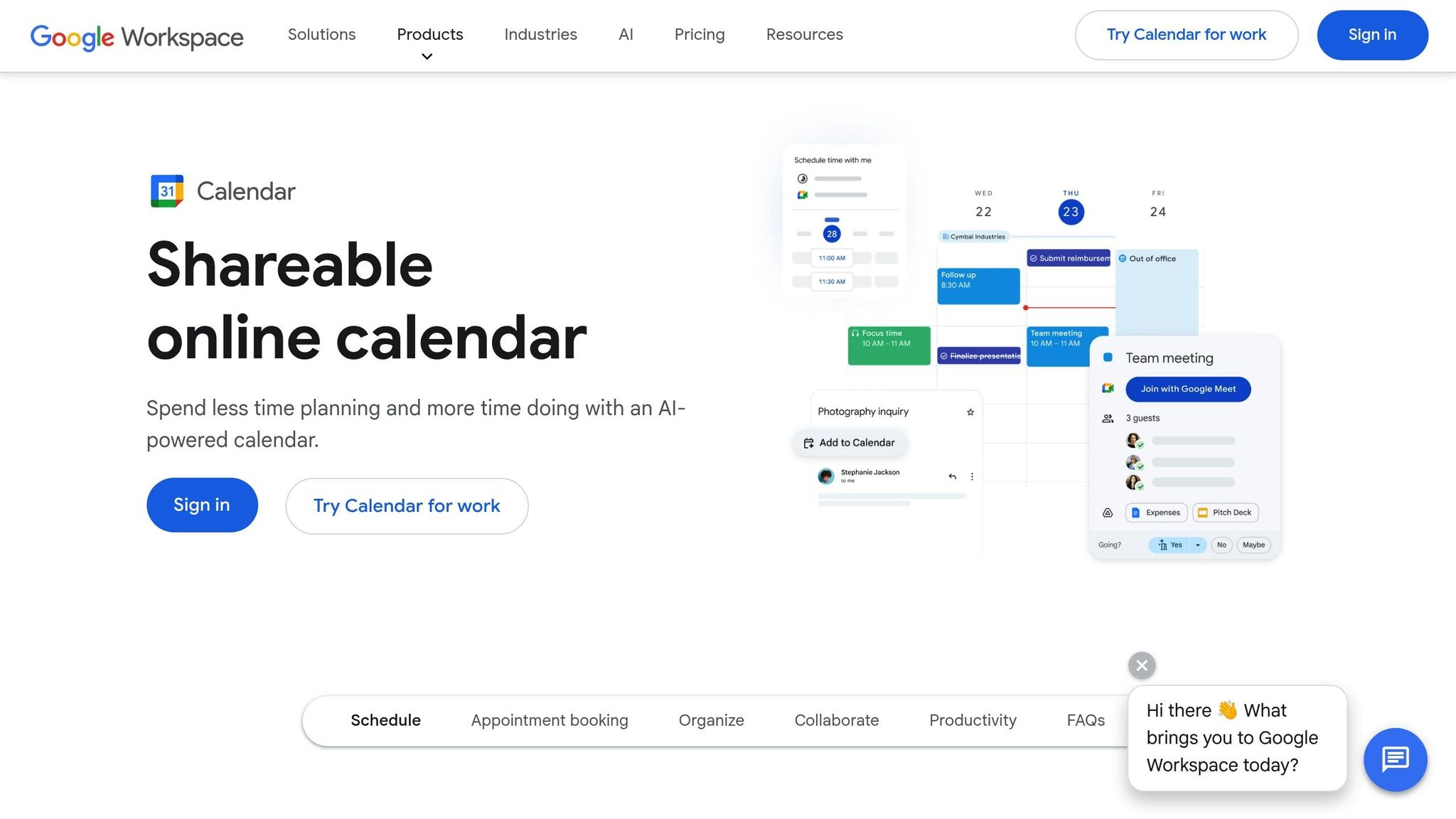
Linking your AI scheduler with Google Calendar and a CRM creates what experts refer to as a "single source of truth" for managing customer interactions. When a new appointment is made, the system checks real-time availability and reserves the time slot across all connected platforms.
This two-way sync ensures that updates are immediate. For example, if you reschedule in your CRM, the calendar adjusts automatically. Similarly, when the AI books an appointment during a phone call, it updates customer profiles on platforms like Salesforce, HubSpot, or Zoho without any extra steps. Businesses using these integrations report a 30% drop in scheduling mistakes and avoid losing 45% of leads due to outdated or unlinked scheduling systems.
With My AI Front Desk, secure OAuth integration with Google Calendar allows appointments to be set during live phone calls, skipping the need for manual checks. Additionally, direct CRM integration ensures every interaction is automatically recorded, keeping your data complete and up-to-date.
Zapier connects your AI scheduling system to over 9,000 apps, automating tasks like adding leads to email campaigns, sending team notifications via Slack, or creating tasks in project management tools.
The standout feature here is real-time data synchronization. API and webhook integrations ensure that every booking, cancellation, or reschedule is instantly reflected across all platforms. This eliminates manual updates and ensures your team always has accurate, up-to-date information.
My AI Front Desk includes built-in Zapier integration and post-call webhooks, enabling seamless connections with thousands of apps - no coding skills required. After a call, the system can automatically update spreadsheets, send alerts, or log meeting details in your preferred software. Combined with real-time scheduling during calls, this setup speeds up service delivery without adding complexity.
Booking appointments during calls eliminates the hassle of back-and-forth communication. AI receptionists answer within 2–3 rings and use natural language processing to understand requests like, "Can I book an appointment for Tuesday afternoon?". The system checks the schedule in real time, confirms the booking, and sends notifications - all while the caller is still on the line.
This immediate action keeps customers engaged. Plus, AI systems can handle multiple calls at once, ensuring no one is left waiting - even during busy periods. After the call, instant notifications via SMS, email, or Slack keep your team informed about every appointment update, so nothing falls through the cracks.
Here’s how to get your AI scheduling system up and running. The process involves syncing your calendar, setting up availability, and personalizing how the AI interacts with your customers.
Start by connecting your Google Calendar using OAuth for a real-time, two-way sync. Once linked, use the Active Times Control feature to establish your booking hours.
Next, set up Texting Workflows to send instant SMS confirmations and reminders - these typically go out 24 and 2 hours before the appointment. This not only keeps customers informed but can also help prevent revenue loss from no-shows.
You can also create Intake Form Workflows to gather essential details, such as service needs, insurance information, or project specifics. Additionally, you can program the system to prioritize keywords like “emergency” or “ASAP,” ensuring urgent cases are routed appropriately.
Once your workflows are in place, use the tools outlined below to monitor and improve the system’s performance.
The Analytics Dashboard is your go-to tool for optimizing scheduling performance after setup. Each call generates an AI summary and a full recording, giving you access to key metrics like call volume, booking rates, and average call durations.
By reviewing call transcripts, you can pinpoint areas where the AI might struggle - for example, recurring questions it can’t answer - and adjust conversation scripts as needed. The dashboard also tracks booking trends, such as the number of callers who complete bookings versus those who hang up. If you notice drop-offs during certain parts of the call, like when discussing payment methods, you can tweak the script to sound more natural and engaging.
Once the basics are set, take customization further to align the AI with your brand and improve customer interactions. Use Pronunciation Guides to ensure the AI correctly says your business name, staff names, and any industry-specific terms. You can also choose from over 100 premium voices to match your brand’s tone - whether you want a warm, approachable style or a more formal, professional vibe.
Enable Multi-Language Support to cater to callers who speak different languages. The AI can automatically detect the caller’s language and respond accordingly, making it especially useful for businesses in multilingual areas.
Refine Conversation Flows using the visual editor. This allows you to adjust greetings, handle objections more effectively, and provide clear service descriptions. For a smoother rollout, consider starting with a soft launch - route 20–30% of calls to the AI initially and monitor its performance before fully integrating it. Assign tech-savvy team members as “super-users” who can master the system early and assist others during the transition.
With 54% of customers still preferring to book appointments over the phone rather than online forms, a well-configured AI receptionist can help you capture more opportunities while providing a seamless customer experience.
AI algorithms are reshaping how small businesses manage appointment scheduling, saving an impressive 4.2 hours of manual work per employee each week. These tools operate 24/7, capturing the 54% of customers who prefer booking appointments by phone. This efficiency translates into real savings - around $11,520 annually - by reducing missed calls and no-shows.
For example, in January 2025, Emirates Health Services rolled out AI-powered scheduling in its primary healthcare centers across the UAE. The results? A 50.7% drop in no-shows and 6,456.6 hours saved in just three months. Similarly, researchers at Pennsylvania State University achieved 85.2% accuracy in predicting no-shows, enabling clinics to address high-risk appointments before they became a problem.
These outcomes highlight actionable steps small businesses can take right now. Start by auditing missed calls and estimating lost revenue. Choose a platform with direct calendar and CRM integration - two-way sync is critical to avoid double bookings. Also, implement automated reminders at 24-hour and 2-hour intervals, which alone can cut no-shows by 29%.
The financial case for AI scheduling is hard to ignore. Platforms typically cost between $199 and $500 per month, a fraction of the $2,830 median monthly cost of hiring a human receptionist. For instance, My AI Front Desk offers 24/7 phone support, Google Calendar integration, and analytics to help fine-tune your booking process.
Beyond cost savings, these tools can boost customer satisfaction and loyalty. Imagine an AI assistant that understands natural language requests like "Can you fit me in Tuesday afternoon?" and confirms availability instantly. This not only saves time but also creates a smoother, more personalized customer experience. By adopting AI as a scheduling ally, small businesses can protect revenue streams while building stronger, lasting relationships with their customers.
AI is changing the way appointment scheduling works by helping businesses predict and reduce no-shows. Through advanced data analysis, it examines past attendance patterns and customer behavior to estimate the chances of someone skipping their appointment. With this insight, businesses can act ahead of time - like sending tailored reminders via text, email, or even phone calls - to boost attendance rates.
On top of that, AI can streamline scheduling by prioritizing urgent bookings while efficiently managing routine appointments. This approach ensures better use of time and fewer gaps in the schedule. For small businesses and healthcare providers, these tools not only improve operational efficiency but also reduce missed appointments and create a smoother experience for customers.
Using AI for appointment scheduling can lead to major cost savings for businesses. One of the biggest advantages is a reduction in no-shows - often by 30-40% - which helps recover lost revenue and ensures resources are used more effectively. On top of that, AI takes over time-consuming tasks like manual scheduling, saving staff 20-40 hours per week. This freed-up time allows employees to focus on more valuable tasks, boosting overall efficiency and lowering labor costs.
Another key benefit is the affordability of AI scheduling systems compared to hiring additional staff. These solutions typically cost around $200 per month, which is far less than the expenses of employing full-time receptionists. With this cost-effectiveness and a quicker return on investment, AI becomes a smart option for businesses aiming to reduce expenses while improving customer service and streamlining operations.
AI handles last-minute scheduling changes and cancellations with ease by automatically updating appointment calendars in real time. When a cancellation happens, the system identifies the newly available slot and can either assign it to someone on a waitlist or adjust the schedule based on current priorities and availability. This keeps operations moving efficiently and minimizes wasted time.
With tools like natural language processing and predictive analytics, AI processes requests from calls, texts, or online forms seamlessly. It can reschedule appointments in an instant, send updated confirmations or reminders, and alert the appropriate staff or customers. This level of automation not only cuts down on administrative tasks but also boosts customer satisfaction by providing quick, accurate responses to changes.
Start your free trial for My AI Front Desk today, it takes minutes to setup!


