
Think of call center automation software as a digital team member who works 24/7 without ever needing a coffee break. It’s your business’s operational superhero, tirelessly handling everything from answering calls and scheduling appointments to logging customer details, all on its own. The real magic is that it frees up your human team to focus on the conversations that actually build relationships and drive your business forward.
Picture this: your business phone rings at 10 PM. Instead of a bland voicemail greeting, an intelligent assistant picks up. It tells the caller your business hours, offers to book an appointment right into your calendar, and even shoots them a quick confirmation text. That's call center automation in a nutshell.
And no, this isn't just for corporate giants anymore. It's a game-changer for small and medium-sized businesses (SMBs).
This kind of software is the central hub for your customer communications. It uses artificial intelligence to manage interactions over the phone, text, and other channels—all without a human needing to step in. The goal is simple: let technology handle the predictable, routine stuff so your team can put their skills to better use.
Not too long ago, managing customer calls—even for a small shop—meant a ton of manual work. Your team would spend their days routing calls, scribbling down messages, and punching data into a spreadsheet or CRM. Automation flips that script completely.
Here are a few of the time-sucking tasks it takes off your plate:
This shift from manual to automated is why the industry is booming. The global call center software market is expected to rocket from USD 17.5 billion in 2026 to nearly USD 35 billion by 2035. That's a huge jump, and it shows just how critical this technology is becoming. You can see more data on this market expansion and its drivers.
By automating routine interactions, businesses can slash operational costs while making their customer service more consistent and reliable. It’s all about working smarter, not just harder.
This idea of working smarter isn't just for customer service, either. You can see the same principles in action with different marketing automation strategies. The core concept is identical: use tech to handle the repetitive grunt work, which frees up your people for creative thinking and building real customer connections. For an SMB, this is how you turn a complex challenge into a simple, powerful tool for growth.
It's one thing to talk about call center automation software in theory, but where the rubber really meets the road is seeing how its features drive actual business growth. These aren’t just shiny tech add-ons; they're the engines that power efficiency, ramp up your sales, and keep your customers coming back.
Think of these features like a mechanic's specialized tools. Each one has a specific job, but when you use them together, they build a powerful, self-running operation for your business. Let's pop the hood and look at the essential parts that deliver real results.
This diagram shows how automation isn't just one siloed function—it's the glue connecting your core business areas to streamline tasks, empower your team, and ultimately, kickstart growth.
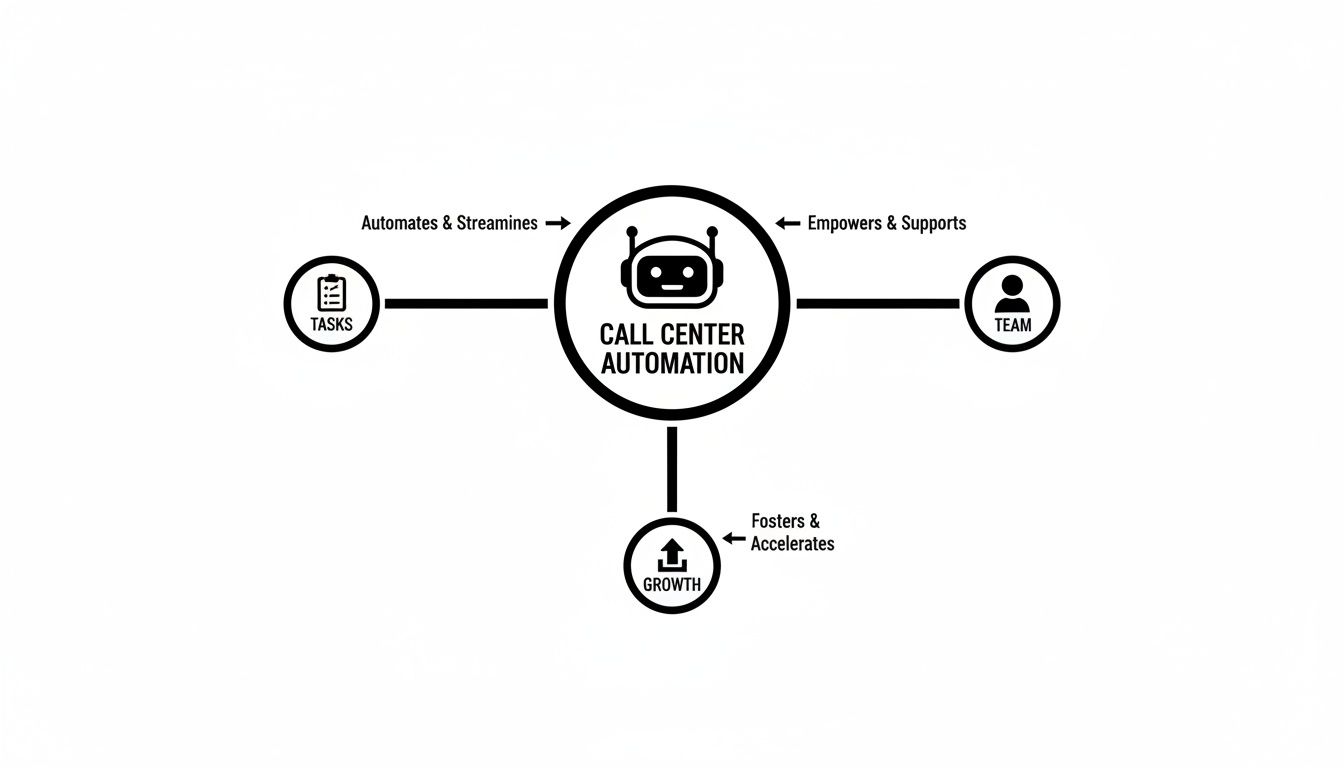
As you can see, automation acts as a central hub, creating a positive feedback loop that improves efficiency across the board, from individual tasks to team performance and overall business expansion.
Before we dive into the specific features, it's helpful to see how they fit together. This table breaks down the most essential automation tools and the direct impact they can have on your business's bottom line.
Each of these components plays a crucial role, but when combined, they create a cohesive system that saves time, cuts costs, and unlocks new growth opportunities. Now, let's look closer at how they work in the real world.
For most small businesses, the AI-powered receptionist is the single most impactful feature. This is your tireless front-line employee who never sleeps, takes a vacation, or misses a single call. It’s your lead capture machine, working around the clock to make sure every opportunity is seized.
Picture a local hair salon. A potential new client calls at 9 PM, long after the stylists have gone home for the night. Instead of getting a generic voicemail, an AI receptionist answers, checks the salon's schedule via its Google Calendar integration, and books the client for a color and cut the very next day.
That’s real revenue captured that would have otherwise been lost forever. This one feature transforms your phone line from a simple communication tool into an automated, money-making asset that’s always on.
Of course, not every call is a simple booking. Some questions are complex and need a human touch. That's where intelligent call routing comes in. The software is smart enough to listen to a caller's needs and instantly figure out the best person to handle their issue.
This simple process gets rid of the frustrating "let me transfer you" game that drives customers crazy. It ensures your team's valuable time is spent only on the calls that truly require their expertise, boosting both customer happiness and internal productivity.
Automation isn't just about handling incoming calls. For businesses that rely on outbound campaigns for sales or follow-ups, an AI outbound dialer is a complete game-changer. This tool can systematically work through a list of contacts, initiate calls, and engage prospects in natural, two-way conversations.
An AI dialer can power through hundreds of calls a day, filtering out all the busy signals and voicemails. It only connects your human agents to live, interested leads, which dramatically increases the efficiency and impact of any sales or marketing campaign.
The technology fueling these features is advancing at a dizzying pace. AI integration is completely reshaping customer service, with the software segment dominating at a 68.40% market share in 2024. This boom is driven by its ability to create better customer experiences while slashing operational costs. In fact, projections suggest AI-based automation will handle 10% of all call interactions by 2026.
To truly capitalize on this shift, understanding the key automation features is critical for selecting the right solution for your business. Platforms like My AI Front Desk bundle these powerful tools into a single, cohesive system. You can explore a detailed breakdown of the comprehensive features available in modern AI receptionist software to see exactly how they all fit together.
New features are always exciting, but for any business owner, the real question always comes down to the bottom line. What’s the actual return on investment (ROI) when you bring in call center automation software? The answer isn't just in the hard numbers you can track on a spreadsheet; it’s also in the invaluable benefits that are harder to pin down but just as crucial for long-term success.
To really get the full picture, you have to look at both the direct financial gains and the powerful, game-changing improvements that will shape your business's future.

The most straightforward way to see your ROI is by looking at direct cost savings and new revenue. When you automate, you introduce efficiencies that immediately boost your financial health.
Think of it as a simple equation: you’re cutting expenses while bringing in more income at the same time. This is where automation really shines.
These financial wins are a huge reason this market is taking off. The global call center automation space is projected to more than double, jumping from USD 72.6 billion in 2025 to USD 172.6 billion by 2030. This growth is all thanks to tools that make operations smoother and cut down on manual work. You can dig into more stats about this explosive market growth right here.
Saving money and booking more appointments is fantastic, but some of the biggest wins from automation aren't about dollars and cents. They're the kind of advantages that build a stronger, more resilient business over the long haul.
Let’s take a small plumbing company as an example. Before automation, the owner, Dave, was drowning in administrative work. He spent hours every day answering the phone, scribbling down appointments, and playing phone tag. He was stressed, overworked, and constantly pulled away from the actual plumbing jobs that paid the bills.
After setting up an AI receptionist, everything changed.
The AI handled all incoming calls, scheduled jobs right into his calendar, and sent him instant text notifications with all the details. Suddenly, Dave wasn't a dispatcher anymore—he was a business owner again.
Dave's story really brings the human-centric ROI to life:
At the end of the day, the true ROI of call center automation software is a mix of all these things. The direct cost savings might be what gets your attention initially, but it’s the reclaimed time and happier customers that deliver lasting value. Solutions like My AI Front Desk are built to give you both, with straightforward and affordable plans that make this kind of technology accessible. You can even calculate your potential savings by checking out the different pricing tiers available.
Picking the right call center automation software can feel like trying to find a needle in a haystack. Every option out there promises the moon, and it's all too easy to drown in a sea of features and tech jargon. The secret is to cut through that noise and zero in on what actually matters for your business.
Think of this less as a technical deep-dive and more as a practical checklist. You're not just buying software; you're finding a partner that can grow with you, plays nice with the tools you already use, and doesn't require an engineering degree to get running. Let's walk through the essential questions you need to ask to make a choice you'll be happy with for years to come.
Your business isn't standing still, so why should your software? The tool you choose today has to keep up with you tomorrow. Scalability isn't just about handling more calls—it's about adapting to your changing needs without forcing you to rip everything out and start over.
When you're looking at a platform, ask these questions:
A scalable solution means you can invest once and know it will keep delivering value as your business hits its stride.
No software operates in a vacuum. The most effective automation tools are the ones that connect seamlessly with the systems you already depend on every single day. Without solid integrations, you’re just creating more work for yourself with data silos and manual workarounds—the very things you’re trying to eliminate.
For most small businesses, the make-or-break integrations are with your CRM and calendar. The software has to be able to log call details and book appointments directly into your current workflow. For any service business, a direct link like My AI Front Desk’s integration with Google Calendar is non-negotiable.
For everything else, make sure the platform connects with Zapier. Seriously, this is a must-have. A Zapier integration unlocks the ability to connect with over 9,000 other apps, letting you create custom workflows that automate just about anything you can imagine.
The best call center automation software is built for business owners, not IT wizards. The setup should be simple, intuitive, and fast. If you can't get up and running in a few minutes, that's a major red flag.
Look for a clean, straightforward interface where you can easily:
My AI Front Desk was designed around this kind of simplicity. You can set up your entire AI receptionist in minutes without touching a line of code. This ease of use means you can adjust things on the fly as your business changes, without having to wait on a support ticket.
Finally, the price needs to be simple and predictable, with no nasty surprises. Complicated pricing models with confusing add-ons and hidden fees can turn a smart investment into a financial headache. Look for vendors who offer clear, upfront pricing tied to your actual usage.
When you’re comparing options, don’t just look at the monthly fee. Ask about overage charges, setup fees, and what it costs to unlock "premium" features. A trustworthy provider will have all this information laid out clearly.
To help with this, we've put together a checklist comparing the key features you should look for against what My AI Front Desk offers.
Before you pull the trigger, take a moment to compare different AI receptionist solutions and see how the features and pricing really stack up. A little homework now will make sure you get the absolute best value for your money.
Bringing call center automation software into your business should feel like a massive win, not a technical nightmare. A great rollout isn’t about flipping a switch and hoping for the best; it's about taking a smart, step-by-step approach. The good news? Modern tools are designed for people who aren't tech wizards, making a smooth, effective launch easier than you might think.
The game plan is simple: start small, see what the data tells you, and slowly give the AI more to do. This approach keeps risk low and makes sure the automation fits your real-world business needs right from the get-go.
Before your AI ever picks up the phone, a little prep work goes a long, long way. This initial setup is all about translating your business smarts into a functional, automated workflow. Think of it as day-one training for your new digital team member.
Here are the essential first steps to get right:
Nailing these fundamentals ensures your AI is ready to represent your brand professionally and accurately from the very first call.
Once you're live, the focus shifts from setup to fine-tuning. The goal is to constantly refine the AI’s performance based on how it's actually doing with real customers. This ongoing process is how you turn a good automation setup into a truly great one.
And you don't need to be a data scientist to monitor performance. A clean analytics dashboard can quickly show you what’s working and what needs a little tweak.
The most effective strategy is to treat your AI like any other part of your business—review its performance, listen to feedback (via call recordings), and make adjustments. This feedback loop is the key to maximizing your return on investment.
Here are a few best practices for managing your system for the long haul:
By following this simple roadmap, you can implement call center automation software with total confidence. Tools like My AI Front Desk are designed to make this process feel straightforward, helping you get results and win back your time right from the start.
For marketing agencies and entrepreneurs, the next big leap in growth isn't just about adopting another tool for your clients—it's about becoming the solution provider.
What if you could offer a sophisticated, AI-powered communication platform under your own brand? That's the core idea behind a whitelabel partnership, a strategic move that elevates you from a service provider to a technology reseller, practically overnight.
This model lets you sell powerful call center automation software directly to your client base, carving out a new, high-margin revenue stream without ever touching a line of code.
You’re not just tacking another service onto your menu. You're building a scalable business on top of a proven, reliable platform. This completely sidesteps all the headaches of development, technical maintenance, and server costs, letting you pour all your energy into your clients and your brand.
The biggest win with whitelabeling is speed. Developing an enterprise-grade AI receptionist from the ground up would demand millions of dollars and years of painstaking work. A whitelabel program hands you a finished, market-tested product you can rebrand and start selling almost immediately.
But this is about more than just slapping your logo on a dashboard. A true partnership sets you up for success. For instance, My AI Front Desk doesn’t just hand over the technology; we provide go-to-market advice from a team that’s been in the trenches. You get a strategic partner who is genuinely invested in helping you sidestep common pitfalls and scale your new venture efficiently.
The whitelabel model empowers agencies to instantly expand their service offerings with a high-demand product. You set your own pricing, control the client relationship, and build recurring revenue, all while we handle the complex technical backend.
This setup means you can confidently offer a leading-edge solution backed by 24/7 technical support, so your clients always have the help they need. You get to be the trusted advisor, while a dedicated team keeps the engine running smoothly in the background.
For agencies ready to diversify and grow, whitelabeling automation software presents a clear path forward. It's not just about adding another revenue stream; it's about making your agency indispensable to your clients and future-proofing your business.
Here’s a look at how a whitelabel program can put your growth on the fast track:
By offering a solution like an AI receptionist, you're solving a massive pain point for small businesses: missed calls and lost leads. This immediately positions your agency as a critical partner in their success.
To see exactly how this model works in practice, you can learn more about My AI Front Desk’s comprehensive whitelabel program for agencies.
Even after seeing all the benefits, you probably have a few practical questions about how call center automation software would actually work for your business day-to-day. Let's tackle the most common questions we hear from business owners, so you can get the straightforward answers you need.
Yes, absolutely. You don't have to change a thing. Modern automation platforms like My AI Front Desk are designed to integrate seamlessly with what you already have.
The technology uses simple call forwarding. You just set it up once, and all incoming calls get routed to the AI receptionist. This means you keep the business number your customers know and trust, with no need to update your website, business cards, or Google listing. It's a completely smooth transition.
Not at all. The best tools are built for busy business owners, not IT wizards. We've made sure My AI Front Desk is incredibly simple, with a guided setup process that most people finish in just a few minutes.
You can tweak call scripts, plug in your business hours, and connect your calendar without touching a single line of code. The whole point is to make this powerful technology accessible to everyone, no matter how tech-savvy you are.
This is where automation really shines. A human receptionist is stuck handling one call at a time. If another call comes in, it goes to voicemail or the caller gets a busy signal. An AI-powered system, on the other hand, can manage a virtually unlimited number of conversations at the exact same time.
This single capability is a game-changer. It means no more busy signals for your customers, no more missed leads during a rush, and every single person who calls gets immediate, professional attention.
A smart system knows what it doesn't know. If a caller has a really complex problem the AI isn't trained to handle, or if they just flat-out ask to talk to a human, the software knows exactly what to do.
It intelligently transfers the call to the right person or department based on the rules you've set. This creates the perfect partnership: the AI handles all the routine, repetitive inquiries, freeing up your team to focus their expertise on the high-value, nuanced conversations where they're needed most.
Ready to see how an AI receptionist can change the game for your business communications? My AI Front Desk offers a simple, powerful, and affordable way to capture every lead and delight every caller. Get started in under five minutes.
Start your free trial for My AI Front Desk today, it takes minutes to setup!


