
When you hear the term "automated voicemail," you might picture a clunky, robotic system that just takes a message. But that’s ancient history. Today's systems, especially those powered by AI, are a world away from that. They can transcribe messages on the fly, book appointments right into your calendar, and even send follow-up texts.
This isn't just a fancy answering machine anymore; it's an active tool for turning missed calls into real business.

Let's be honest, a standard voicemail box is where potential leads go to die. Every time a call goes unanswered, a small business loses an opportunity. Modern automated voicemail messages flip this script, turning a passive liability into your most dependable sales assistant. It’s not just about sounding professional—it’s about actively capturing business you would otherwise lose.
Think about a solo contractor out on a job site, unable to pick up the phone. A potential customer calls. Instead of the dreaded "leave a message" tone, they're greeted by an AI-powered receptionist that can instantly:
That single interaction transforms a likely dead end into a qualified lead or even a confirmed job. And the business owner didn't have to lift a finger.
Traditional voicemail is just a utility, another line item on your phone bill. An AI-driven automated system, however, is a growth engine.
It's no surprise the global voicemail service market has hit $2.5 billion and is climbing fast, driven by the kind of cloud-based features small businesses are clamoring for. When you pair these tools with a VoIP system, you can cut communication costs by up to 20% while simultaneously boosting your team's productivity.
The real shift is in mindset. Stop seeing voicemail as a message-taking chore and start seeing it as an automated, 24/7 front desk that never misses a chance to make a sale or book an appointment.
One of the biggest game-changers is instant message transcription. Forget about wasting precious time listening to rambling messages. With transcription, you can scan readable text in seconds, letting you immediately prioritize callbacks and spot urgent requests.
We dive deeper into this in our guide on AI voicemail transcription, exploring how small businesses are using it to slash response times.
The table below breaks down just how different these two approaches really are.
Ultimately, an automated system ensures no lead ever falls through the cracks. Whether it's after hours, during a chaotic lunch rush, or when you're tied up on another call, your AI assistant is always there to engage, inform, and convert. That consistency builds trust and a reputation for responsiveness—two invaluable assets for any growing business.
Think about the last time you left a voicemail for a business. Was it a generic, robotic "leave a message"? Or did it feel like a professional, helpful extension of the business itself? That greeting is often the first real impression a potential customer gets, especially when you're too busy to pick up.
A weak, uninspired message can make you sound disorganized and cost you a lead. But a well-crafted one? It can save the call, guide the customer, and show them you're a pro. The goal isn't just to take a message; it's to keep the conversation going and turn that missed call into a future customer.
Your automated voicemail isn't just a placeholder—it's a 15-second sales pitch. You have a very small window before a caller gets bored and hangs up, so every single word has to count.
A great voicemail greeting isn't improvised; it has a clear, intentional structure. No matter your industry, every effective message needs these three core parts.
Key Takeaway: The single biggest mistake businesses make is having a weak or non-existent call-to-action. Don't just say, "leave a message." Prompt them with clear instructions like, "Please leave your name, number, and the best time to call you back," or direct them to an even better option: "For the fastest service, visit our website to book your appointment online."
One size definitely does not fit all. Your greeting needs to adapt to your business's real-time situation. A message for a busy salon during peak hours should sound completely different from a contractor's after-hours greeting.
Here are a couple of practical examples:
Example 1: After-Hours Greeting
"Hi, you've reached Pawsitive Pet Grooming. Our salon is now closed for the day. We're open from 9 AM to 5 PM, Tuesday through Saturday. The best way to book an appointment is on our website at PawsitiveGrooming.com. Otherwise, please leave your name and number, and we'll call you back when we reopen."
Example 2: Holiday Closure Greeting
"Thank you for calling Bright Electric. We are currently closed for the holiday and will reopen on Tuesday, July 5th. We will be checking messages periodically for any emergencies. If you have an urgent electrical issue, please describe the problem, and we will get back to you as soon as possible."
If you need more ideas, we've put together a full guide with more professional voicemail greeting examples to help you find the perfect script.
Let's be honest—recording your own voice can feel awkward, and the final quality might not live up to your brand's professional image. This is where an AI voice library makes a world of difference.
Even today, voicemail is still a key part of 35% of enterprise communication setups, so sounding professional is non-negotiable. Modern systems, like My AI Front Desk, use premium, natural-sounding AI voices to deliver a flawless and consistent greeting every single time. You get that polished, professional sound without ever having to hit the record button yourself.
Crafting the perfect greeting is just the first step. The real power of an automated voicemail system comes alive in the setup—this is where you turn a simple message-taker into a smart, efficient assistant that works exactly when and how you need it to.
Think of it as creating a seamless experience for your callers while building a behind-the-scenes engine that runs on autopilot. You don't need to be a tech wizard; modern platforms are designed for business owners, not IT experts. It’s all about making deliberate choices to control call flow, manage your notifications, and make sure every caller gets professional treatment.
The first, and maybe most important, setting to tackle is Active Times Control. This feature lets you decide the precise hours your AI receptionist is on duty. You can set it to activate only after business hours, during your lunch break, or even 24/7 if you want every single call screened.
For example, a busy salon might set their AI to answer calls only during their peak hours of 10 AM to 2 PM. This allows stylists to focus completely on their clients without interruption. A contractor, on the other hand, could have the system active all day while they’re out on job sites and can't get to the phone.
Seamless integration with your existing business number is just as important. You don't need a new number. You simply set up call forwarding with your current provider. When a call comes in that you can't answer, it automatically routes to your AI assistant. To learn more about how this works, check out our tutorial on how to allow voicemails in My AI Front Desk.
The process of crafting effective automated voice mail messages boils down to three core parts: state who you are, provide context for the call, and give a clear call to action.
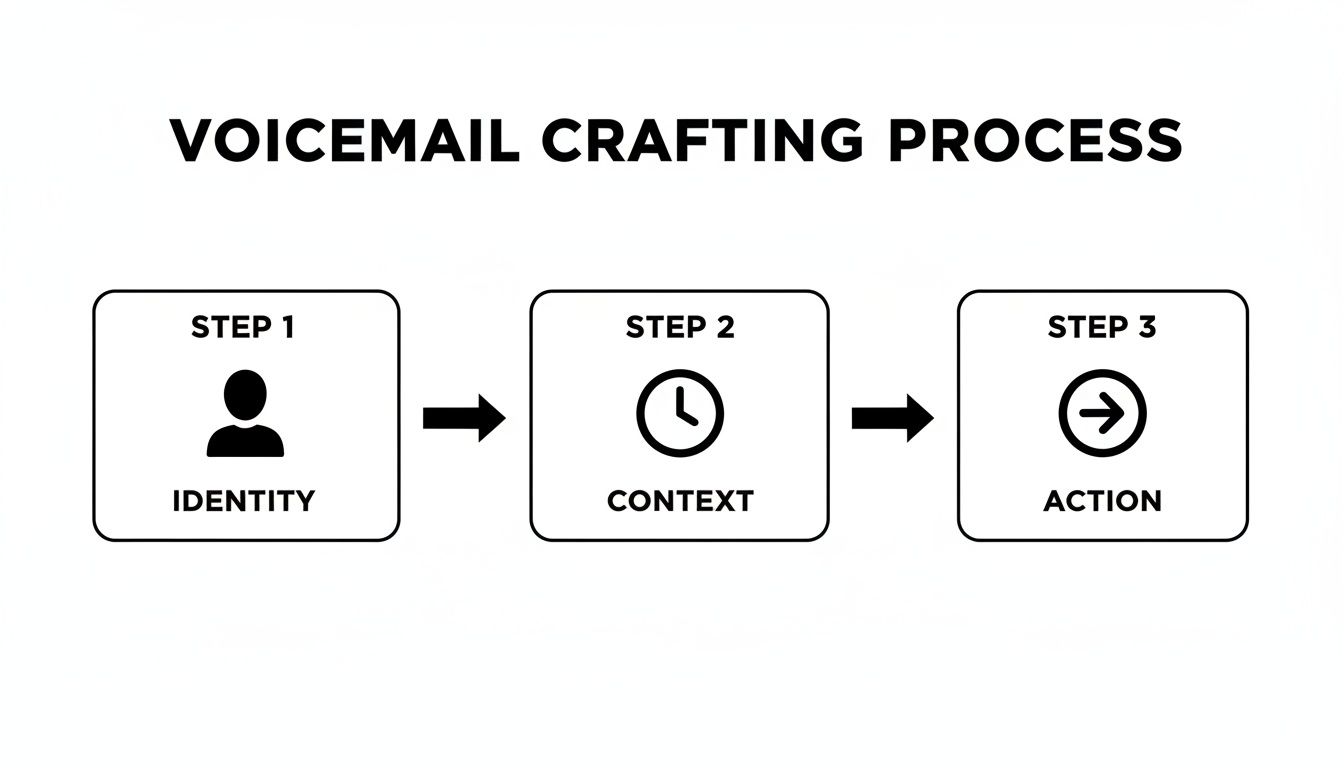
This simple flow ensures your message is direct and helpful, guiding the caller instead of just passively recording them.
So, what happens after a message is left? Timely follow-up is everything. You can configure your system to send instant notifications via email or SMS directly to specific team members. This means that even when your AI handles the call, your team gets the information immediately and can act on anything urgent.
But what if the AI can't understand a caller? This is where fallback rules become critical. A smart fallback might be a simple, polite message: "I'm sorry, I'm having a bit of trouble understanding. Please leave your name and number, and a team member will call you back shortly." This simple step prevents caller frustration and ensures no lead is lost due to a technical hiccup.
Pre-Launch Checklist: Before going live, test everything. A thorough check ensures a smooth rollout and prevents day-one issues that could cost you business.
Here’s a quick checklist to run through before you launch:
This final check guarantees your automated voicemail messages perform flawlessly from the very first call.
Let's be honest: standard automated voicemail messages are a dead end. They’re a passive log of missed opportunities, a list of things you have to get back to later. But what if your voicemail could do more? What if it could work for you around the clock?
By integrating artificial intelligence, your voicemail can transform from a simple message log into a proactive business hub. It stops being a chore and becomes an action engine.
The first step in this transformation is real-time transcription. Forget wasting valuable minutes listening to recordings. You get an instant, readable text of every message. This lets you scan for keywords, gauge urgency, and prioritize callbacks in seconds—all without ever hitting play.
But transcription is just the starting point. The real power comes from turning the content of those messages into immediate, automated actions that drive your business forward.
Imagine a potential client leaves a message asking for a consultation. A traditional system just holds that message for you. An AI-powered system, on the other hand, can identify the intent behind the words and kick off an entire workflow.
This is where integrations become game-changers. By connecting your voicemail to other business tools, you create a seamless operational flow that captures leads and keeps customers happy.
For small businesses looking to get started, developing a comprehensive AI strategy is a key first step in turning your voicemail into a true action engine.
The possibilities for automation are nearly endless. Using tools like Zapier, you can connect your AI voicemail to over 9,000 other applications through webhooks. A webhook is simply a way for one app to send real-time information to another app the moment something happens.
The goal is to build a system where a missed call isn't a failure, but rather the starting point for a fully automated business process. This is how you build a system that scales your capacity without increasing your headcount.
This level of connectivity allows for some incredibly specific and powerful workflows. You could set up a system where a voicemail mentioning a specific service automatically adds the caller to a targeted email marketing list in Mailchimp. Or a message from a VIP client could trigger a personalized alert on your smart home device.
This rapid adoption of AI is changing customer service for the better. Recent reports show that 63% of organizations are in the final stages of rolling out conversational AI, with consumer satisfaction soaring. For small businesses, this means tools like My AI Front Desk can use advanced AI-powered voicemail and message-taking, transcribing messages and launching workflows that save time and capture revenue. You can discover more insights on these AI trends and their impact from Verloop.io.
Ultimately, these intelligent systems ensure that every single interaction, even a missed call, is an opportunity to move your business forward.

Getting your automated voicemail messages up and running is a great start, but the work isn't over. A ‘set it and forget it’ approach just won't cut it if you want real results.
You have to treat your voicemail like any other marketing channel—that means measuring its performance and making data-driven tweaks. This is what turns a decent system into an incredible one. Without tracking key metrics, you’re just guessing. You won’t know if your greeting is actually working, if callers are bailing before leaving a message, or if any of those messages are turning into real business.
To really dial in your strategy, you need to focus on a few core data points. These numbers paint a clear picture of how callers interact with your system and shine a light on where you can make impactful changes. Don't get overwhelmed; just start with the essentials.
Here are the key performance indicators (KPIs) to watch:
Digging into call recordings and transcripts gives you invaluable insights. You might discover that callers constantly ask the same question, which is a clear signal to update your greeting or website FAQ to answer it upfront.
Once you have a baseline for your metrics, it's time to start experimenting. A/B testing is perfect for optimizing your automated voice mail messages, and it’s way simpler than it sounds. You’re just comparing two versions of something to see which one performs better.
Try this: For one week, run a greeting with a direct call-to-action (CTA) like, "For the fastest response, text 'APPOINTMENT' to this number." The next week, switch it to something like, "Please leave your name, number, and the best time to call you back."
After your two-week test, compare the numbers:
This kind of testing gives you concrete proof of what connects with your audience. For example, you might find that a message promising a quick callback generates 20% more leads than one that just pushes callers to your website. These small, iterative changes are what will transform your voicemail from a simple answering machine into a powerful, fine-tuned conversion tool that gets better over time.
Whenever you're thinking about adding a new tool to your business, a few questions always pop up. It's smart to dig into the details before you commit. When it comes to automated voicemail messages, we've noticed that most business owners are curious about the same things: integration, performance, and just how easy it is to actually use.
Let's clear the air. Below, we’ve tackled the most common questions we get from small businesses looking into an AI-powered voicemail system. The goal here is to give you straight, simple answers so you can see exactly how this kind of tool fits into what you’re already doing.
Yes, you absolutely can. This is usually the first and most important question on everyone's mind, and the answer is simple. Modern AI receptionist systems are built specifically to work with your current setup, so you don’t have to go through the headache of changing your number and updating it everywhere.
The process is straightforward: you just set up call forwarding with your phone provider. When a call comes in that you can't get to, it’s instantly and invisibly passed to your AI receptionist. Your customers get a professional, immediate response, and they’ll have no idea the call was ever forwarded. It just works.
This is where AI voicemail really leaves traditional systems in the dust. Today’s advanced AI is built with powerful multi-language and accent detection. It can recognize the language being spoken and respond in the same one, creating a welcoming and effective experience for every single caller.
This is a massive advantage if you operate in a multicultural area. It means you can connect clearly with every potential customer—something a standard, one-language voicemail greeting just can't do. You’re not just answering a call; you're breaking down communication barriers and making your business feel more accessible to everyone.
An AI's ability to understand and respond to various languages and accents isn't just a technical feature—it's a customer service tool that shows every caller they are valued, regardless of their background.
Not in the slightest. These platforms are designed for busy entrepreneurs, not IT wizards. Connecting essential tools like your Google Calendar is usually as simple as logging in and clicking "allow." No coding, no complicated manuals.
Want to build more advanced workflows? You can use platforms like Zapier to connect your automated voicemail to thousands of other apps you already use. It’s all done through a simple, step-by-step interface. You can create powerful automations that capture leads and save time with just a few clicks—no technical skills required.
Ready to turn missed calls into confirmed business? My AI Front Desk offers a powerful, easy-to-use AI receptionist that handles calls, books appointments, and integrates with the tools you already use.
Start your free trial for My AI Front Desk today, it takes minutes to setup!


