
When you hear the term “enterprise contact center solution,” what comes to mind? For many, it’s a massive room full of people wearing headsets. But that's a seriously outdated picture.
Today’s enterprise contact center solutions are the powerful, centralized nervous systems for managing all customer communications. We're talking everything from phone calls and emails to social media DMs and live website chats, all handled within one cohesive platform.
Think of it less as a call center and more as a strategic hub designed to unify customer interactions, automate tedious workflows, and create a genuinely seamless experience for both your customers and your agents.

Picture your company's communication channels as a bustling city. You have highways for phone calls, local roads for emails, and bike paths for social media messages. Without a central traffic authority, you get gridlock, lost travelers (your customers), and completely overwhelmed city planners (your agents).
An enterprise contact center solution is that central traffic control. It doesn't just watch one road; it orchestrates the flow across the entire map, ensuring every customer journey is smooth and connected. No more forcing a customer who just emailed you to repeat their entire story over the phone.
The old-school call center was purely reactive. Agents sat and waited for the phone to ring, dealing with one issue at a time, often with zero context. Modern enterprise contact centers are proactive, omnichannel hubs built to solve real business problems, such as:
At the heart of any modern solution are a few non-negotiable components that work together to create this unified experience. Each piece plays a critical role in turning a chaotic communication environment into an efficient, data-driven operation.
These pillars are what separate a true enterprise solution from a simple phone system. They are the engine that drives efficiency, customer satisfaction, and ultimately, business growth.
An enterprise contact center isn't a cost center for handling complaints. It's a strategic asset that builds loyalty, uncovers sales opportunities, and drives real revenue by turning every customer interaction into a positive, memorable experience.
This shift isn't just a minor trend; it's a fundamental change in how successful companies operate. The demand for scalable, AI-powered platforms is exploding as businesses try to keep up with rising customer expectations and interaction volumes without letting quality slip.
The numbers don't lie. The global Contact Center as a Service (CCaaS) market was valued at USD 7.27 billion in 2025 and is projected to hit a staggering USD 39.25 billion by 2034. That's a compound annual growth rate of 20.60%. This incredible growth, detailed in Precedence Research's contact center analysis, underscores just how critical these intelligent solutions have become.
At the end of the day, these platforms are about more than just fancy technology. They're about forging stronger customer relationships, one seamless conversation at a time.
An enterprise contact center isn't just a fancy phone system. It's really a powerful engine made up of several key pieces working together. When you understand how these core features click, you start to see how modern customer service operations can turn chaotic streams of communication into smooth, intelligent conversations.
Think of it like the crew of a high-performance race car. Every member has a specific, vital job. The navigator plots the route, the pit crew keeps the car in top shape—it's their perfectly coordinated effort that wins the race. Each part is absolutely essential.
A customer's journey starts the second they reach out, and those first few moments are critical for setting the right tone. This is where Automatic Call Distribution (ACD) and Interactive Voice Response (IVR) systems step in.
The ACD is basically the traffic director for your contact center. Instead of just tossing an incoming call to whoever's free, it uses smart rules to send it to the best person for the job. This could be based on an agent's skills (like technical support versus billing), the customer's history, or even their language. The immediate payoff is a huge jump in first-contact resolution because customers aren't getting bounced from one department to another.
An advanced IVR isn't just a robotic menu. It's more like a 24/7 frontline agent. It lets customers handle simple things on their own—like checking an order status or paying a bill—which frees up your human agents for the complex, higher-value conversations.
When you pair a smart ACD with a sophisticated IVR, the system gets even more powerful. Modern IVRs can understand natural language, letting customers just say what they need. This kind of automation handles a massive volume of routine questions. In fact, some companies report that up to 80% of common inquiries can be resolved without ever needing a human agent.
People switch channels without a second thought these days. They might start a question on your website's live chat, follow up with an email, and then finish the conversation on the phone. An omnichannel routing engine is what makes this a seamless experience, preventing the customer from having to repeat their story over and over. It pulls every interaction from every channel into one, easy-to-follow thread.
This unified view becomes incredibly powerful with deep CRM Integration. When your contact center is plugged directly into your Customer Relationship Management system, agents instantly see a customer's full history—past purchases, support tickets, contact info—the second they connect. This allows for truly personal service that makes customers feel like you actually know them. You can see many of these capabilities in action by exploring the features of a modern AI front desk.
Behind the scenes, a couple of other critical functions keep the whole operation running smoothly and securely. Workforce Management (WFM) tools are like the strategic command center for your staff. They use historical data and forecasting to predict call volumes, ensuring you have the right number of agents scheduled at the right times. This prevents you from being understaffed during a rush or overstaffed during quiet periods, which directly impacts your budget.
Finally, solid reporting and analytics give you the insights you need to keep getting better. These tools track hundreds of KPIs—from average handle time to customer satisfaction scores—and display them on easy-to-read dashboards. This data-first approach helps managers spot coaching opportunities, fine-tune workflows, and make smarter strategic decisions.
For any contact center dealing with sensitive information, strict adherence to standards like [ISO and PCI DSS compliance](http://redchip.com.ph/ISO and PCI DSS.html) isn't just a nice-to-have; it's a non-negotiable core feature. These certifications guarantee that customer data, especially payment details, is locked down with tight security protocols, building crucial trust and heading off major risks.
Figuring out where your contact center solution will "live" is one of the biggest decisions you'll make. This choice ripples through everything—from your budget and security posture to how quickly you can adapt to new customer demands. It's less of a technical detail and more of a strategic fork in the road.
Think of it like setting up a new headquarters. You could build your own from the ground up, lease a slick, modern office in a high-tech park, or maybe do a bit of both. Each path comes with its own set of trade-offs on control, cost, and agility.
The decision tree below helps break down this choice by focusing on what's most important to your business.
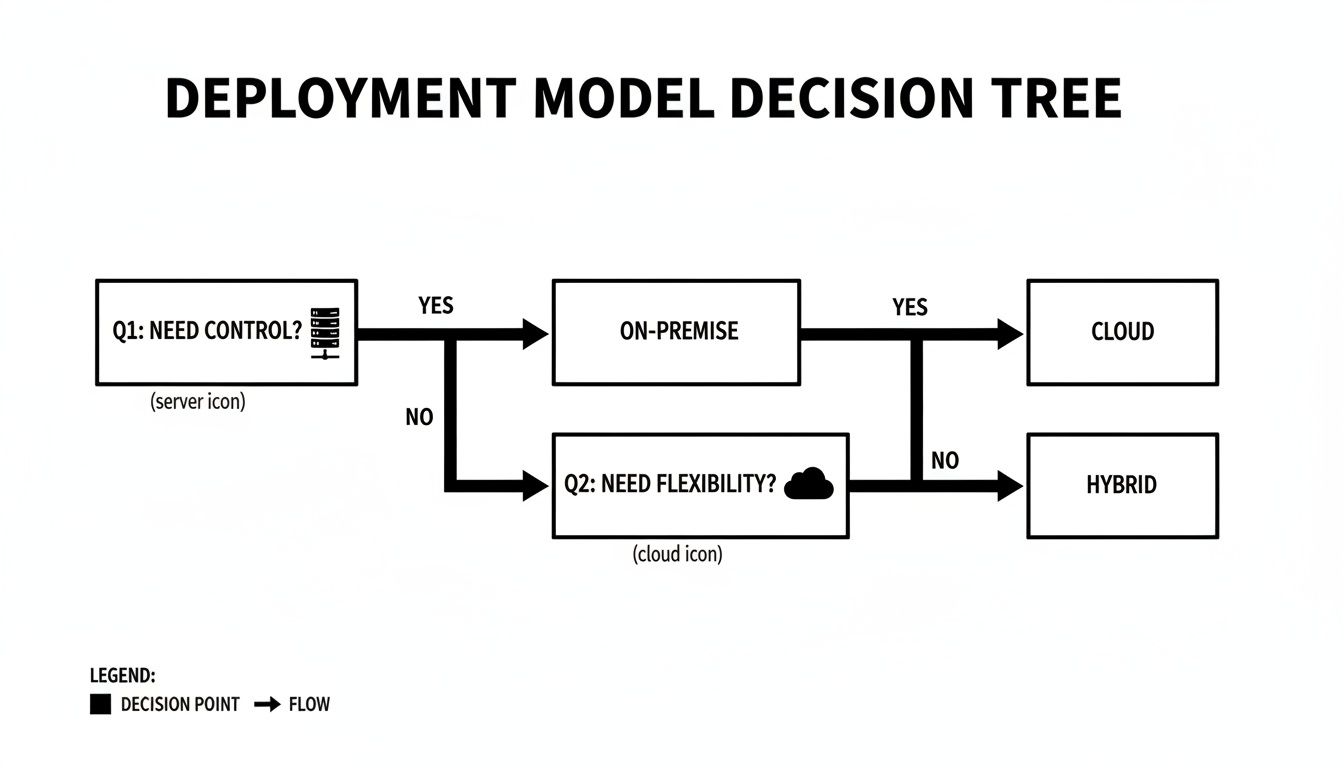
As the visual shows, if absolute control over every nut and bolt is your top priority, on-premise is your path. If you need ultimate flexibility to scale and innovate, the cloud is the obvious answer. And for those who need to balance both worlds, a hybrid model is the way to go.
The on-premise model is the classic approach. You buy all the hardware, purchase the software licenses, and run everything inside your own data centers. It’s like owning the building, the land it's on, and the security team guarding the gate.
This gives you total control over your data, security protocols, and system configurations. For businesses in finance or healthcare with intense data sovereignty or regulatory rules, this direct oversight is often non-negotiable.
But that control comes with a hefty price tag. You're looking at a huge upfront capital expenditure (CapEx) for all the servers and gear. Plus, you’ll need a dedicated IT team to handle maintenance, patches, updates, and troubleshooting when things go wrong.
Cloud-based solutions, known as Contact Center as a Service (CCaaS), are the polar opposite. Instead of owning, you're leasing a fully serviced, state-of-the-art office. You pay a predictable subscription fee, and the vendor handles all the infrastructure, security, maintenance, and software updates.
This flips your spending from a massive upfront CapEx hit to a much friendlier operational expense (OpEx). The real magic, though, is in the agility it unlocks:
The industry has already voted with its wallet. The global cloud contact center market is on track to hit USD 82.43 billion by 2030, with cloud platforms expected to grab 78.3% of the market share by 2035. This massive shift, detailed in recent contact center statistics, shows that enterprises overwhelmingly prefer agility over ownership.
What if you need the security of on-premise but crave the innovation of the cloud? That’s where the hybrid model comes in. It’s the best of both worlds—like owning your corporate headquarters for sensitive data while leasing flexible satellite offices for your sales teams.
In a hybrid setup, a company might keep its core customer database and payment systems on-premise to satisfy strict compliance rules. At the same time, it can plug into a cloud provider for features like the IVR, omnichannel routing, or AI-powered analytics.
This approach lets you modernize key parts of your contact center without ripping everything out and starting over. It creates a strategic, manageable path to the cloud, allowing you to migrate at your own pace while keeping tight control where it matters most.
To make the decision clearer, here’s a side-by-side look at how each model stacks up against key business factors.
Ultimately, the right deployment model comes down to your organization's specific priorities regarding cost, control, and the need for future-facing flexibility.
Artificial Intelligence isn't some far-off concept from a movie anymore. It's a real, practical tool that's fundamentally changing how customer service gets done. Inside an enterprise contact center, AI is the engine that makes every interaction smarter, quicker, and a whole lot less painful for everyone.

This isn't about replacing people. It's about elevating them. AI steps in to handle the repetitive, predictable stuff, freeing up your human agents to apply their skills to the complex, high-stakes problems that actually need a human brain.
The upshot? An operation that runs smoother, a team that feels more capable, and customers who get their issues sorted out with minimal fuss.
One of the most obvious ways AI is making its mark is through intelligent virtual agents and chatbots. And no, I'm not talking about those clunky, keyword-based bots from a few years ago that constantly got stuck. Today's AI assistants understand natural language, figure out what a customer actually wants, and can handle a huge chunk of initial queries without a human ever getting involved.
Just think about the sheer number of basic questions a contact center gets every single day: "What's my account balance?" or "Where's my package?" AI assistants can field these questions 24/7, giving instant answers and saving your agents from the monotony of repeating the same information over and over.
This constant availability is a game-changer. An AI-powered system doesn't need breaks or sleep, ensuring that customers can get help with common issues at any time, on any day, leading to a significant boost in customer satisfaction.
This automation goes way beyond simple Q&A, too. More advanced solutions can walk customers through troubleshooting, process a product return, or even book an appointment right into your company's calendar. That kind of self-service power drastically cuts down wait times and brings down operational costs.
While automation is busy on the frontline, AI is also working hard in the background to make your human agents even better at their jobs. It's like having a co-pilot, feeding them the right information and guidance at the exact moment they need it.
Here are a few ways AI gives agents a helping hand:
This toolkit helps agents solve problems faster and more accurately. You can dig deeper into how automated and human-led support work together in our detailed look at AI receptionists versus human receptionists. The tech doesn't replace an agent's judgment; it supercharges it with data.
Maybe the biggest long-term impact of AI is its ability to learn from mountains of data and make smart predictions. By sifting through thousands of past customer interactions, AI models can spot patterns and start anticipating what customers will need next.
For example, predictive analytics can forecast call volumes with surprising accuracy, which helps managers nail down staffing schedules. It can also flag customers who are at a high risk of leaving based on their recent calls, giving the business a chance to step in proactively with a special offer or a check-in call.
This data-driven approach is also shaking up the market. Big enterprises used to have a lock on advanced contact center tech, but accessible cloud platforms are leveling the playing field. The AI-powered solution segment now makes up 66.2% of the market. More importantly, Small and Medium-sized Enterprises (SMEs) are on track to grab a 55.50% market share in CCaaS by 2025, growing at a blistering 18.90% CAGR. This massive adoption, detailed by Grand View Research, proves that enterprise-grade AI is no longer just for the Fortune 500.
At the end of the day, AI is transforming the contact center from a reactive cost center into a proactive, intelligent hub for building better, more personal customer relationships.

Jumping into a new enterprise contact center solution can feel like a massive undertaking. But with a solid roadmap, you can turn that mountain into a series of manageable steps. The key is to split the journey into two distinct phases: selection and implementation. This approach keeps things organized, minimizes disruptions, and gets your team delivering value faster.
Choosing the right platform is about more than just a feature checklist. It’s about finding a genuine partner. You need someone whose technology not only fits your long-term vision but also plays nice with your existing tech stack and meets your strict security needs.
Before you even start looking at vendors, you have to look inward. Seriously. The foundation of a good choice is a crystal-clear understanding of what you actually need. Start by mapping out your current customer journeys and pinpointing the exact frustrations you’re trying to fix.
Once you have that, build a scorecard to evaluate potential providers. This keeps the process objective and data-driven, so you aren't just swayed by a flashy sales demo.
Your scorecard should absolutely include:
A vendor's platform is only half of the equation. Their commitment to a personalized implementation, comprehensive training, and dedicated, ongoing support is what truly determines long-term success.
Once you’ve picked your partner, the focus shifts to a carefully planned implementation. This is where your big-picture strategy turns into a day-to-day reality. Taking it one phase at a time prevents chaos and gives you room to test and tweak as you go.
As you get started, you'll also need to evaluate specialized tools. For instance, you might need to find the best outbound call center software that integrates smoothly with your shiny new platform.
A typical implementation follows a clear path designed to get your team up and running without any major headaches.
The Four Phases of Implementation
By following this structured approach, you can confidently navigate the complexities of adopting a new enterprise contact center solution. If you're curious about how different automated solutions compare, you can explore a detailed comparison of AI call services to see where they fit into this ecosystem.
So, you've invested in a powerful enterprise contact center solution. That's a big step. But how do you actually prove it's paying off? The real answer isn’t just about looking at call volume; it’s about digging into the metrics that show how healthy your customer service operation is and how it’s truly impacting the bottom line.
Measuring success means going beyond the obvious numbers to understand efficiency, quality, and financial returns. When you focus on the right Key Performance Indicators (KPIs), you can build a rock-solid business case that shows clear value and helps you fine-tune your strategy for the future.
To get the full picture, you need to track metrics from a few different angles. Each one tells a part of the story, from how fast your team works to how happy your customers are. A balanced approach is key—you don’t want to chase speed at the expense of quality, or vice versa.
Here are some of the most critical KPIs you should be watching:
First Call Resolution (FCR): This is the gold standard for efficiency and effectiveness. FCR measures the percentage of customer problems solved in a single interaction, with no need for a callback or follow-up. A high FCR is a great sign that your agents are well-equipped and your processes are dialed in.
Average Handle Time (AHT): This metric tracks the full duration of a customer interaction, from the moment it starts until all the post-call work is done. While a lower AHT is often the goal, you have to look at it alongside FCR and customer satisfaction. Rushing agents off the phone just to hit a time target can backfire badly.
Customer Satisfaction (CSAT): Usually measured with a quick survey after an interaction, CSAT scores give you direct feedback on how customers feel about the service they just received. It’s a vital pulse check on service quality and a strong indicator of brand loyalty.
For a deeper dive, check out our guide on the eight key call center metrics that every manager should have on their dashboard.
Beyond the day-to-day operational stats, you have to connect the dots between your contact center’s performance and actual financial results. Calculating Return on Investment (ROI) gives you the hard data to justify the expense to executives and stakeholders. It demonstrates how your contact center isn't just a cost center—it's a value-driver.
ROI isn't just about cutting costs. It’s a measure of value creation, blending the efficiencies you gain from new tech with the revenue growth that comes from delivering a standout customer experience.
When calculating ROI, focus on two main buckets:
Cost Savings: Tally up all the efficiencies you've gained. This could be reduced labor costs from AI handling routine queries, lower agent turnover because they have better tools to work with, or decreased operational overhead from smarter scheduling and workflows.
Revenue Growth: This is where you measure the impact on the top line. Look for things like higher lead conversion rates from smarter outbound campaigns, an increase in Customer Lifetime Value (CLV) driven by happier, more loyal customers, and even new sales opportunities that your agents uncover during service calls.
Jumping into the world of contact center solutions can feel a bit overwhelming. Once you get past the basic concepts, the practical questions start popping up. How long will this take? What's the biggest headache I'm not seeing? Is this even for a business my size?
Let's cut through the noise and tackle some of the most common questions we hear.
Forget the horror stories of year-long, on-premise deployments. One of the best things about modern cloud-based (CCaaS) solutions is how quickly you can get up and running. The exact timeline always depends on how complex your setup is, but you'd be surprised at the speed.
For a lot of businesses, a straightforward setup with standard call routing and an IVR can be live in just a few days or weeks. If you're looking at a more involved project—say, with deep CRM integrations, custom agent workflows, or moving a ton of historical data—you're probably looking at a timeline of 4 to 12 weeks. The two biggest things that move the needle are your vendor's onboarding process and how prepared your own team is.
Honestly, the technology itself is rarely the bottleneck. The real variable is the internal planning. If you walk in with a clear map of your call flows, integration points, and agent training needs, you can shave weeks off your go-live date.
Nine times out of ten, the biggest hurdle isn't technical; it's change management. People get comfortable. Your team is used to the old system, quirks and all. Introducing a new platform, even a much better one, can create resistance and derail the whole project if you're not careful.
Getting this transition right comes down to a few key things:
Absolutely. The old idea that enterprise-level tools are just for giants is completely outdated. Thanks to scalable, subscription-based cloud platforms, powerful communication features are now well within reach for businesses of any size. Small businesses can now tap into the same advanced tech that used to be reserved for the Fortune 500.
Think about it. A small law firm can use an AI receptionist to book consultations 24/7, making sure a potential new client never gets sent to voicemail. A local home services company can automatically send out appointment confirmation calls, cutting down on costly no-shows. These aren't just fancy features; they directly impact lead conversion and revenue, proving that enterprise contact center solutions deliver serious value well beyond the enterprise.
Ready to see how an AI-powered front desk can automate tasks and help your business grow? My AI Front Desk offers a scalable solution that handles everything from inbound calls and scheduling to outbound lead acquisition campaigns. Discover how it works at myaifrontdesk.com.
Start your free trial for My AI Front Desk today, it takes minutes to setup!


