
It’s 9 p.m. You finally stop working, put your phone down, and a potential customer decides that now is the right time to call. Maybe they’re comparing contractors after dinner. Maybe they’re trying to book a legal consultation after the kids are asleep. Maybe they need to schedule a cleaning, ask about insurance, or confirm whether you handle urgent requests.
Your business line rings. No one answers. The caller hears voicemail.
Most small business owners know that feeling. You don’t need a long lecture to understand the problem. You need a phone system that answers when you can’t, sounds professional, and doesn’t add another payroll burden.
A 24 7 virtual receptionist turns your phone line into an always-on part of your business. Instead of sending callers to voicemail after hours, during lunch, on weekends, or when your team is tied up, the system answers immediately and handles the conversation based on your rules.
For a small business, that changes more than phone coverage. It changes how customers experience your company. A missed call doesn’t feel like a small operational issue to the caller. It feels like unavailability, delay, and uncertainty. If they need help now, they keep moving.
This isn’t a niche tool anymore. The virtual receptionist market reached $3.85 billion in 2024 and is projected to reach $9 billion by 2033, with a 9.8% CAGR, according to Resonate’s AI receptionist market statistics. That growth reflects something practical. Small and midsize businesses want customer coverage without adding the staffing overhead of a full front desk team.
What used to feel like enterprise technology now fits ordinary operating needs. A solo attorney can use it. A med spa can use it. A home services company can use it. A clinic, agency, or accounting firm can use it.
Many owners assume a receptionist tool is mainly for “answering calls.” That’s too narrow.
A modern system can do work that normally gets scattered across sticky notes, text messages, and missed follow-ups:
Practical rule: If the phone is a sales channel for your business, it can’t be treated like a side task.
That’s why this topic matters for your bottom line. A 24 7 virtual receptionist doesn’t just reduce interruptions. It protects revenue opportunities you’re already paying to generate through referrals, ads, SEO, repeat business, and word of mouth.
Think of it as your front desk, but without business-hour limits.
It doesn’t get distracted, doesn’t step away, and doesn’t force callers into voicemail because three people called at once. For a small company, that means your first response becomes more consistent. Consistency is often what separates the business that wins the job from the one that never gets a callback.
A lot of owners hear “AI receptionist” and picture something stiff, awkward, or fragile. In practice, the better way to think about it is this: it’s a phone agent that listens, understands, responds, and follows instructions fast enough that the conversation feels natural.
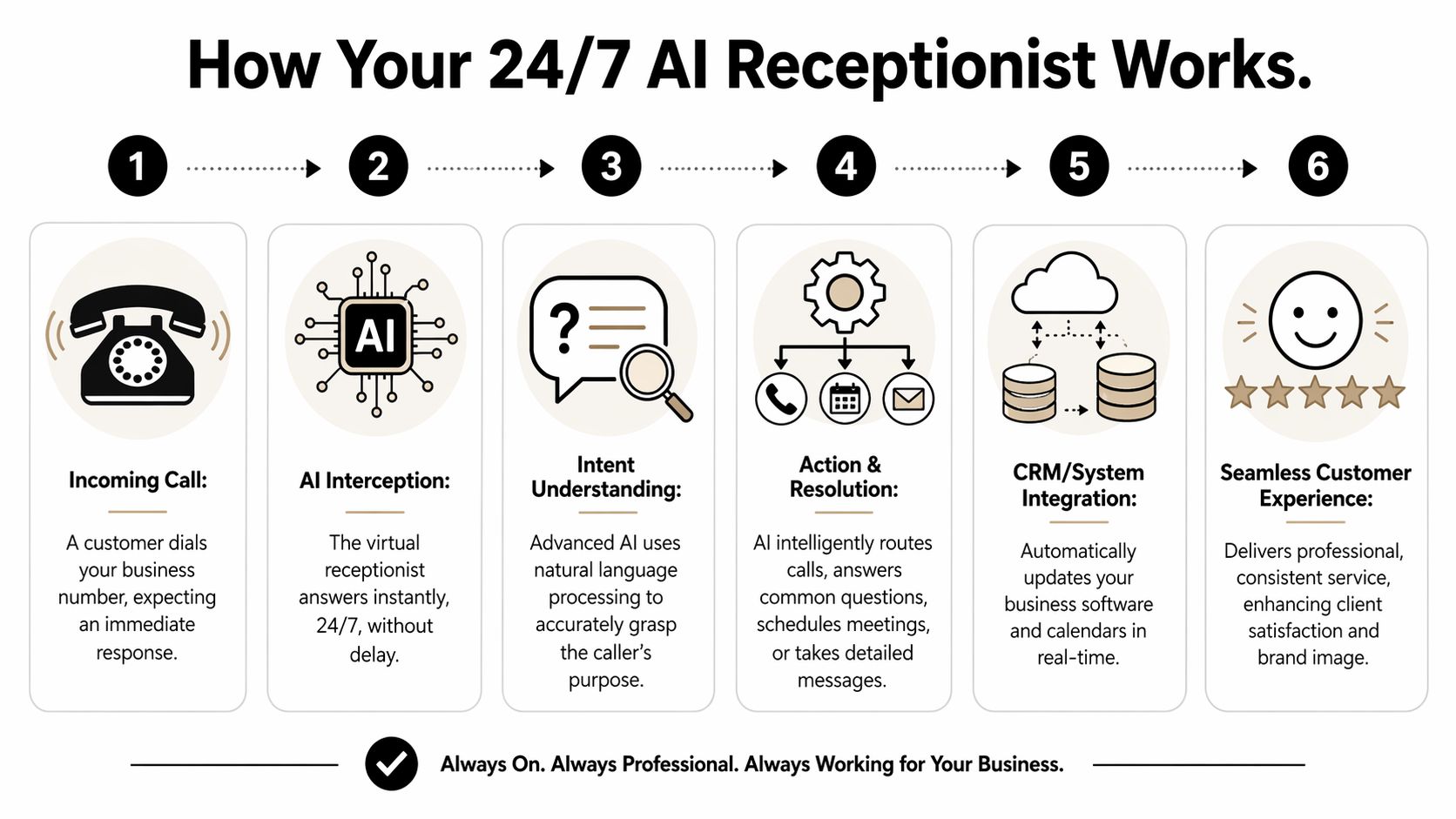
When someone calls your business, the system answers the line right away. It listens to what the caller says, turns speech into text, figures out the caller’s intent, and then responds based on your setup.
That may sound complicated, but the flow is straightforward:
If you’ve ever wondered how the AI “knows” what someone means when they say, “I need to move my appointment,” the answer starts with language understanding. If you want a simple primer on the idea behind open-ended conversational systems, Sight AI’s explanation of how an open-domain chatbot functions is a useful background read.
There are three pieces that matter most.
First, the system has to hear the caller accurately. It converts spoken words into text so the software can work with them. If this part fails, everything after it gets weaker.
That’s why voice quality and transcription quality matter more than flashy marketing terms. If a caller says a street name, a product name, or an unusual last name, the system needs to catch it reliably enough to keep the interaction useful.
Next, the AI has to interpret the request. Natural language processing, or NLP, handles this task. It’s the part that decides whether the caller wants to ask a basic question, book time, leave information, or talk to a person.
According to RingCentral’s explanation of AI receptionist architecture, unlimited parallel call handling uses cloud telephony and scalable AI to process multiple simultaneous calls. Upon connection, natural language processing through premium large language models can perform intent recognition in 200 to 500 milliseconds, classifying calls into buckets such as FAQs (40%), lead intake (30%), or scheduling (20%).
That speed matters because callers notice pauses. If the response feels immediate, the system feels more like a competent receptionist and less like a phone maze.
Once the system understands the intent, it follows your rules. It might answer a question about hours, collect intake details, send the caller to a booking flow, transfer the call, or log the message for follow-up.
Here’s where owners often get confused. The AI isn’t “guessing” what your business should do. You define the paths. The AI carries them out through conversation.
A strong setup beats a clever script. If you give the system clean rules, callers usually get a clean experience.
This phrase sounds technical, but the business meaning is simple. If several people call at once, they can all be answered.
That’s different from a single human receptionist, who can only handle one live conversation at a time. It’s also different from a basic phone tree, which may still create bottlenecks, transfers, and voicemail spillover when things get busy.
For a small business, this solves a very common problem:
A 24 7 AI receptionist doesn’t have to choose one caller and lose the others. It can manage all of them at once.
Callers don’t care whether your missed call problem came from understaffing, field work, break coverage, or a busy front desk. They only care whether they got help.
When the system answers right away, the interaction starts with confidence. That lowers friction. It also gives your team better information later because the call can be categorized, recorded, and organized instead of disappearing into voicemail.
Features matter only when they produce a business result. A long list of capabilities doesn’t help if you can’t connect them to revenue, speed, or customer experience.
The easiest way to evaluate a 24 7 virtual receptionist is to group features by the job they do inside the business.
The first job is simple. Don’t let interested callers disappear.
A good receptionist system should collect names, reasons for calling, preferred timing, and any intake details your team needs before a callback. That matters most when the caller reaches out after hours or while staff is busy.
Structure beats memory. If the system uses intake workflows instead of a generic “leave a message,” you get organized information instead of a vague note like “someone called about service.”
Useful lead capture features include:
If you want to see what that feature stack typically includes in one platform, the AI receptionist feature set from My AI Front Desk shows examples such as CRM integration, intake workflows, texting, post-call notifications, and call recordings.
Scheduling is one of the highest-friction parts of phone work. A caller wants to book. Your staff needs to check availability. Someone gets put on hold. Another callback happens later. Then the time slot is gone.
A receptionist system with calendar integration removes much of that back-and-forth. Instead of taking a message that says “please call me to schedule,” the system can guide the caller toward an actual booking outcome during the conversation.
That’s valuable in businesses where speed matters, including:
| Business type | Booking need | Why automation helps |
|---|---|---|
| Med spas | Consults and follow-ups | Staff stays focused on in-person clients |
| Law firms | Intake consultations | Potential clients get a next step immediately |
| Home services | Estimates and dispatch windows | Fewer missed opportunities during field work |
| Clinics | Routine scheduling requests | Front desk load drops during busy periods |
Not every caller needs the same thing. Some need a human right away. Some need a short answer. Some need a text link. Some need to leave details for a later callback.
That’s why intelligent routing matters more than a generic script. The best systems let you decide how different situations should be handled.
For example:
This is also where small details improve the brand experience. Pronunciation guides help the system say your business name, neighborhood names, doctor names, or service terms correctly. Extension handling can work with a more traditional phone setup. Active times controls can change behavior based on the hour or day.
When the caller hears the right greeting, gets the right question, and reaches the right next step, the interaction feels intentional.
Phone calls often don’t end on the phone. A caller may need a confirmation text, a booking reminder, a form, an address, or a follow-up link.
AI-powered texting matters because it extends the conversation without making your team chase small tasks manually. The phone call becomes the trigger for the next step instead of a disconnected event someone has to remember later.
That’s especially useful when your staff handles operations, service delivery, or sales and can’t spend the day sending routine follow-ups one by one.
The return on a 24 7 virtual receptionist starts with cost, but cost isn’t the whole picture. You should evaluate it the same way you’d evaluate a new hire or a new sales tool. What does it replace, what does it prevent, and what new opportunity does it create?
The most obvious comparison is staffing. According to OnCall Clerk’s cost breakdown for AI receptionists, AI 24 7 virtual receptionists deliver 62% to 90% cost savings compared to human alternatives, typically costing $30 to $300 per month for unlimited 24/7/365 coverage, versus $53,700 per year for a fully-loaded in-house receptionist. The same source notes that these tools often pay for themselves within the first month for many SMBs.
That gives you a practical baseline.
| Service | Typical Annual Cost | Coverage Hours | Parallel Calls |
|---|---|---|---|
| AI receptionist | $600 to $3,600 | 24/7/365 | Unlimited |
| In-house receptionist | $53,700 | Business hours | One at a time |
| Human answering service | Varies by plan | Depends on provider | Limited by staffing |
If you want to map this against your current call load and plan options, the pricing page for My AI Front Desk is one example of how vendors package usage, included minutes, and feature access.
A lot of owners stop the calculation too early. They compare subscription cost against receptionist salary and call it done. That misses the bigger financial effect.
A better ROI question is this: what happens when a customer gets an answer right away instead of hitting voicemail?
Sometimes the value is immediate. A booked consultation. A captured estimate request. A same-day service inquiry that doesn’t go to a competitor.
Sometimes the value is operational. Your team spends less time on repetitive phone tasks and more time handling work that moves revenue forward.
Administrative phone work has a hidden cost because it interrupts productive work. The interruption is the expense, not just the minutes spent talking.
When your team no longer needs to answer every basic question manually, they can stay focused on:
That’s why the best ROI conversations include both hard cost and reclaimed attention.
Owner’s lens: If the phone keeps pulling skilled staff into routine tasks, you’re using expensive labor for low-value work.
You don’t need a complicated spreadsheet to make a first-pass decision. Ask four questions.
If your phone drives appointments, consultations, estimates, or client intake, the ROI case usually becomes clear quickly. Even before you measure every downstream result, better call coverage reduces leakage in a part of the business that most owners already know is underperforming.
Buying a receptionist solution gets confusing fast because many vendors sound similar on the surface. They all promise better coverage, smoother service, and fewer missed calls. The differences show up when you look at control, integrations, reporting, and how easy the tool is to adapt to your real workflow.
Some businesses need after-hours lead capture. Others need full-time front desk support. Some need appointment scheduling. Others care most about routing, intake, or texting.
If you don’t define your real use case first, you’ll end up evaluating polished demos instead of business fit.
Write down your top call scenarios in plain language:
That list becomes your evaluation script.
A receptionist that answers calls but doesn’t connect to your systems creates a new silo. That means your team still has to re-enter information, chase notes, and guess which calls turned into actual business.
This is a common problem. AnswerFirst’s discussion of virtual receptionist gaps notes that 67% of SMBs struggle with CRM-virtual receptionist sync, and that the market often lacks data-driven benchmarks for ROI. In practice, that leaves owners with answered calls but weak visibility into revenue impact.
That’s why integration depth should sit near the top of your checklist.
Look for support for things like:
If you want a side-by-side view of how vendors differ on these kinds of capabilities, the comparison resources from My AI Front Desk show the categories buyers typically care about when comparing AI receptionist platforms.
A good buying process sounds less like “what features do you have?” and more like “how will this behave in my business?”
Ask questions such as:
A small business doesn’t need maximum complexity. It needs enough control to match reality.
That usually means the ability to adjust greetings, define business hours, change routing, update intake questions, and decide which calls trigger texts, bookings, or notifications. If every edit requires a ticket, the tool will drift out of date as your business changes.
Buy for maintenance, not just setup. A system that’s easy to tune will stay useful longer.
Not every weak option looks bad in a demo. Watch for these warning signs:
The right vendor should make your front desk operation easier to run and easier to measure, not just more automated.
Most implementation problems happen because owners try to “turn on AI” before they’ve decided what the phone should do. Keep it simple. Build the system around your call flow, your team, and your follow-up process.
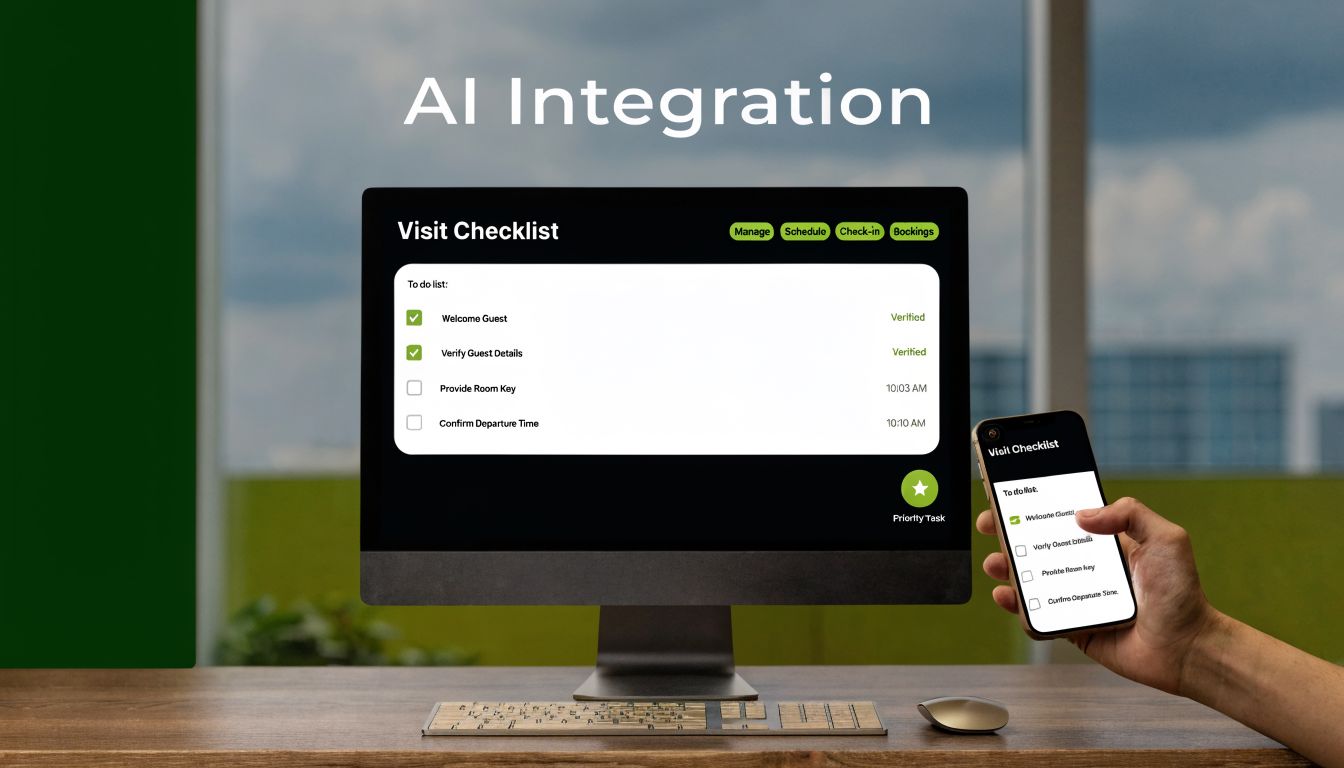
Start with a short list of use cases. Don’t begin with settings. Begin with outcomes.
For most small businesses, the first version should answer questions like:
If you’re using My AI Front Desk, this is the stage where you decide how to structure the receptionist’s behavior before touching the dashboard. Clear goals make later setup much easier.
You usually have two practical options. Keep your existing business number and forward calls, or provision a new number for AI handling.
That decision depends on how attached you are to your current line and whether you want to test with a separate number first. In My AI Front Desk, those paths map to Call Forwarding and New Number Provisioning, with Area Code Selection available if local presence matters to your business.
Often, many owners overcomplicate things. You don’t need dozens of rules on day one.
Start with a few clean choices:
In My AI Front Desk, Active Times Control lets you define when the receptionist is active and how call handling changes by time window. That’s useful if you want different behavior at noon than at night, or different weekend logic than weekday logic.
A receptionist becomes valuable when it gathers the right information in the right order. That means deciding what each caller type should be asked.
A home services company may want service address, issue type, and preferred appointment window. A law firm may want practice area, urgency, and callback number. A clinic may want visit type and availability preferences.
My AI Front Desk supports this through Intake Form Workflows, which help turn conversations into structured data instead of loose notes.
Keep intake short. Ask for the information your team will actually use, not everything you might want someday.
This is the part that keeps the system from becoming “just another inbox.”
A practical setup usually includes:
If your business lives in shared calendars, a CRM, email, and messaging tools, these connections matter as much as the phone conversation itself.
Owners often worry that the receptionist will sound generic. That part is fixable if you configure it properly.
My AI Front Desk includes a Voice Library with premium voice options, plus Pronunciation Guides so business names, staff names, neighborhoods, and service terms sound right. It also uses Premium AI Models such as GPT-4, Claude, and Grok, which helps the conversation stay flexible rather than rigid.
This is also where you decide whether to enable Multi-Language Support, use Texting Workflows, or set Extension Digits for more traditional routing needs.
Don’t trust a setup you haven’t called yourself.
Run test calls for common scenarios:
Use Shareable Call Links and Call Recordings to review what happened with your team. Check whether the questions were clear, whether the tone matched your brand, and whether the right actions happened after the call.
Once calls are coming in, review performance regularly. You’re looking for patterns, not perfection on day one.
Use the Analytics Dashboard to inspect call types, outcomes, and operational trends. Then make small updates. Tighten scripts. Adjust intake. Refine when notifications fire. Shorten or expand call duration rules with Adjustable Call Duration and Auto Hangup settings where needed.
A strong implementation doesn’t come from one perfect setup session. It comes from treating your receptionist like a living business process and tuning it as your business changes.
Business owners usually hesitate for sensible reasons. The common questions aren’t about whether answering calls matters. They’re about whether the experience will feel good enough, safe enough, and flexible enough to trust.
Not necessarily. Voice quality depends on the platform, the voice library, and how well the conversation flow is configured.
Modern systems can sound much more natural than the old phone bots people remember. In practice, tone improves when the setup uses clear prompts, natural pacing, correct pronunciations, and a voice that fits the brand. If you want a broader small-business view of where these tools fit operationally, this article on AI receptionist use for small business efficiency and customer service covers the business context well.
That’s a valid concern. A receptionist shouldn’t try to do work that requires judgment it doesn’t have.
The right setup creates boundaries. The AI can handle routine questions, intake, booking, and message capture. For edge cases, it should transfer the call, log the issue clearly, or notify your team for follow-up. The fallback path matters as much as the main path.
That depends on the vendor and your use case. You should ask where call data is stored, who can access it, what controls exist for recordings and transcripts, and whether the provider supports the privacy standards your business needs.
The key point is simple. Treat the evaluation like you would any business software that handles customer information. Ask direct questions. Get direct answers.
Usually, it works better as support for your staff than as a complete replacement for every interaction.
A 24 7 virtual receptionist is strongest when it takes repetitive front-line work off your team’s plate, captures calls they would otherwise miss, and hands over cleaner information when a person needs to step in. That tends to improve consistency rather than remove the need for people entirely.
The goal isn’t to remove the human side of your business. It’s to make sure human attention is used where it matters most.
It depends on how complex your call handling needs are. A simple after-hours setup is faster than a multi-path workflow tied to calendars, CRM actions, texts, and escalation rules.
What matters most is clarity. Businesses that know their call scenarios, booking rules, and follow-up process usually get to a useful setup much faster than businesses trying to invent the workflow while configuring the tool.
If your business depends on phone calls for leads, bookings, or customer service, My AI Front Desk is one option to explore for setting up a 24 7 virtual receptionist with call handling, calendar booking, texting, CRM workflows, and analytics in one system.
Start your free trial for My AI Front Desk today, it takes minutes to setup!


